

Spentio: Subscription Tracker
BASTIAN VIDELA Finance iPhoneiPadiPod touch
Spentio: Subscription Tracker is a free Finance app for iPhone and iPad by BASTIAN VIDELA. Requires iOS 26.0. Updated October 23, 2026.
- Price
- Free
- on the App Store
- Size
- 26 MB
- Age 4+
- Updated
- Oct 23
- 2026 · v2.0.3
Screenshots


About Spentio: Subscription Tracker
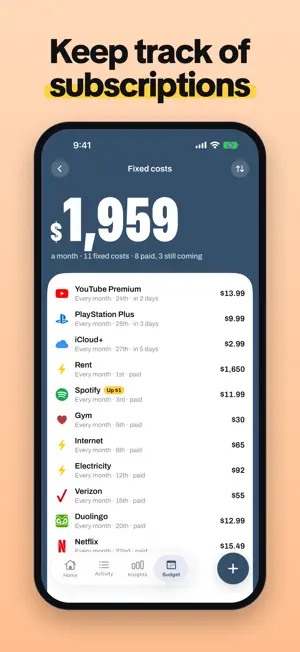
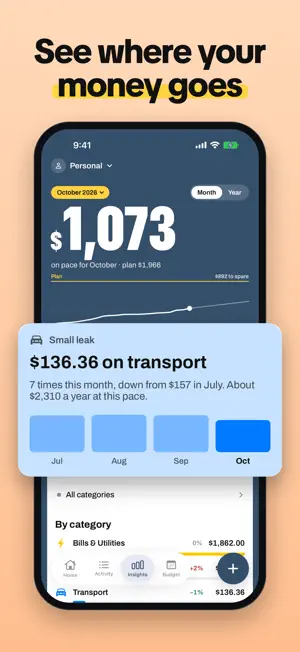
Know what's left to spend today, this week and this month. Spentio does the math for you: income minus fixed costs, savings, budgets and what you've already spent. LOG IN SECONDS • Type an item and its price; the category is guessed for you • Scan a receipt and every line lands in the right category • Log Apple Pay purchases automatically with a Shortcuts automation • Add several items at once, or a whole shopping trip as one receipt SEE WHAT'S LEFT • One clear number: left to spend today, this week or this month • Fixed costs, subscriptions and income are counted up front, so the number is honest from the 1st • A heads-up the day before a fixed cost is due, and when a subscription price goes up SHARE A BUDGET • Share a profile with your partner or family through iCloud: you both add, you both see it • Separate profiles for your home, a trip or a side project, each with its own color and currency UNDERSTAND YOUR MONEY • Where the month is heading at your current pace • Small leaks: the little purchases that quietly add up • Every subscription and what it costs you a year • A monthly recap you can share PLAN AHEAD • Savings goals that fill up as you save • A monthly budget for any category, like groceries: what's left shows as you log, with a heads-up at 80% • Widgets for the Home Screen and Lock Screen, and a Control Center button PRIVATE BY DESIGN • No bank login, no account, no ads • Your data stays on your iPhone and in your iCloud • Import from your bank or another app (CSV, Excel, OFX, QIF); export to CSV or PDF FREE AND PRO Free: logging, what's left, Activity, the Budget tab with income, fixed costs, one category budget and one savings goal, and import. Spentio Pro adds receipt scanning, Apple Pay logging, adding several items at once, shared and extra profiles, all of Insights with the monthly recap, more budgets and savings goals, widgets, reminders, your own categories and export. The yearly plan comes with a 14-day free trial; monthly and lifetime are also available. Terms of Use (EULA): https://www.apple.com/legal/internet-services/itunes/dev/stdeula/ Privacy Policy: https://tupungatostudios.com/en/privacy/spentio
What’s new
Version 2.0.3 · Updated October 23, 2026
New: • Paid weekly, every 2 weeks or twice a month? Set your real pay schedule, and Spentio counts each payday in the month it lands in. • Choose what happens when payday falls on a weekend: paid the Friday before, or the Monday after. • Five new profile colors: Slate, Celadon, Sand, Cream and Coral, in light and dark mode. Fixes: • Deleting a repeating income now updates this month's numbers right away. • The welcome screen no longer gets cut off the first time you open the app. • The upgrade screen fits every phone and language, with no words split in half.
App privacy
The developer, BASTIAN VIDELA, reported these privacy practices to Apple.
Data Not Collected
The developer does not collect any data from this app.
Alternatives to Spentio: Subscription Tracker
Looking for apps like Spentio: Subscription Tracker? Here are 6 similar apps on the App Store.
-
 Spendly - Budget Diary
-
 Tenra: Budget, Expense Tracker
-
 Pennywise: Budget & Expense
-
 SpendLog: Easy Expense Tracker
-
 Cuentio: AI Expense Tracker
-
 FIVAMO: Budget & Debt Tracker
| App | Rating | Price | Last updated | Compare |
|---|---|---|---|---|
| Spentio: Subscription Tracker | – | Free | October 23, 2026 | |
| Spendly - Budget Diary | – | Free | Jul 30, 2026 | Compare |
| Tenra: Budget, Expense Tracker | – | Free | Oct 19, 2026 | Compare |
| Pennywise: Budget & Expense | – | Free | Jun 4, 2026 | Compare |
| SpendLog: Easy Expense Tracker | – | Free | Oct 13, 2026 | Compare |
| Cuentio: AI Expense Tracker | – | Free | Oct 18, 2026 | Compare |
| FIVAMO: Budget & Debt Tracker | – | Free | Oct 10, 2026 | Compare |