

Spendly - Budget Diary
庆鸿 林 Finance iPhoneiPadiPod touch
Spendly - Budget Diary is a free Finance app for iPhone and iPad by 庆鸿 林. Requires iOS 13.0. Updated July 30, 2026.
- Price
- Free
- on the App Store
- Size
- 33 MB
- Age 4+
- Updated
- Jul 30
- 2026 · v1.0.3
Screenshots

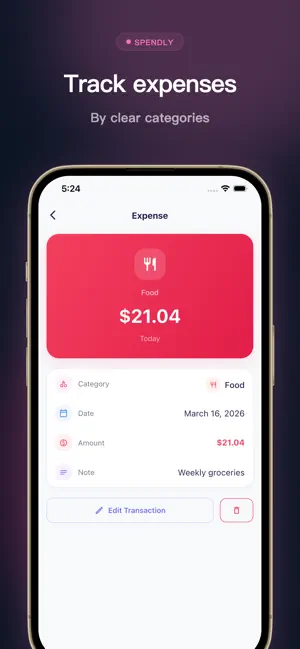


About Spendly - Budget Diary
Spendly was designed for people who want one thing: to know where their money went today — without wading through bank-grade complexity. Your data syncs securely across your own devices, so your records are always up to date. It starts with a living balance card. Your monthly income, expense, and balance sit inside a gently animated display, and when you set a monthly budget, a soft arc fills to show how much room you have left. It is the first thing you see when you open the app, and it tells you exactly what you need to know. RECORD IN SECONDS Tap the + button, enter an amount, pick a category, and you are done. Add a date and an optional note if you want context. The very first time you open Spendly, it detects your device region and sets the default currency automatically — zero setup required. MONTHLY BUDGET TRACKING Set a spending goal for each month. The balance card responds with a visual arc that fills as your expenses grow, giving you an at-a-glance sense of whether you are on track. FLEXIBLE CATEGORIES Built-in categories cover the basics — food, transport, shopping, housing, salary, bonus, and more. When your life does not fit neatly into defaults, create custom categories with any name you like. STATISTICS THAT REVEAL PATTERNS Pie charts break down spending and income by category. Toggle between time ranges — today, this month, last month, this year, last 3 or 6 months, all time, or any custom date range — to spot trends and high-frequency expenses. FIND ANY RECORD Scroll through a date-grouped list of every transaction, or search by keyword, category, or date to jump straight to what you need. SYNC ACROSS DEVICES Your bookkeeping data stays in sync across your personal devices through cloud backup. Switch phones or restore a device without losing a single record. BACK UP AND RESTORE Export your entire history as a portable file. Import it on another device to pick up right where you left off. YOUR THEME, YOUR CHOICE Switch between light and dark themes, or let Spendly follow your system setting. WHY SPENDLY EXISTS Most finance apps keep adding features until they feel like work. Spendly goes the other way: it removes everything that does not help you record and understand your daily spending. The result is an app that is calm enough to open every single day — and that is the whole point, because the best tracker is the one you actually use.
What’s new
Version 1.0.3 · Updated July 30, 2026
1. Improved performance for a smoother everyday experience 2. Better compatibility with the latest devices 3. Enhanced overall stability
App privacy
The developer, 庆鸿 林, reported these privacy practices to Apple.
Data Used to Track You
The following data may be used to track you across apps and websites owned by other companies:
- Usage Data: Advertising Data
Data Not Linked to You
The following data, which may be collected but is not linked to your identity, may be used for the following purposes:
- Usage Data: Advertising Data
Used for: Third-Party Advertising
Alternatives to Spendly - Budget Diary
Looking for apps like Spendly - Budget Diary? Here are 6 similar apps on the App Store. The highest rated is Simple Bookkeeping - no ads (4.5/5), and all 6 are free to download.
-
 Riyu
Riyu
-
 Moji - Money Tracker
-
 Subscription Tracker - Subi
-
 Budget Snap: Bookkeeping
-
 Simple Bookkeeping - no ads
4.5
Simple Bookkeeping - no ads
4.5
-
 Spentio: Expense Tracker
| App | Rating | Price | Last updated | Compare |
|---|---|---|---|---|
| Spendly - Budget Diary | – | Free | July 30, 2026 | |
| Riyu | – | Free | Aug 19, 2026 | Compare |
| Moji - Money Tracker | – | Free | Oct 12, 2026 | Compare |
| Subscription Tracker - Subi | – | Free | Sep 3, 2026 | Compare |
| Budget Snap: Bookkeeping | – | Free | Jun 16, 2026 | Compare |
| Simple Bookkeeping - no ads | 4.5 / 5 (2) | Free | May 27, 2024 | Compare |
| Spentio: Expense Tracker | – | Free | Jul 9, 2026 | Compare |