

Flint: Expense Tracker & Bills
Burak Tunc Finance iPhoneiPadiPod touch
Flint: Expense Tracker & Bills is a free Finance app for iPhone and iPad by Burak Tunc. Rated 4.6/5 from 5 ratings. Requires iOS 18.0.
- Rating
- 4.6
- 5 ratings
- Price
- Free
- on the App Store
- Size
- 33 MB
- Age 4+
- Updated
- Sep 17
- 2026 · v1.6.0
Screenshots


About Flint: Expense Tracker & Bills
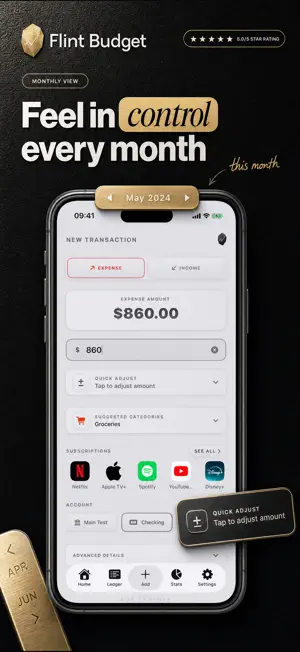
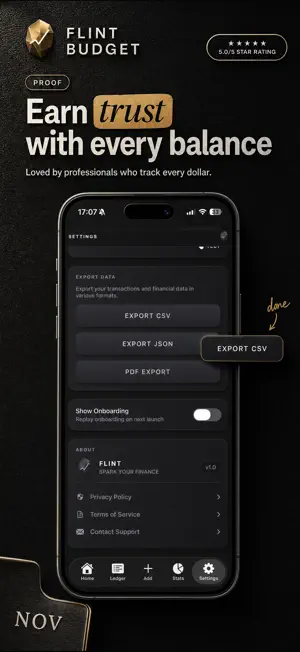
Flint is the expense tracker that finally makes managing your money feel good. Built around a real subscription catalog, a per-account budget gauge, and a neo-skeuomorphic visual language with textures, depth, and metallic surfaces, Flint is the personal finance app for people who care about how their money — and their tools — feel. SMART SUBSCRIPTION TRACKING Never lose track of recurring payments again. Flint catalogs weekly, monthly, and yearly subscriptions with due-date calculations and monthly equivalent breakdowns. Streaming services, your gym, cloud storage, software, donations — see exactly where your recurring money goes, every month, on one screen. TRACK EVERY DOLLAR, EFFORTLESSLY Add expenses and income in seconds. Pick a category, enter an amount, done. Quick entry means you'll actually use Flint every day, not just the first week. MULTIPLE ACCOUNTS, ONE CLEAR PICTURE Track cash, credit cards, debit cards, and savings accounts separately. Each account has its own balance, transaction history, and optional monthly budget. Swipe through the dashboard carousel to see everything at a glance. PER-ACCOUNT BUDGETS WITH A VISUAL GAUGE Set monthly spending limits for each account independently. The visual gauge ring shows budget usage in real-time, so you always know where you stand before your next purchase. POWERFUL ANALYTICS Understand your spending patterns across four time periods: week, month, quarter, and year. Visual bar charts break down daily, weekly, and monthly trends. See your top expense and income categories ranked by percentage. Track net income and know whether you're in the green. 7 WIDGETS FOR YOUR HOME AND LOCK SCREEN Keep your finances visible without opening the app. Add a Quick Add shortcut, a 7-day expense chart, monthly budget gauge, full account card with recent transactions, or income vs. expense stats right to your home screen. Two lock screen widgets show your balance and daily spending at a glance. COMPREHENSIVE EXPORT Generate professional PDF financial reports, export to CSV for spreadsheet analysis, or create full JSON backups of all your data. Great for freelancers, tax-prep season, or sharing with a financial advisor. 39 CURRENCIES SUPPORTED From USD and EUR to JPY and BRL, Flint supports 39 currencies with locale-specific formatting. Travel or relocate without switching apps. 4 PREMIUM THEMES Choose the look that fits your style: • Frost Steel — clean, minimal, sharp • Rose — bold, vibrant, fiery • Turquoise — cool, calm, refreshing • Indigo — deep, electric, premium Each theme transforms every surface, shadow, glow, and accent across the entire app. PRIVACY BY DESIGN All your financial data stays on your device. No accounts to create. No data uploaded to servers. No analytics tracking. No third-party data sharing. No ads in the free tier. Your money is your business. BUILT FOR YOU Freelancer tracking business expenses? Managing multiple accounts after a big life change? Just want a clean way to stay on top of spending? Flint handles it all. WHAT'S INCLUDED FREE • Unlimited expense and income tracking • Unlimited accounts with budget support • Dashboard with monthly analytics • All 4 themes • 39 currencies • Subscription tracking • 7 home screen and lock screen widgets FLINT PREMIUM — $2.99/mo or $19.99/yr Unlock the full experience: • Advanced analytics (Week, Quarter, Year views + Top Categories) • Full data export (CSV, JSON, PDF reports) • Custom categories beyond the defaults • Priority support Download Flint today and finally enjoy managing your money. — Terms of Use (EULA): https://www.apple.com/legal/internet-services/itunes/dev/stdeula/ Privacy Policy: https://flintbudget.app/privacy-policy/
Ratings & reviews
4.6
5 ratings
What’s new
Version 1.6.0 · Updated September 17, 2026
Your app icon now matches your theme. Flint ships with four new Liquid Glass icons, Frost, Rose, Turquoise, and Indigo designed for iOS 27. Pick a theme in Settings and the icon on your Home Screen changes with it. Everything else stays the way you like it: your spending, budgets, and subscriptions stay on your device.
App privacy
The developer, Burak Tunc, reported these privacy practices to Apple.
Data Not Collected
The developer does not collect any data from this app.
Alternatives to Flint: Expense Tracker & Bills
Looking for apps like Flint: Expense Tracker & Bills? Here are 6 similar apps on the App Store. The highest rated is Bill & Expense Tracker: Budget (5.0/5), and 5 of the 6 are free to download.
-
 Bill & Expense Tracker: Budget
5.0
-
 ClarityFlow: Decision Maker
5.0
-
 Equira Portfolio Manager Tools
5.0
-
 RentScope: Rental Property ROI
5.0
-
 Cashy: Smart Budget & Expenses
4.0
-
 Money Manager: MyFuturePlan
4.0
| App | Rating | Price | Last updated | Compare |
|---|---|---|---|---|
| Flint: Expense Tracker & Bills | 4.6 / 5 (5 ratings) | Free | September 17, 2026 | |
| Bill & Expense Tracker: Budget | 5.0 / 5 (10) | Free | Aug 28, 2026 | Compare |
| ClarityFlow: Decision Maker | 5.0 / 5 (1) | Free | Jul 29, 2026 | Compare |
| Equira Portfolio Manager Tools | 5.0 / 5 (13) | Free | Oct 16, 2026 | Compare |
| RentScope: Rental Property ROI | 5.0 / 5 (1) | 5.99 USD | Oct 21, 2026 | Compare |
| Cashy: Smart Budget & Expenses | 4.0 / 5 (4) | Free | Oct 10, 2026 | Compare |
| Money Manager: MyFuturePlan | 4.0 / 5 (1) | Free | Jun 18, 2026 | Compare |