

Quillo: Voice to Tasks
Hemanth Kumar Kumaresan Productivity iPhoneiPadiPod touchApple Watch
Quillo: Voice to Tasks is a free Productivity app for iPhone and iPad by Hemanth Kumar Kumaresan. Requires iOS 15.1. Updated October 6, 2026.
- Price
- Free
- on the App Store
- Size
- 50 MB
- Age 4+
- Updated
- Oct 6
- 2026 · v1.1.5
Screenshots



About Quillo: Voice to Tasks
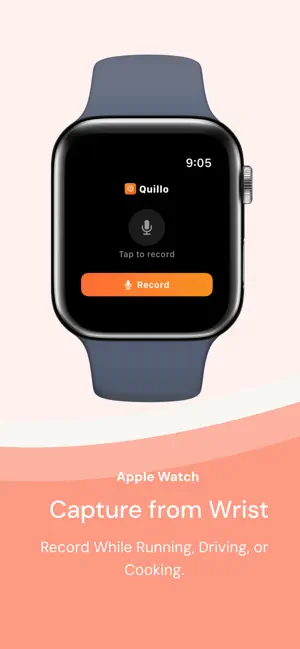
Quillo is an AI voice notes app for iOS that turns speech into tasks, events, reminders, and lists-then routes them to the right apps with one tap. You always review and confirm before anything is sent. Capture however you think: - Voice: ramble naturally and let the AI organize - Text: type freely in your own words - Paste: drop in meeting notes or messages and extract action items How it works: 1. Capture your thoughts in seconds 2. Quillo extracts tasks, events, reminders, and lists 3. Review and confirm before sending AI that understands intent: - Smart deadline detection when you say a date or time - Priority recognition for phrases like "urgent" or "when I have time" - Multi-action extraction from a single recording - Context hints that help categorize tasks, events, and lists - Contact hints when you say "email Sarah" or "call Alex" What Quillo can extract: - Tasks with due dates and priorities - Calendar events with times and locations - Reminders and follow-ups - Shopping lists and simple lists Integrations: Apple Reminders, Apple Calendar, Apple Notes, Google Calendar, Google Tasks, Todoist, Trello, Notion. Routing and control: - Review screen lets you edit, delete, or reroute any item - Send all items at once or pick individually - Smart routing rules in Pro let you map work tasks to one app and personal tasks to another - Route by keywords, priority, or category - Multi-destination routing for power users Apple Watch support: Record from your wrist, sync to iPhone, and process with one tap. Great for walking, driving, or mid-meeting. Add Quillo to your watch face to see pending actions and start recording instantly. Widgets and fast capture: Use widgets or lock screen access to start a capture without opening the app. Built for people who think faster than they type: - Busy professionals capturing follow-ups after meetings - Families coordinating schedules, errands, and shopping - Freelancers tracking deliverables, deadlines, and invoices - Neurodivergent users who need frictionless capture Real examples: - "Book a flight next month and remind me to renew my passport." - "Schedule a design review for Friday and add the invoice to my to-do list." - "Pick up milk, reorder filters, and call the electrician tomorrow." Why people choose Quillo: - One recording can become multiple organized actions - You control where each item goes - No manual sorting, no app hopping - Works with the tools you already use - Capture when you are on the move - Clear review before anything is executed Quillo vs. typical voice assistants: Voice assistants handle one command at a time with specific phrasing. Quillo lets you speak naturally, extract multiple actions from one capture, and review everything before sending. Setup in minutes: Quillo works immediately with Apple Reminders and Apple Calendar. Connecting other apps like Todoist or Google Calendar is optional and takes seconds. Offline capture: Record offline and Quillo will process when you are back online. AI processing requires an internet connection. Privacy-first by design: Audio files and transcripts are encrypted. Audio can be auto-deleted after processing. Data is not sold or shared. Free and Pro plans: Start free with 5 captures per month and no credit card. Free includes voice, text, and paste capture, all integrations, and voice notes up to 30 seconds. Pro unlocks unlimited captures, longer recordings up to 10 minutes, auto processing, priority processing, advanced routing rules, smart learning patterns, unlimited destinations, recordings available for 30 days, and priority support. Use Quillo for meeting followups errands shopping lists travel planning and quick reminders. If you can say it, Quillo can route it. Get started in seconds and keep your existing system intact-Quillo simply makes it faster. --- LEGAL & PRIVACY Terms of Use (EULA): https://tryquillo.com/terms Privacy Policy: https://tryquillo.com/privacy Support: [email protected]
What’s new
Version 1.1.5 · Updated October 6, 2026
Bug Fixes
App privacy
The developer, Hemanth Kumar Kumaresan, reported these privacy practices to Apple.
Data Linked to You
The following data, which may be collected and linked to your identity, may be used for the following purposes:
- Usage Data: Product Interaction
- Purchases: Purchase History
- Contact Info: Email Address, Name
- User Content: Audio Data, Other User Content
- Identifiers: User ID
Used for: Analytics, App Functionality
Alternatives to Quillo: Voice to Tasks
Looking for apps like Quillo: Voice to Tasks? Here are 6 similar apps on the App Store. The highest rated is TellDone (5.0/5), and all 6 are free to download.
-
 Voice To Do: TaskTalk
-
 TellDone
5.0
-
 WhisperAct: Voice Task Planner
5.0
-
 Voice To-Do List - VoiceTasks
5.0
-
 Voice To-do: AI Task Buddy
5.0
-
 Vox.md - Quick Capture Notes
4.7
| App | Rating | Price | Last updated | Compare |
|---|---|---|---|---|
| Quillo: Voice to Tasks | – | Free | October 6, 2026 | |
| Voice To Do: TaskTalk | – | Free | May 11, 2026 | Compare |
| TellDone | 5.0 / 5 (1) | Free | Oct 14, 2026 | Compare |
| WhisperAct: Voice Task Planner | 5.0 / 5 (1) | Free | Oct 11, 2026 | Compare |
| Voice To-Do List - VoiceTasks | 5.0 / 5 (1) | Free | Oct 1, 2026 | Compare |
| Voice To-do: AI Task Buddy | 5.0 / 5 (2) | Free | Aug 10, 2026 | Compare |
| Vox.md - Quick Capture Notes | 4.7 / 5 (3) | Free | Oct 16, 2026 | Compare |