

PDF Scanner: Scan, Sign & Edit
Yehor Yurchenko Productivity iPhoneiPadiPod touch
PDF Scanner: Scan, Sign & Edit is a free Productivity app for iPhone and iPad by Yehor Yurchenko. Rated 5.0/5 from 2 ratings. Requires iOS 26.2.
- Rating
- 5.0
- 2 ratings
- Price
- Free
- on the App Store
- Size
- 8 MB
- Age 4+
- Updated
- Apr 10
- 2026 · v2.5.5
Screenshots
About PDF Scanner: Scan, Sign & Edit
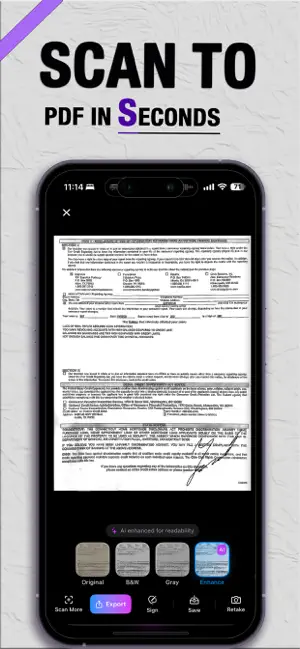
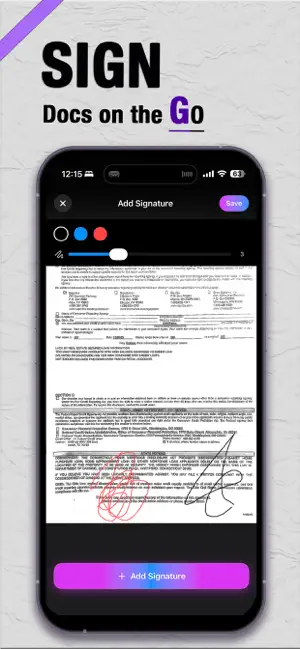
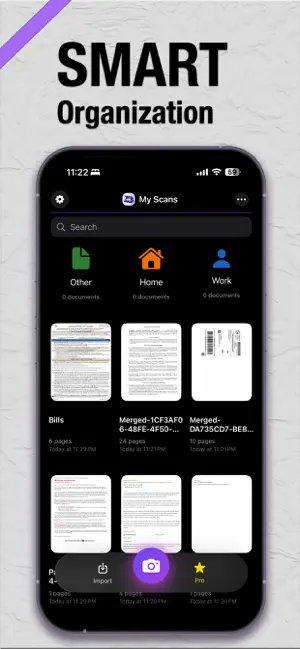
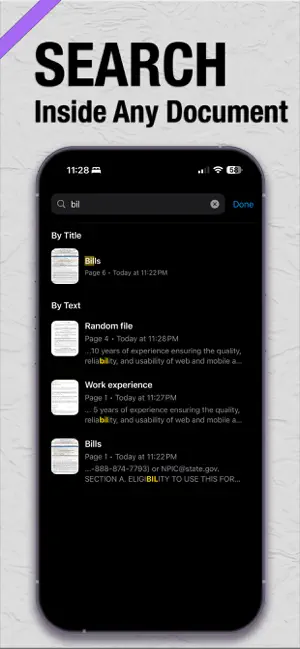
PDF Scanner is a powerful document scanner and PDF creator that turns your iPhone into a smart mobile scanner. Scan documents, convert them to searchable PDFs with OCR, and instantly find the exact text you need. PDF Scanner helps you scan, organize, search, and share documents in seconds — all in one clean and powerful workspace. Perfect for scanning: • contracts • receipts • invoices • notes • books • documents • study materials Key Features • Scan documents with your camera • Create high-quality PDF files • Convert scans into searchable PDFs with OCR • Search text inside PDF documents instantly • Highlight exact text matches • Import photos and existing PDFs • Create multi-page documents • Add, remove, and reorder pages • Rename and organize files with folders • Recover deleted files from Trash • Share PDFs anywhere Unlimited Scanning Scan documents anytime without daily limits. The free version allows you to explore the core features of the app. Upgrade to PDF Scanner Pro for unlimited scanning and full OCR capabilities. Pro Features • Unlimited scans and imports • Full-document OCR recognition • Advanced search across PDFs • Premium editing tools Perfect For • Work documents and contracts • Searching text inside PDFs • Study notes and research • Organizing personal files • Converting photos into PDFs Subscription Information PDF Scanner offers auto-renewable subscriptions: • Weekly • Monthly • Yearly (Best Value) Subscriptions renew automatically unless canceled at least 24 hours before the end of the current period. You can manage or cancel your subscription anytime in your App Store account settings. Privacy Policy https://vollanddzaft.github.io/PDFScanner/privacy.html Terms of Use https://www.apple.com/legal/internet-services/itunes/dev/stdeula/
What’s new
Version 2.5.5 · Updated April 10, 2026
What’s New - Added a powerful new document enhancement filter for cleaner, sharper scans - New export options: choose file quality and size - Improved crop experience with better edge detection and full-page adjustment - Enhanced localization for a smoother experience in multiple languages - Updated Home screen with a fresh folder design - Improved overall app performance and speed - Various bug fixes and stability improvements
App privacy
The developer, Yehor Yurchenko, reported these privacy practices to Apple.
Data Not Collected
The developer does not collect any data from this app.
Alternatives to PDF Scanner: Scan, Sign & Edit
Looking for apps like PDF Scanner: Scan, Sign & Edit? Here are 6 similar apps on the App Store. The highest rated is Recibo de Pagamento Orçamento (4.9/5), and all 6 are free to download.
-
 Recibo de Pagamento Orçamento
4.9
Recibo de Pagamento Orçamento
4.9
-
 Office Word - Edit Word Docs
4.4
Office Word - Edit Word Docs
4.4
-
 Prit: Professional Scheduler
4.5
Prit: Professional Scheduler
4.5
-
 Word Editor: Edit Documents®
4.3
Word Editor: Edit Documents®
4.3
-
 PDF Reader - OCR Scan Edit
4.3
PDF Reader - OCR Scan Edit
4.3
-
 Smart Cleaner: Storage Cleanup
4.3
Smart Cleaner: Storage Cleanup
4.3
| App | Rating | Price | Last updated | Compare |
|---|---|---|---|---|
| PDF Scanner: Scan, Sign & Edit | 5.0 / 5 (2 ratings) | Free | April 10, 2026 | |
| Recibo de Pagamento Orçamento | 4.9 / 5 (49) | Free | Oct 19, 2026 | Compare |
| Office Word - Edit Word Docs | 4.4 / 5 (15) | Free | Jun 1, 2026 | Compare |
| Prit: Professional Scheduler | 4.5 / 5 (4) | Free | Oct 21, 2026 | Compare |
| Word Editor: Edit Documents® | 4.3 / 5 (765) | Free | Apr 16, 2026 | Compare |
| PDF Reader - OCR Scan Edit | 4.3 / 5 (487) | Free | May 12, 2026 | Compare |
| Smart Cleaner: Storage Cleanup | 4.3 / 5 (574) | Free | Jul 11, 2025 | Compare |