

Observa: HRV & Recovery Score
Antti Aittamaa Health & Fitness iPhoneiPadiPod touchApple Watch
Observa: HRV & Recovery Score is a free Health & Fitness app for iPhone and iPad by Antti Aittamaa. Rated 3.0/5 from 2 ratings. Requires iOS 17.6.
- Rating
- 3.0
- 2 ratings
- Price
- Free
- on the App Store
- Size
- 88 MB
- Age 4+
- Updated
- Nov 5
- 2026 · v2.1.7
Screenshots
Save to Pinterest


About Observa: HRV & Recovery Score
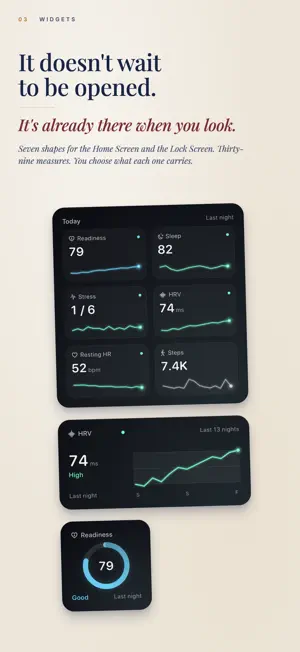
Apple Health holds months of your sleep and heart data, but it rarely tells you what any of it means for today. Observa reads that data and tells you each morning how ready you are, and why. Your Readiness score is built from your sleep, HRV, resting heart rate, and training load, and it is measured against your own typical range. Tap "Why this score?" to see which signals are in your usual range and which moved the score most. Then ask "Should I train today?" and get a straight answer with a reason: push, maintain, recover, or rest. Sleep you can understand A daily Sleep Score from how long you slept, how efficiently, how often you woke, and your sleep stages. See how your heart behaved overnight and track sleep debt against your own sleep goal. Find out whether you're a lark, an owl, or somewhere in between. If a night looks wrong, correct it yourself and choose which sleep source Observa trusts. Patterns from your own data Discover which habits tend to line up with better recovery, sleep, and HRV. Each pattern shows how confident Observa is about it, and you can mark whether it feels accurate or doesn't apply to you. Your Functional Age An estimate of how your fitness compares with people of your age, with the factors behind it. It is a wellness estimate, not a clinical measure. A plan for the day Start with a short, personal daily note and a 10-second morning check-in, then follow a simple plan based on how recovered you are. Your training load shows when to push and when to rest. Wherever you look The Apple Watch app (watchOS 10 or later) puts your readiness and the training call on your wrist, with complications for your watch face. Log water in a tap, by voice, or from your wrist. Ask Siri for your Readiness or last night's Sleep Score without opening the app. Home Screen and Lock Screen widgets keep your numbers in view; widget content is included with Premium and your first 7 days. Private by design Observa runs its analysis on your iPhone and uploads nothing. You never create an account or see an ad, and nothing you do is tracked. Free to start The daily scores and dashboards are free. Every install begins with 7 days of full access, with no signup and no card. Premium adds sleep trends across 30, 90, and 365 days, the full analysis screens, and Functional Age. The monthly and yearly plans each start with a 1-week free trial through the App Store, and every plan, Lifetime included, works with Family Sharing. Thousands of people already track their health with Observa, on iPhone, iPad, and Apple Watch. Observa is a wellness app, not a medical device. Terms of Use: https://www.apple.com/legal/internet-services/itunes/dev/stdeula/
What’s new
Version 2.1.7 · Updated November 5, 2026
See where your health is heading One rough night or one heavy weigh-in says little on its own. Trends & Analysis now shows the bigger picture on Sleep, Recovery, Heart, Activity, Workouts, Respiratory, Body, and Energy, and you can switch between sections without leaving the screen. Choose 7 days, 30, 90, or a full year, and each metric it tracks gets its own card. Each card draws a smoothed trend line through your daily readings, so a single odd day can't hide the direction you're heading. Your usual range sits shaded behind it, and the card shows how this period compares with the one before. Read it in one line Every card opens with a plain sentence, such as "Improving: −3 bpm vs the previous period" or "Lowest reading in 90 days." Where higher or lower is clearly better, it tells you whether you're improving. Otherwise it says up or down. Understand every number Tap ⓘ on a card to learn what the metric means and how to read its chart. Drag across the chart to check any day, and on cards with a detail screen, tap See Full Analysis to go deeper. Put your metrics first Edit Cards lets you reorder or hide cards in each section, so the numbers you follow sit at the top. Metrics without readings yet wait in one row until Apple Health has data for them. A full year of Recovery Recovery's trend cards now reach back 365 days instead of 180, and Heart Rate Variability and Resting Heart Rate cards have joined them. Your weight, without the daily swings Weight detail adds Weight Trends, a 30, 90, or 365-day chart with a smoothed line through your weigh-ins and your lowest and highest marked. The Weight card shows your change over each range, and its See Full Analysis button now always opens Weight detail. 7 days of trends are free. Longer ranges, Weight Trends, and the explainers come with Premium. The monthly and yearly plans include a 1-week free trial.
App privacy
The developer, Antti Aittamaa, reported these privacy practices to Apple.
Data Not Collected
The developer does not collect any data from this app.
Alternatives to Observa: HRV & Recovery Score
Looking for apps like Observa: HRV & Recovery Score? Here are 6 similar apps on the App Store. The highest rated is HRV Flow: Trends & Breathing (5.0/5), and all 6 are free to download.
-
 HRV Flow: Trends & Breathing
5.0
-
 LoadSense: Recovery & HRV
4.7
-
 Body Vitals: Health Widgets
3.7
-
 Push: Recovery & Readiness
5.0
-
 valenta: health tracker
5.0
-
 Kim: Personal Health Assistant
5.0
| App | Rating | Price | Last updated | Compare |
|---|---|---|---|---|
| Observa: HRV & Recovery Score | 3.0 / 5 (2 ratings) | Free | November 5, 2026 | |
| HRV Flow: Trends & Breathing | 5.0 / 5 (4) | Free | Sep 27, 2026 | Compare |
| LoadSense: Recovery & HRV | 4.7 / 5 (3) | Free | Nov 10, 2026 | Compare |
| Body Vitals: Health Widgets | 3.7 / 5 (9) | Free | Nov 15, 2026 | Compare |
| Push: Recovery & Readiness | 5.0 / 5 (2) | Free | Nov 7, 2026 | Compare |
| valenta: health tracker | 5.0 / 5 (4) | Free | Jun 20, 2026 | Compare |
| Kim: Personal Health Assistant | 5.0 / 5 (1) | Free | Sep 23, 2026 | Compare |