

Well Planned: Daily Planner
Simply Practical, LLC Productivity iPhoneiPadiPod touch
Well Planned: Daily Planner is a free Productivity app for iPhone and iPad by Simply Practical, LLC. Rated 5.0/5 from 3 ratings. Requires iOS 15.1.
- Rating
- 5.0
- 3 ratings
- Price
- Free
- on the App Store
- Size
- 51 MB
- Age 4+
- Updated
- Oct 18
- 2026 · v1.0.122
Screenshots

About Well Planned: Daily Planner
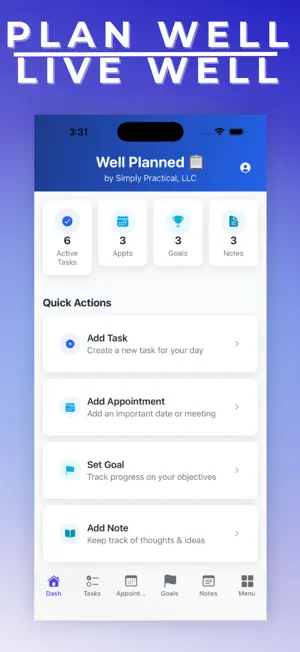
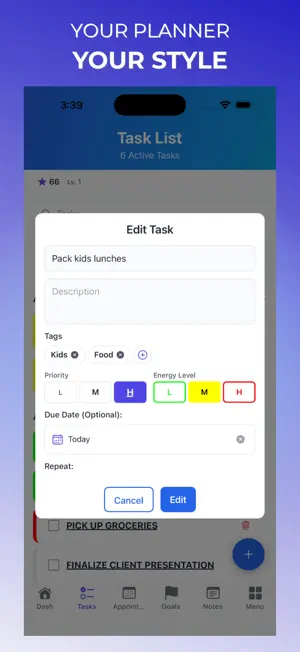
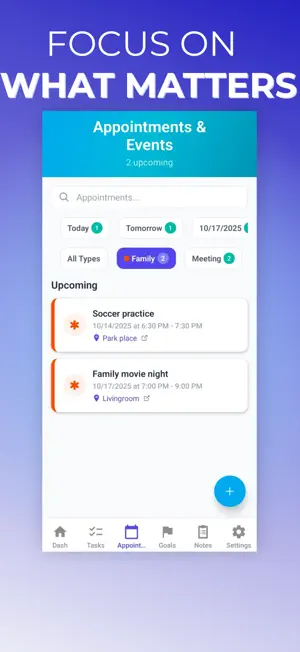
Well Planned brings Tasks, calendar events, routines, Notes and Goals together in one daily planner. Privacy by design means your everyday planning stays on your device by default, with no account required to get started. Choose the optional Personal Cloud subscription when you want cloud backup and sync. ◆ PLAN YOUR DAY • Organize daily tasks, appointments, reminders, checklists, routines, and notes in one place • See what needs attention now, what is coming up next, and how your plan fits into the rest of your day • Use one planner for your to-do list, calendar organization, and everyday productivity ◆ BUILD ROUTINES THAT STICK • Create recurring tasks and repeatable routines for mornings, evenings, school, work, home, wellness, and family life • Keep chores, habits, errands, and regular responsibilities easier to manage with simple repeating schedules • Stay consistent with reminders, streaks, and a planner designed for real life ◆ TRACK GOALS AND PROGRESS • Break bigger goals into manageable steps you can actually finish • Connect daily actions to longer-term goals and see progress build over time • Stay motivated with milestones, achievements, and progress tracking ◆ PLAN BY PRIORITY AND ENERGY • Organize tasks by priority, energy level, due date, and tags • Focus on the right work at the right time instead of trying to do everything at once • Great for busy days when you need a productivity app that helps you plan realistically ◆ FOR REAL LIFE • Use Well Planned for personal productivity, family organization, school routines, home projects, shopping lists, errands, and travel planning • Keep tasks, appointments, goals, and notes together in one system • Use Home Screen widgets to stay on top of what matters and capture updates faster ◆ EXPAND YOUR PLANNER • Use Travel Planning for itineraries, packing lists, reservations, excursions, and budgets • Use Home Planner for recurring home tasks, seasonal checklists, and household planning • Unlock advanced planning tools like Energy Level Tracking, tags, note formatting, and goal milestones ◆ STAY CONNECTED WHEN YOU NEED IT • Start planning offline with no account required • Add Personal Cloud when you want sync, backup, and access across devices • Use Family Sharing to coordinate plans together • Turn on Calendar Sync when you want Well Planned connected to your schedule ◆ PRIVACY-FIRST BY DEFAULT • Stay in control of your data • Keep planning local on your device, then add cloud features only when you want them • Protect access with Face ID or Touch ID on supported devices Personal Cloud and Family Sharing are auto-renewable subscriptions. Travel Planning and Home Planner are one-time purchases. Subscriptions are billed monthly or annually through your Apple ID account and automatically renew unless cancelled at least 24 hours before the end of the current period. You can manage or cancel subscriptions in your App Store Account Settings at any time. By subscribing you agree to Apple's Terms of Use (EULA): https://www.apple.com/legal/internet-services/itunes/dev/stdeula/ and our Privacy Policy: https://www.simplypractical.life/privacy Well Planned is made for professionals, parents, students, and anyone who wants a simpler way to organize work and life. Download today and bring it all together in one app.
What’s new
Version 1.0.122 · Updated October 18, 2026
- Preview Personal Cloud and Family Sharing restores with source details, included items, and item counts. - Enjoy peace of mind with an automatic safety backup before restoring your synced plans. - Copy trips with each traveler’s packing list to simplify Travel Planning. Your plans, your choice. Well Planned is private by design: everyday planning stays on your device by default, with no account required to get started. Choose the optional Personal Cloud plan when you want cloud backup and sync.
App privacy
The developer, Simply Practical, LLC, reported these privacy practices to Apple.
Data Linked to You
The following data, which may be collected and linked to your identity, may be used for the following purposes:
- Purchases: Purchase History
- Contact Info: Email Address
- User Content: Photos or Videos, Other User Content
- Identifiers: User ID
Used for: App Functionality
Data Not Linked to You
The following data, which may be collected but is not linked to your identity, may be used for the following purposes:
- Usage Data: Product Interaction
- Identifiers: Device ID
- Diagnostics: Crash Data
Used for: Analytics, App Functionality
Alternatives to Well Planned: Daily Planner
Looking for apps like Well Planned: Daily Planner? Here are 6 similar apps on the App Store. The highest rated is Quantified: Habit Tracker (5.0/5), and all 6 are free to download.
-
 HourLife: Life Planner
-
 Quantified: Habit Tracker
5.0
Quantified: Habit Tracker
5.0
-
 WakeMeBot: Alarms & Reminders
-
 Free Time Finder: Calendar
-
 Nished: To-Do List & Planner
5.0
Nished: To-Do List & Planner
5.0
-
 Anomalor - Password Manager
| App | Rating | Price | Last updated | Compare |
|---|---|---|---|---|
| Well Planned: Daily Planner | 5.0 / 5 (3 ratings) | Free | October 18, 2026 | |
| HourLife: Life Planner | – | Free | Oct 18, 2026 | Compare |
| Quantified: Habit Tracker | 5.0 / 5 (3) | Free | Jul 2, 2026 | Compare |
| WakeMeBot: Alarms & Reminders | – | Free | Aug 27, 2026 | Compare |
| Free Time Finder: Calendar | – | Free | May 7, 2026 | Compare |
| Nished: To-Do List & Planner | 5.0 / 5 (1) | Free | Aug 26, 2026 | Compare |
| Anomalor - Password Manager | – | Free | Oct 21, 2026 | Compare |