

Anomalor - Password Manager
Usukhbayar Batbayar Productivity iPhoneiPadiPod touchMac
Anomalor - Password Manager is a free Productivity app for iPhone and iPad by Usukhbayar Batbayar. Requires iOS 26.0. Updated October 21, 2026.
- Price
- Free
- on the App Store
- Size
- 3 MB
- Age 4+
- Updated
- Oct 21
- 2026 · v2.6.1
Screenshots


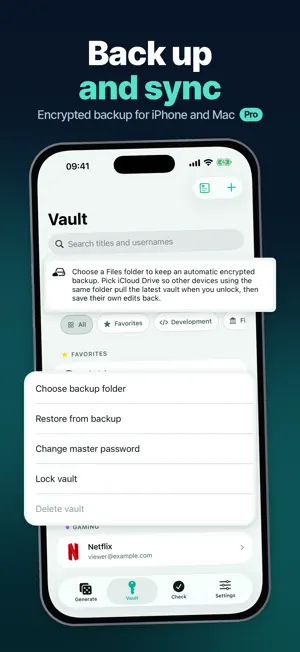
About Anomalor - Password Manager
Anomalor creates strong, random passwords instantly — completely offline. Keep the ones you need in an optional AES-GCM encrypted vault and fill them anywhere with Password AutoFill on iPhone, iPad and Mac. No account. No ads. No tracking. Your data never leaves your device unless you choose to sync or back it up. GENERATE • Random passwords with custom length, symbols, numbers and case • Memorable passphrases and PINs • One-tap copy with automatic clipboard clearing • Works 100% offline PROTECT • Optional vault encrypted with AES-GCM • Unlock with Face ID or Touch ID • Data Not Collected — verified by Apple's privacy label EVERYWHERE YOU WORK • One purchase for iPhone, iPad and Mac • Native Mac app with Safari AutoFill • Keyboard-friendly design on iPad and Mac ANOMALOR PRO Unlock everything with an Anomalor Pro subscription or a one-time lifetime purchase: • Unlimited vault entries (free version stores up to 5) • Password AutoFill extension for Safari and apps on iPhone, iPad and Mac • Encrypted backup and restore • iPhone ↔ Mac sync • Password health audit: spot weak and reused passwords Plans: Monthly, Annual (with 1-week free trial) and Lifetime (one-time purchase). Prices vary by region and are shown in the app before purchase. SUBSCRIPTION INFORMATION • Payment is charged to your Apple Account at confirmation of purchase. • Subscriptions renew automatically unless cancelled at least 24 hours before the end of the current period. Your account is charged for renewal within 24 hours before the period ends. • Manage or cancel anytime in your Apple Account settings. • Any unused portion of a free trial is forfeited when you purchase a subscription. • Lifetime is a one-time purchase and does not renew. Terms of Use (EULA): https://www.apple.com/legal/internet-services/itunes/dev/stdeula/ Privacy Policy: https://unobatbayar.github.io/anomalor/
What’s new
Version 2.6.1 · Updated October 21, 2026
Fixes Face ID, Touch ID and passcode unlock for the vault, and fixes AutoFill showing a Keychain error. AutoFill now asks for Face ID right away and fills your password, and the vault locks again whenever you leave the app. Site logos are now free for everyone.
App privacy
The developer, Usukhbayar Batbayar, reported these privacy practices to Apple.
Data Not Collected
The developer does not collect any data from this app.
Alternatives to Anomalor - Password Manager
Looking for apps like Anomalor - Password Manager? Here are 6 similar apps on the App Store. The highest rated is Lyt WorkShift (4.1/5), and all 6 are free to download.
-
 AI Grammar Keyboard: TypeBuddy
-
 AreaViz-Integrated AI Chatbot
-
 Focus Tower: Study Timer
3.7
Focus Tower: Study Timer
3.7
-
 AuthGuard - PA Records
-
 Plot Spark
-
 Lyt WorkShift
4.1
Lyt WorkShift
4.1
| App | Rating | Price | Last updated | Compare |
|---|---|---|---|---|
| Anomalor - Password Manager | – | Free | October 21, 2026 | |
| AI Grammar Keyboard: TypeBuddy | – | Free | Oct 15, 2026 | Compare |
| AreaViz-Integrated AI Chatbot | – | Free | Oct 1, 2026 | Compare |
| Focus Tower: Study Timer | 3.7 / 5 (3) | Free | Sep 29, 2026 | Compare |
| AuthGuard - PA Records | – | Free | Sep 23, 2026 | Compare |
| Plot Spark | – | Free | Aug 24, 2026 | Compare |
| Lyt WorkShift | 4.1 / 5 (10) | Free | Oct 14, 2026 | Compare |