

WakeMeBot: Alarms & Reminders
Yuval Haimovits Productivity iPhoneiPadiPod touch
WakeMeBot: Alarms & Reminders is a free Productivity app for iPhone and iPad by Yuval Haimovits. Requires iOS 26.4. Updated August 27, 2026.
- Price
- Free
- on the App Store
- Size
- 11 MB
- Age 12+
- Updated
- Aug 27
- 2026 · v1.0.2
Screenshots
About WakeMeBot: Alarms & Reminders
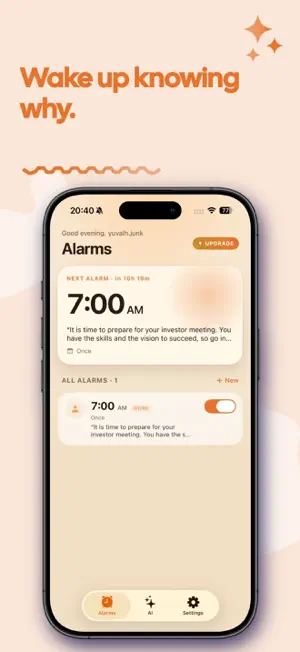
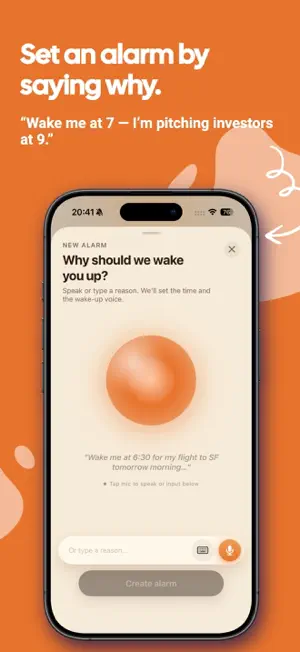
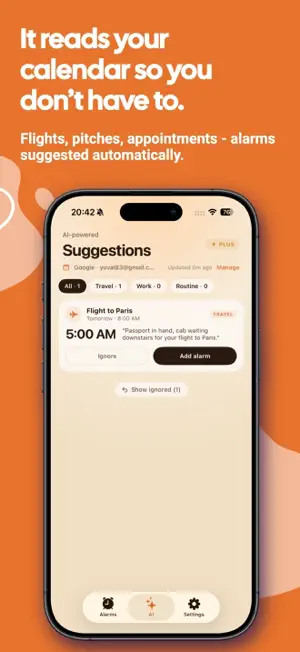
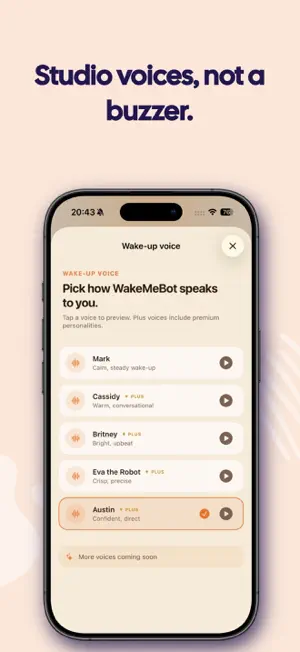
WakeMeBot is the alarm clock that actually knows why it's waking you. Most alarms ring for no reason — same tone every day, no clue what's coming. WakeMeBot looks at your calendar, picks the moments that matter, and wakes you with a voice line that names the day's anchor: "Pitch deck on the table, coffee in the kitchen — board meeting at Sequoia in two hours." It's an alarm. With context. And a voice. HOW IT WORKS • Connect Apple Calendar or Google Calendar (read-only). • WakeMeBot's AI scans the next three days, skips your daily standup and lunch, surfaces the events that actually deserve a heads-up. • For each one it proposes a fire time AND a personal wake/alert line. Pitch at 9? Wake at 7. Flight at 6:30? Out the door by 4:30 — security and traffic. • Tap accept. Done. WHAT MAKES IT DIFFERENT Calendar-aware suggestions. Most alarm apps make you set the time. WakeMeBot reads your calendar and proposes alarms before you ask. Voice that says WHY. The wake line isn't generic. It references your actual meeting, person, location. Studio-quality voices (Rachel, Domi, Bella) on the Plus tier. Smart lead times. Morning events get a real wake-up window. A 9 AM pitch fires at 7 AM, not at 8:35. Travel events bump 3 hours for security + traffic. Dynamic Island integration. Your next alarm lives on the lock screen and Dynamic Island, counting down. FREE / PLUS WakeMeBot is free to use with up to three active alarms and the system voice. WakeMeBot Plus unlocks: • Unlimited alarms • Calendar-driven AI suggestions • Studio-quality wake voices (ElevenLabs) • Personalised wake lines tuned to your morning style • 7-day free trial, then $9.99/mo or $39.99/year Terms of Use (EULA): https://www.apple.com/legal/internet-services/itunes/dev/stdeula/
What’s new
Version 1.0.2 · Updated August 27, 2026
New and improved onboarding and some minor bug fixes.
App privacy
The developer, Yuval Haimovits, reported these privacy practices to Apple.
Data Linked to You
The following data, which may be collected and linked to your identity, may be used for the following purposes:
- Contact Info: Email Address, Name
- Identifiers: User ID, Device ID
- Usage Data: Product Interaction
- Diagnostics: Crash Data, Performance Data, Other Diagnostic Data
Used for: Analytics, App Functionality
Data Not Linked to You
The following data, which may be collected but is not linked to your identity, may be used for the following purposes:
- User Content: Other User Content
Used for: Analytics, App Functionality
Alternatives to WakeMeBot: Alarms & Reminders
Looking for apps like WakeMeBot: Alarms & Reminders? Here are 6 similar apps on the App Store. The highest rated is Well Planned: Daily Planner (5.0/5), and all 6 are free to download.
-
 Panda Calendar
-
 Rappel - Reminders
-
 CueTask: Reminders & todo list
-
 TaskJogger: Life Organizer
-
 Well Planned: Daily Planner
5.0
Well Planned: Daily Planner
5.0
-
 ToDue: Relentless Reminders
| App | Rating | Price | Last updated | Compare |
|---|---|---|---|---|
| WakeMeBot: Alarms & Reminders | – | Free | August 27, 2026 | |
| Panda Calendar | – | Free | Aug 31, 2026 | Compare |
| Rappel - Reminders | – | Free | Feb 7, 2026 | Compare |
| CueTask: Reminders & todo list | – | Free | Jun 24, 2026 | Compare |
| TaskJogger: Life Organizer | – | Free | Apr 24, 2026 | Compare |
| Well Planned: Daily Planner | 5.0 / 5 (3) | Free | Oct 18, 2026 | Compare |
| ToDue: Relentless Reminders | – | Free | Sep 20, 2026 | Compare |