

Lecture Recorder AI: Lomel
Halim Ozturk Productivity iPhoneiPadiPod touch
Lecture Recorder AI: Lomel is a free Productivity app for iPhone and iPad by Halim Ozturk. Rated 4.0/5 from 1 ratings. Requires iOS 18.
- Rating
- 4.0
- 1 ratings
- Price
- Free
- on the App Store
- Size
- 14 MB
- Age 4+
- Updated
- Oct 22
- 2026 · v1.1.3
Screenshots


About Lecture Recorder AI: Lomel
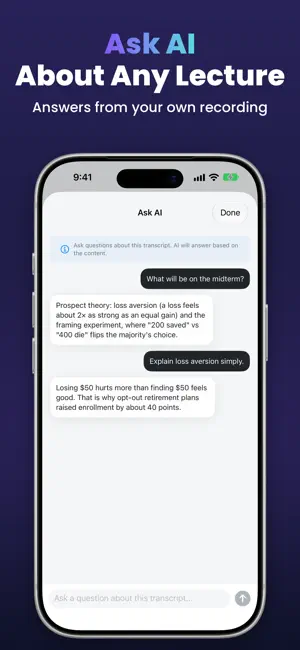
Lomel is an AI note taker and transcription app. Record a lecture, meeting or interview, or import an audio file, and turn it into a clean transcript and structured notes you can review, search, translate and share. AI Note Taker: Lecture, Meeting and Interview Notes After a recording, choose a note style and AI organizes your transcript for you: - Lecture Notes: main topics, key concepts, examples and review questions - Meeting Minutes: agenda, discussion, decisions, action items, open questions and people mentioned - Interview Notes: main themes, questions and answers, notable quotes and follow-up questions Export your notes as a Full Report with every section heading included. More AI Tools - AI Cleanup to remove filler words, repetitions and transcription errors - AI Summary with key points, action items and decisions - Ask AI to ask questions about your transcript and get answers - One-tap AI titles for your transcripts - Enhanced Meeting and Interview modes for cleaner transcripts Record or Import Audio Record speech in the app and watch your words appear as text, or import existing audio from Files or other apps. Supported formats: MP3, M4A, WAV, AAC, AIFF and CAF. Review Every Moment Timestamped transcript segments, audio playback, a waveform view, bookmarks and tap-to-seek navigation take you straight to the moment you need. 47 Languages and Regional Accents Transcribe in 47 languages and accents, including English, Spanish, German, French, Arabic, Hindi, Turkish, Russian, Portuguese, Italian and Dutch. Translate Your Transcripts Translate transcripts into 29 languages using Apple's on-device Translation framework where available. Stay Organized - Folders for classes, projects, clients and meetings - Custom tags, stars and bookmarks - Fast search across your whole library Export and Share Export to PDF, Word (DOCX) or plain text (TXT): raw or cleaned transcripts, meeting notes, action item reports, polished dictation or full reports. Your Privacy and AI Dictation and audio file transcription use Apple speech recognition. AI features are optional and run only when you tap them. The first time, Lomel asks for your permission before any transcript text is shared. The text is then processed by our AI service, powered by OpenAI, only to create the result you asked for. Your audio is never sent to our AI service. Recording, transcription, translation and export work without this permission, and you can withdraw it anytime in Settings. AI features have a daily usage limit. Premium Subscription Full access requires a Premium subscription, billed weekly or monthly. Eligible new subscribers may get a free trial on the weekly plan. Payment is charged to your Apple Account at confirmation of purchase. The subscription renews automatically unless canceled at least 24 hours before the end of the current period. Manage or cancel it anytime in your App Store account settings. Perfect For - Lecture notes and study sessions - Meeting minutes and business calls - Interview notes and research recordings - Voice notes and ideas - Audio file transcription Privacy Policy: https://lomel.halimozturk.com/privacy Terms of Use: https://lomel.halimozturk.com/terms
What’s new
Version 1.1.3 · Updated October 22, 2026
What's New in Lomel: A clearer start with Lomel Plans and Links: - The yearly plan is now shown first, with a free trial when you are eligible - Privacy Policy and Terms links now open the new Lomel website AI Features: - Clearer description of what the AI features do - The consent screen now spells out exactly what is sent for AI processing Thank you for using Lomel. Your feedback drives every improvement we make.
App privacy
The developer, Halim Ozturk, reported these privacy practices to Apple.
Data Not Linked to You
The following data, which may be collected but is not linked to your identity, may be used for the following purposes:
- Purchases: Purchase History
- Location: Coarse Location
- Identifiers: Device ID
- Usage Data: Product Interaction
- Diagnostics: Crash Data, Performance Data
- User Content: Other User Content
Used for: Analytics, App Functionality
Alternatives to Lecture Recorder AI: Lomel
Looking for apps like Lecture Recorder AI: Lomel? Here are 6 similar apps on the App Store. The highest rated is Dictation App-Dictate Anywhere (4.7/5), and all 6 are free to download.
-
 Text Reader Narrator: TTS
4.1
Text Reader Narrator: TTS
4.1
-
 Dictation App-Dictate Anywhere
4.7
Dictation App-Dictate Anywhere
4.7
-
 Voice to Text - Speechy
4.6
Voice to Text - Speechy
4.6
-
 Voice to Text - Speech Note
4.5
Voice to Text - Speech Note
4.5
-
 Cue: AI Note Taker & Recorder
4.4
Cue: AI Note Taker & Recorder
4.4
-
 SpeakApp AI: Voice Notes
4.6
SpeakApp AI: Voice Notes
4.6
| App | Rating | Price | Last updated | Compare |
|---|---|---|---|---|
| Lecture Recorder AI: Lomel | 4.0 / 5 (1 rating) | Free | October 22, 2026 | |
| Text Reader Narrator: TTS | 4.1 / 5 (32) | Free | Oct 26, 2026 | Compare |
| Dictation App-Dictate Anywhere | 4.7 / 5 (531) | Free | Aug 5, 2024 | Compare |
| Voice to Text - Speechy | 4.6 / 5 (2,942) | Free | Jul 15, 2026 | Compare |
| Voice to Text - Speech Note | 4.5 / 5 (11,346) | Free | Oct 19, 2026 | Compare |
| Cue: AI Note Taker & Recorder | 4.4 / 5 (3,724) | Free | Sep 22, 2026 | Compare |
| SpeakApp AI: Voice Notes | 4.6 / 5 (9,622) | Free | Oct 15, 2026 | Compare |