

Voice to Text - Speechy
吉华 郑 Productivity iPhoneiPadiPod touchApple Watch
Voice to Text - Speechy is a free Productivity app for iPhone and iPad by 吉华 郑. Rated 4.6/5 from 2,941 ratings. Requires iOS 26.0. Updated July 15, 2026.
- Rating
- 4.6
- 2.9K ratings
- Price
- Free
- on the App Store
- Size
- 69 MB
- Age 4+
- Updated
- Jul 15
- 2026 · v4.3.8
Screenshots



About Voice to Text - Speechy
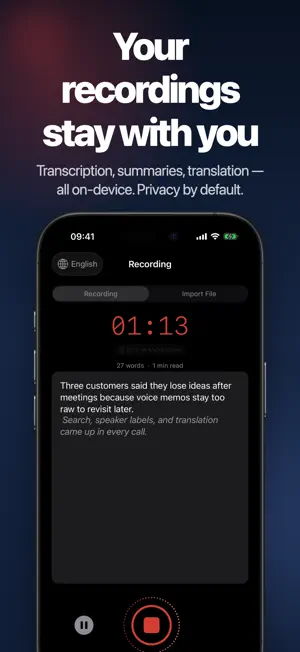
Every recording becomes a searchable note, an AI summary, and a list of action items — ready to share, translate, or export as SRT/VTT subtitles. Speechy follows your meetings, interviews, classes, podcasts, and customer calls on iPhone and Apple Watch. Transcription runs on device with Apple's speech recognition, so your audio stays private by default. From a single recording you get an editable transcript with speaker labels, a structured summary, bilingual translation, and SRT/VTT subtitles. Why people use Speechy: • Real-time dictation and transcription on iPhone • Import audio and video files to transcribe old recordings • Copy the full transcript or selected sections when you need them elsewhere • Speaker labels for meetings, interviews, and podcasts • Subtitle mode with SRT / VTT export • AI summary templates for meetings, interviews, medical (SOAP), legal, lectures, and 1-on-1s • Action items with one-tap send to Calendar — dates in your transcript become real events • Face ID or passcode lock for the whole app or individual notes • Bilingual translation and read aloud for original or translated text • Full-text search, tags, edited transcript, playback sync, and easy sharing More ways to capture and work: • Start recording from Apple Watch and continue on iPhone • Use widgets, Live Activity, and Dynamic Island for faster access and status • Send content from other apps with Share, Translate, and Read Aloud extensions • Extract article text from web links and reopen notes from Spotlight Advanced AI and control: • Works with Apple Intelligence, local MLX models, OpenAI, Anthropic, Gemini, and custom OpenAI-compatible APIs • Download and manage local MLX or Hugging Face models • Use AI memory, tools, and MCP servers for deeper note workflows • Supports on-device speech recognition, on-device translation, and on-device speaker analysis • Fine-tune recognition with custom vocabulary, VAD, auto punctuation, emoji conversion, and sensitive-word filtering Great for: • Meeting notes and project recaps • Interviews, research, and customer calls • Lectures, study notes, and podcasts • Bilingual work, subtitles, and content creation Get started in 3 steps: 1. Record, import a file, or start from Apple Watch 2. Review the transcript, summary, action items, speakers, and translation 3. Search, share, export subtitles, or ask AI to go deeper Subscription: Speechy Pro offers auto-renewing subscriptions: • Monthly: US$6.99 / month • Yearly: US$47.99 / year Prices apply to customers in the United States. Pricing in other countries or regions may vary, and charges may be converted to your local currency. Payment will be charged to your Apple Account at confirmation of purchase. Subscription renews automatically unless auto-renew is turned off at least 24 hours before the end of the current period. Your account will be charged for renewal within 24 hours before the end of the current period. You can manage or cancel subscriptions in your Account Settings after purchase. Terms of Use: https://www.speechy.app/terms-of-service Privacy Policy: https://www.speechy.app/privacy-policy
Ratings & reviews
4.6
2.9K ratings
What’s new
Version 4.3.8 · Updated July 15, 2026
Speechy focuses on clearer capture, safer private notes, and easier export. • Improved templates for meetings, interviews, lectures, legal notes, and SOAP-style summaries • Calendar actions can turn dates and follow-ups from a transcript into real events • Face ID or passcode lock helps protect sensitive recordings and notes • Full transcript copy, speaker labels, and SRT/VTT export are easier to reach • Apple Watch capture, Live Activity, and Dynamic Island status are more reliable Thanks for using Speechy. If recording or transcription does not behave as expected, please contact support so we can help directly.
App privacy
The developer, 吉华 郑, reported these privacy practices to Apple.
Data Linked to You
The following data, which may be collected and linked to your identity, may be used for the following purposes:
- User Content: Other User Content
- Identifiers: User ID, Device ID
Used for: App Functionality
Data Not Linked to You
The following data, which may be collected but is not linked to your identity, may be used for the following purposes:
- Usage Data: Product Interaction
- Diagnostics: Other Diagnostic Data, Crash Data
Used for: Analytics, App Functionality
Alternatives to Voice to Text - Speechy
Looking for apps like Voice to Text - Speechy? Here are 6 similar apps on the App Store. The highest rated is iTranscribe - Audio to Text (4.6/5), and all 6 are free to download.
-
 Voice to Text - Dictate Speech
4.5
-
 Transcribe α: Audio To Text
4.4
-
 Speech to Text+
3.0
-
 Voice to Text AI Transcriber
4.3
-
 Transcriber • Speech to Text
3.6
-
 iTranscribe - Audio to Text
4.6
| App | Rating | Price | Last updated | Compare |
|---|---|---|---|---|
| Voice to Text - Speechy | 4.6 / 5 (2,941 ratings) | Free | July 15, 2026 | |
| Voice to Text - Dictate Speech | 4.5 / 5 (11,339) | Free | Oct 4, 2026 | Compare |
| Transcribe α: Audio To Text | 4.4 / 5 (835) | Free | Sep 8, 2025 | Compare |
| Speech to Text+ | 3.0 / 5 (2) | Free | May 18, 2026 | Compare |
| Voice to Text AI Transcriber | 4.3 / 5 (258) | Free | Oct 1, 2026 | Compare |
| Transcriber • Speech to Text | 3.6 / 5 (20) | Free | Nov 19, 2025 | Compare |
| iTranscribe - Audio to Text | 4.6 / 5 (6,821) | Free | Sep 8, 2026 | Compare |