

Cue: AI Note Taker & Recorder
44pixels Productivity iPhoneiPadiPod touch
Cue: AI Note Taker & Recorder is a free Productivity app for iPhone and iPad by 44pixels. Rated 4.4/5 from 3,741 ratings. Requires iOS 16.6.
- Rating
- 4.4
- 3.7K ratings
- Price
- Free
- on the App Store
- Size
- 175 MB
- Age 4+
- Updated
- Sep 22
- 2026 · v4.10.0
Screenshots


About Cue: AI Note Taker & Recorder
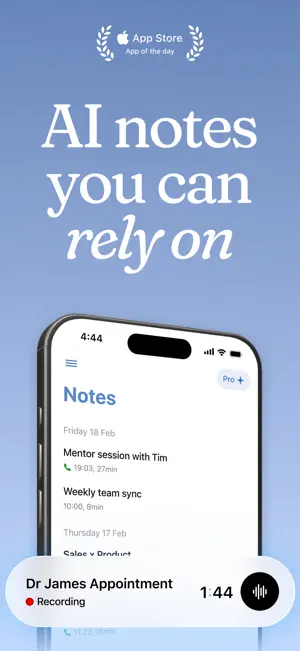
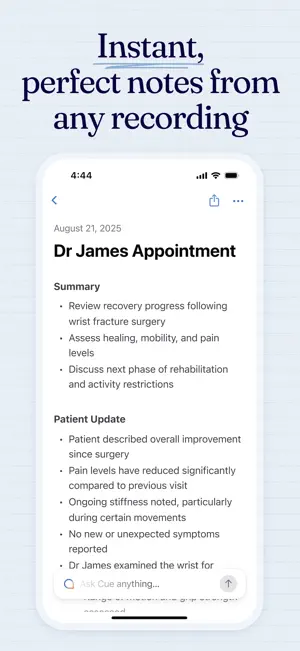
Cue – The Hands-Free AI Meeting Note Taker Stay fully engaged in every conversation without the hassle of taking notes. Cue uses cutting-edge AI to capture discussions— in person or online—and instantly produce accurate summaries, action items, and key information. Whether you’re in a business meeting, attending a class, catching up with friends, or brainstorming on an afternoon walk, Cue ensures you never miss a crucial detail. No distractions—only the information you care about. Why Cue? Advanced AI Accuracy Cue uses state-of-the-art speech recognition and natural language processing to handle multiple speakers and even the most technical jargon —so you always have reliable, high-quality notes. Automatic Summaries & Action Points No more wading through endless transcripts. Cue condenses lengthy discussions into concise, easy-to-digest summaries, complete with actionable to-do lists and clear next steps. Privacy & Security First Your data remains yours alone. Cue never sells or grants third parties access to your recordings or transcripts. Export, share, or delete your files any time, with total peace of mind. Hands-Free & Distraction-Free Focus on the conversation and let Cue do the work. Once you tap to record, it quietly transcribes in the background, ensuring you stay present and engaged. Search & Ask Questions Quickly retrieve vital moments or details by searching for keywords in your transcripts. Go deeper with AI-driven queries like, “Which deadlines were decided in Monday’s meeting?” to pinpoint answers without leafing through reams of text. Flexible Use Cases Meetings & Conferences: Transform real-time audio into polished meeting notes, complete with speaker labels. Lectures & Study Sessions: Let Cue be your personal study companion, transcribing and summarising lessons for faster revision. Creative Brainstorms: Capture every idea and seamlessly compile them into shareable insights. Professional Interviews & Research: Keep track of critical data when interviewing clients, stakeholders, or subjects for qualitative studies. Personal Productivity: Record daily thoughts, reminders, or journaling, and let Cue organise it all for you. Multilingual Support Need Spanish transcripts with English summaries? Cue supports multiple languages for transcription and summarisation, so you can collaborate across diverse teams or practise your language skills with ease. Calendar Integration Never miss a moment with Cue's smart calendar sync. Connect your Google, iCloud, or Microsoft calendars to receive timely reminders before each event—ensuring you’re always ready to capture key insights. Whether it’s a meeting, class, or personal check-in, Cue helps you stay on top of your schedule and start recording right on time. — How It Works 1. Open Cue Launch the app just before your meeting, class, or brainstorming session begins. 2. Start Recording Cue listens discreetly in the background, automatically transcribing every word without interrupting the conversation. 3. Receive Summaries & Action Items When you’re done, Cue compiles all key points, tasks, and next steps into a concise summary, ready for immediate review. 4. Review & Share Edit if needed, then export your transcripts or summaries as PDFs, emails, or URLs. Perfect for collaborating with teams or classmates. Have a question for us? Email us at: [email protected] Privacy Policy: https://44pixels.ai/privacy Terms of Use: https://44pixels.ai/cue-terms
Ratings & reviews
4.4
3.7K ratings
What’s new
Version 4.10.0 · Updated September 22, 2026
Performance improvements and bug fixes. As always, thanks for being part of Cue. Got ideas or running into something? We'd love to hear from you at [email protected]
App privacy
The developer, 44pixels, reported these privacy practices to Apple.
Data Used to Track You
The following data may be used to track you across apps and websites owned by other companies:
- Location: Coarse Location
- Identifiers: User ID, Device ID
- Usage Data: Advertising Data, Other Usage Data
Data Linked to You
The following data, which may be collected and linked to your identity, may be used for the following purposes:
- Contacts: Contacts
Used for: App Functionality
Data Not Linked to You
The following data, which may be collected but is not linked to your identity, may be used for the following purposes:
- Identifiers: User ID, Device ID
- Usage Data: Advertising Data, Product Interaction, Other Usage Data
- Location: Coarse Location
- Diagnostics: Crash Data, Performance Data, Other Diagnostic Data
- Contact Info: Name, Email Address
- User Content: Audio Data
Used for: Third-Party Advertising, Developer’s Advertising or Marketing, Analytics, Product Personalization, App Functionality
Alternatives to Cue: AI Note Taker & Recorder
Looking for apps like Cue: AI Note Taker & Recorder? Here are 6 similar apps on the App Store. The highest rated is Notee: AI Note Taker (4.8/5), and all 6 are free to download.
-
 CraftNote: Smart AI Note Taker
4.7
CraftNote: Smart AI Note Taker
4.7
-
 Notee: AI Note Taker
4.8
Notee: AI Note Taker
4.8
-
 Summary - AI Note Taker
4.7
Summary - AI Note Taker
4.7
-
 Note AI: Smart Note Taker
4.5
Note AI: Smart Note Taker
4.5
-
 Voicenotes AI Notes & Meetings
4.8
Voicenotes AI Notes & Meetings
4.8
-
 Smart Noter - AI Note Taker
4.7
Smart Noter - AI Note Taker
4.7
| App | Rating | Price | Last updated | Compare |
|---|---|---|---|---|
| Cue: AI Note Taker & Recorder | 4.4 / 5 (3,741 ratings) | Free | September 22, 2026 | |
| CraftNote: Smart AI Note Taker | 4.7 / 5 (4,903) | Free | Sep 26, 2026 | Compare |
| Notee: AI Note Taker | 4.8 / 5 (5,001) | Free | Oct 28, 2026 | Compare |
| Summary - AI Note Taker | 4.7 / 5 (56,597) | Free | Nov 2, 2026 | Compare |
| Note AI: Smart Note Taker | 4.5 / 5 (744) | Free | Oct 28, 2026 | Compare |
| Voicenotes AI Notes & Meetings | 4.8 / 5 (7,241) | Free | Oct 30, 2026 | Compare |
| Smart Noter - AI Note Taker | 4.7 / 5 (2,425) | Free | Oct 26, 2026 | Compare |