

Busy Bee Time Tracker
Steve Rose Business iPhoneiPadiPod touchMacApple Watch
Busy Bee Time Tracker is a free Business app for iPhone and iPad by Steve Rose. Rated 5.0/5 from 1 ratings. Requires iOS 18.6. Updated July 9, 2026.
- Rating
- 5.0
- 1 ratings
- Price
- Free
- on the App Store
- Size
- 9 MB
- Age 4+
- Updated
- Jul 9
- 2026 · v1.1
Screenshots


About Busy Bee Time Tracker
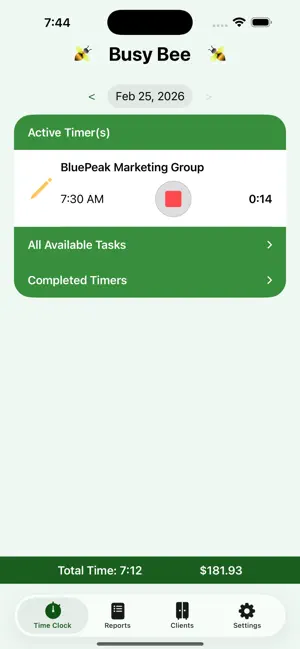
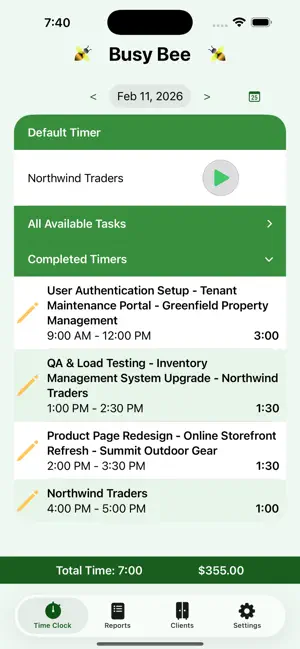
Busy Bee Time Tracker is a straightforward time-tracking app packed with features that won’t clutter your screen or make you sit through annoying ads. You can easily track your time by client, project, and task, or no task at all. To begin, you’ll create a client, and a default project and task will be set up for you. Alternatively, you can start the timer and choose a task later—or not. You can also add multiple projects and tasks to get super precise and detailed tracking that suits your workflow. Want flexible billing? You’re in luck! You can set hourly rates at the client, project, or task level, or keep it simple with one rate per client that automatically applies to everything below. Powerful reporting is included. You can pick any date range to see a clear breakdown of your time by day, client, project, or task. If you prefer a summary, you can hide the details or view a chart broken down by any of those categories. Need to do some calculations? Export your data as a CSV file for easy use in your favorite spreadsheet or database tools. Busy Bee Time Tracker is free to try out. When you create your first item, you’ll get a two-week unlimited preview. If you like it, subscribe to keep tracking without limits. Or, you can keep using it for free with limits of one client, two projects, and three tasks. Features • Start and stop a timer with a single tap. • Start tracking time with no task. • Track time by client, project, and task. • Change a timer's task after it starts. • Manually set the start and/or end times for a timer. • Starting a new timer stops the current timer. • Log a description for each timer entry if desired. • Attach detailed notes to each client, project, task, or timer. • Set hourly rates at the client, project, or task level. • Powerful reporting options with flexible date ranges. • Filter reports by Client, Project, or Task • Summary reports give you the totals and hide the details. • Display summary reports as a pie chart. • Export report data as a CSV file. Terms of Use (EULA): https://www.apple.com/legal/internet-services/itunes/dev/stdeula/
What’s new
Version 1.1 · Updated July 9, 2026
Added support for timer validation. Various display improvements and bug fixes.
App privacy
The developer, Steve Rose, reported these privacy practices to Apple.
Data Not Collected
The developer does not collect any data from this app.
Alternatives to Busy Bee Time Tracker
Looking for apps like Busy Bee Time Tracker? Here are 6 similar apps on the App Store. The highest rated is FLO: Finance Ledger Optimizer (5.0/5), and all 6 are free to download.
-
 Ochre: Invoices & Estimates
-
 Clockee - Business
-
 FLO: Finance Ledger Optimizer
5.0
FLO: Finance Ledger Optimizer
5.0
-
 NexBook Business
5.0
NexBook Business
5.0
-
 5min: Focus & Tasks
-
 UntilPayday: Expense tracker
| App | Rating | Price | Last updated | Compare |
|---|---|---|---|---|
| Busy Bee Time Tracker | 5.0 / 5 (1 rating) | Free | July 9, 2026 | |
| Ochre: Invoices & Estimates | – | Free | Oct 30, 2026 | Compare |
| Clockee - Business | – | Free | Oct 28, 2026 | Compare |
| FLO: Finance Ledger Optimizer | 5.0 / 5 (3) | Free | Jun 12, 2026 | Compare |
| NexBook Business | 5.0 / 5 (1) | Free | Oct 30, 2026 | Compare |
| 5min: Focus & Tasks | – | Free | Aug 24, 2026 | Compare |
| UntilPayday: Expense tracker | – | Free | Mar 5, 2026 | Compare |