

Library QR Manager
Amir Mohammad Ahangar Business iPhoneiPadiPod touch
Library QR Manager is a free Business app for iPhone and iPad by Amir Mohammad Ahangar. Requires iOS 15. Updated March 3, 2026.
- Price
- Free
- on the App Store
- Size
- 63 MB
- Age 4+
- Updated
- Mar 3
- 2026 · v1.1.1
Screenshots


About Library QR Manager
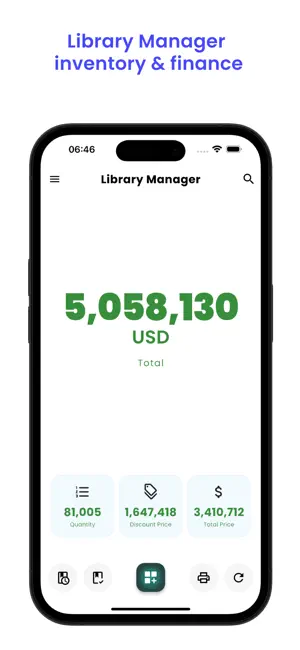
Welcome to Library QR Manager, your comprehensive solution for library book management. Designed for both small personal collections and large public libraries, our app simplifies inventory management with powerful features. Library QR Manager Key Features: 1. Product Management: ● Effortless QR and Barcode Scanning: Add books to your library inventory by scanning QR codes or barcodes. ● Detailed Book Information: Store complete details about each book, including: ◌ Book Name ◌ author ◌ genre ◌ Price ◌ Quantity ◌ Discount Price ◌ currency ◌ isbn (International Standard Book Number) ◌ Publisher ◌ Publication Date ◌ Acquisition Date ◌ And Book Description. ● Capture Book images directly from your iPhone or iPad gallery or camera. ● Securely store images in your iPhone or iPad storage. 2. Editing Books: ● Quickly edit book information. ● Select a specific book for editing and save changes seaml 2. Inventory Tracking and Customizable Records Details: ● Easily monitor the availability and sale status of each book. ● Include descriptions, currency information, and cover images for each book. ● Keep track of when books were added to your inventory with automatic timestamps. 3. QR Code and Barcode Scanning: ● Users can access book information by scanning QR codes or barcodes. ● Pre-registered book details are displayed after each scan. 4. Latest Books: ● Designed to enhance your shopping experience by showcasing the latest books. It provides daily, monthly, and yearly updates, each distinguished by different color-coded notifications. This feature allows you to easily track new arrivals and trends. Stay updated and never miss out on the latest books with our user-friendly app. 5. Warranty Ended Books: ● Our application offers a feature that displays books that have warranty ended. These books are organized based on their expiration dates into three categories: daily, monthly, and yearly. ● Each of these categories is represented by a unique color in unique page, making it straightforward for users to quickly identify the status of their books. 6. Automated Calculations: ● Automatically calculate total prices and total discount prices based on book quantity and pricing. ● Total quantities, total prices, total discount prices, and grant total are displayed on the main screen. 7. Reports: ● Generate comprehensive reports from stored book data. ● Keep track of sales, stock levels, and other relevant information. 8. User-Friendly Design: ● Enjoy a straightforward, intuitive interface for efficient library management. ● Easy to navigate interface. ● Choose between light and dark theme modes. 9. Multi languages Support: Available in multiple languages, including: ● English ● Arabic ● Chinese ● French ● Spanish ● Russian ● Portuguese ● German ● Hindi ● Turkish ● Pashto ● Italian ● Persian ● Polish ● Dutch ● Romanian ● Filipino ● Vietnamese Library QR Manager is Ideal For: ● Libraries ● Bookstores ● Personal Collections ● Educational Institutions ● And Much More. Download Library QR Manager today and streamline your library management like never before! Need assistance? Our customer support team is available 24/7. Feel free to reach out to us at [email protected] for any queries.
What’s new
Version 1.1.1 · Updated March 3, 2026
App improved.
App privacy
The developer, Amir Mohammad Ahangar, reported these privacy practices to Apple.
Data Linked to You
The following data, which may be collected and linked to your identity, may be used for the following purposes:
- Location: Coarse Location
- Identifiers: Device ID
- Usage Data: Product Interaction
- Diagnostics: Performance Data
Used for: Third-Party Advertising
Alternatives to Library QR Manager
Looking for apps like Library QR Manager? Here are 6 similar apps on the App Store.
-
 Fair Till: Craft Fair POS
-
 Visitor Check-in Kiosk
-
 ID Scanner for Venues
-
 Offline Scan -barcode,stock,qr
-
 Training Timer Plus
-
 Sky Terminal
| App | Rating | Price | Last updated | Compare |
|---|---|---|---|---|
| Library QR Manager | – | Free | March 3, 2026 | |
| Fair Till: Craft Fair POS | – | Free | Nov 1, 2026 | Compare |
| Visitor Check-in Kiosk | – | Free | Oct 16, 2026 | Compare |
| ID Scanner for Venues | – | Free | Jun 29, 2026 | Compare |
| Offline Scan -barcode,stock,qr | – | Free | Oct 20, 2026 | Compare |
| Training Timer Plus | – | Free | May 9, 2025 | Compare |
| Sky Terminal | – | Free | Mar 11, 2024 | Compare |
Compare Library QR Manager with the top alternatives: ratings, updates, ASO score and keyword gaps →