

Offline Scan -barcode,stock,qr
QAEE CONPUUTENG Business iPhoneiPadiPod touch
Offline Scan -barcode,stock,qr is a free Business app for iPhone and iPad by QAEE CONPUUTENG. Requires iOS 15.0. Updated October 20, 2026.
- Price
- Free
- on the App Store
- Size
- 22 MB
- Age 4+
- Updated
- Oct 20
- 2026 · v1.0.2
Screenshots



About Offline Scan -barcode,stock,qr
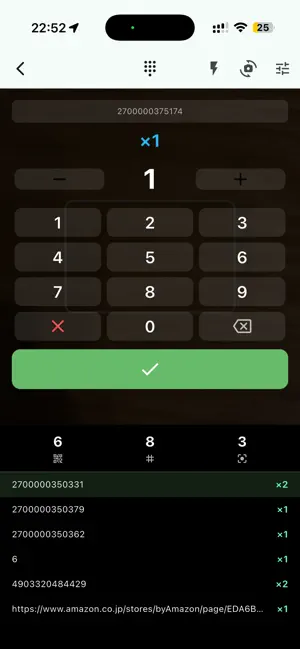
Turn the iPhone or iPad you already carry into a warehouse-grade scanner that keeps working where there is no signal — instead of buying a dedicated handheld terminal. Most free barcode apps look every code up on the internet to show a product name. That adds half a second to a full second of waiting to every single scan, and it breaks the rhythm of continuous work. Worse, in a basement stockroom, a steel-framed warehouse, a back room or an event hall with no reception, the lookup fails and the job stops entirely. The professional alternative — a dedicated handheld barcode terminal — costs hundreds to thousands of dollars per unit, which is hard to justify for a seasonal stocktake or a one-off event. Offline Scan solves both problems at once. No product names — deliberately This app records exactly two things: the code string and the quantity. Because it never looks a name up, it makes no network requests at all and scans continuously at the limit of your camera. To attach product names, export the CSV and join it against your master spreadsheet on a PC with VLOOKUP or similar. If you need the product name to appear on screen as you scan, this is not the right app — we say so up front. Try everything free first For an initial period after installation, every Pro feature is unlocked with no limits: unlimited scanning, CSV export and QR aggregation. Try it on a real job first. When the period ends, viewing the data you already saved remains free. Main features Fully offline: no network calls whatsoever. Every read is written to the device the instant it is captured, so it runs at the same speed in airplane mode, underground or out in the field. Nothing is sent to a server, so your stock data never leaves the company. Count without thinking: repeat codes increment automatically. A sound and a vibration confirm each read, so you can keep your eyes and hands on the goods instead of the screen. Switch between a keypad mode for entering an exact quantity per item and a continuous +1 mode for fast blind counting. Reads only what you aim at: only the code inside the centre frame is captured, so densely packed shelf labels never get counted by mistake. Merge several devices by QR — no cloud: your team splits the work across their own phones, then the lead device simply reads the QR shown on each worker's screen (paged automatically when there are many rows) to merge the totals. Missing pages are listed by number so a gap is obvious. No Wi-Fi, no mobile plan, no account. CSV export: export code, quantity and last-scanned time, then send it to a PC by mail or chat and load it straight into your inventory sheet or ERP. Notes and labels: attach a note or a label to any code, and correct quantities by hand afterwards. Made for Retail and warehousing (stocktakes in basements and back rooms, goods-in checks, returns sorting) Events and conferences (offline ticket QR check-in and headcount at the door) IT and facilities (asset registers and audits from serial-number barcodes on PCs and equipment) Construction and manufacturing (counting materials and tools, check-out tracking) About the price After the free period, Pro is available monthly or yearly. It is priced so that for less than the cost of a single dedicated handheld terminal, every phone on your team can do the same job. The yearly plan saves two months. Free trial: every feature is free for 30 days after you install the app. To keep using them after that, an auto-renewing monthly or yearly subscription is required. Terms of Use (EULA): https://www.apple.com/legal/internet-services/itunes/dev/stdeula/
What’s new
Version 1.0.2 · Updated October 20, 2026
Quantity pad: the first digit you type now replaces the default 1 (typing 12 no longer gives 112), and the pad is no longer see-through. Scan settings: the option that isn't selected is now readable in light appearance. Dates in the list now follow the app's language, and the message shown when the camera can't open is now translated. Dark appearance: fixed hard-to-read colors on the subscription screen and an invisible icon in the merge-complete notice. At the largest text size, screens, dialogs and the quantity pad are no longer cut off and words no longer break mid-word.
App privacy
The developer, QAEE CONPUUTENG, reported these privacy practices to Apple.
Data Not Linked to You
The following data, which may be collected but is not linked to your identity, may be used for the following purposes:
- Purchases: Purchase History
- Usage Data: Product Interaction
- Identifiers: Device ID
Used for: Analytics, App Functionality
Alternatives to Offline Scan -barcode,stock,qr
Looking for apps like Offline Scan -barcode,stock,qr? Here are 6 similar apps on the App Store. The highest rated is SiteCheck by MadeleineCrush (5.0/5), and all 6 are free to download.
-
 Skanzo : Inventaire & Scan
-
 Stock Count: Barcode Counter
-
 Fair Till: Craft Fair POS
-
 SiteCheck by MadeleineCrush
5.0
SiteCheck by MadeleineCrush
5.0
-
 DHQI Scanner Companion
-
 BoxTrail
| App | Rating | Price | Last updated | Compare |
|---|---|---|---|---|
| Offline Scan -barcode,stock,qr | – | Free | October 20, 2026 | |
| Skanzo : Inventaire & Scan | – | Free | Sep 4, 2026 | Compare |
| Stock Count: Barcode Counter | – | Free | Oct 23, 2026 | Compare |
| Fair Till: Craft Fair POS | – | Free | Oct 1, 2026 | Compare |
| SiteCheck by MadeleineCrush | 5.0 / 5 (2) | Free | Oct 24, 2026 | Compare |
| DHQI Scanner Companion | – | Free | Apr 23, 2026 | Compare |
| BoxTrail | – | Free | Jul 24, 2026 | Compare |