

AI Video Generator Cartoon Roy
Mustafa Utku Coskun Photo & Video iPhoneiPadiPod touch
AI Video Generator Cartoon Roy is a free Photo & Video app for iPhone and iPad by Mustafa Utku Coskun. Rated 3.7/5 from 6 ratings. Requires iOS 16.6.
- Rating
- 3.7
- 6 ratings
- Price
- Free
- on the App Store
- Size
- 155 MB
- Age 4+
- Updated
- Aug 25
- 2026 · v6.85.2
Screenshots


About AI Video Generator Cartoon Roy
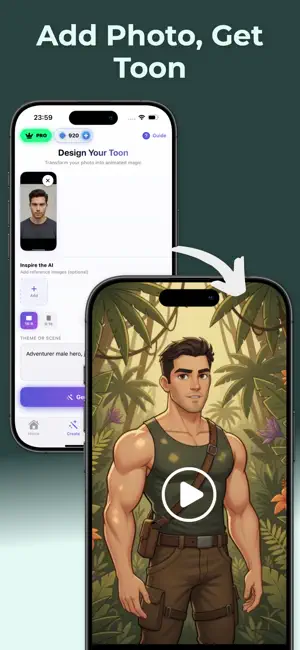
Create eye-catching videos in seconds. Cartoon Video Generator Studio is your all-in-one Video Maker & Editor for social content, featuring Photo-to-Video, Prompt-to-Video, and ready-made cartoon/anime/comic models. What you can make * Photo → Video: Animate a single photo with Face Swap, Lip Sync, and motion presets. * Prompt → Video: Type your idea (e.g., “futuristic city chase, comic style”) and get a video clip with scene, camera moves, and toon effects. * Edit like a pro: Trim, merge, add captions/subtitles, voiceover, music beat sync, filters, transitions, and stickers. * Cartoon styles: One-tap Toon/Anime/Comic looks; mix with VFX/Glitch/Film filters. * Export & share: 9:16, 1:1, 16:9; HD/4K export for Reels/Shorts/TikTok. Key features * Video Maker & Editor: timeline edit, speed (slow/velocity), keyframe basics. * Face tools: Face Swap, talking avatars with Lip Sync and Dubbing. * Text & audio: Auto Captions, subtitles, sound FX, and music beat sync. * Green Screen / Chroma Key: remove backgrounds, place yourself in any scene. * Templates: ready presets for trends; swap media and publish. * Cartoon models: curated toon/anime/comic styles for characters and scenes. How it works 1. Choose a mode: Photo-to-Video or Prompt-to-Video. 2. Select a style: Cartoon, Anime, or Comic model; add filters/effects. 3. Edit & enhance: Face Swap, Lip Sync/Dubbing, transitions, captions. 4. Export: Choose size and quality, then share to Reels/Shorts/TikTok. Perfect for Creators, brands, UGC editors, and anyone who needs fast video editing with a distinctive cartoon look—product promos, music clips, meme edits, tutorial intros, and more. Why creators choose us * Speed: Idea to publish in minutes. * Quality: Clean edges, smooth motion, crisp captions. * Control: Flexible edits + one-tap templates.Some features may require in-app purchase or a subscription. Some features may require in-app purchase or a subscription. Terms of Use - https://www.apple.com/legal/internet-services/itunes/dev/stdeula/ Privacy Policy - https://sites.google.com/view/cartoonroy/privacy-policy
Ratings & reviews
3.7
6 ratings
What’s new
Version 6.85.2 · Updated August 25, 2026
Fixed some bugs.
App privacy
The developer, Mustafa Utku Coskun, reported these privacy practices to Apple.
Data Not Collected
The developer does not collect any data from this app.
Alternatives to AI Video Generator Cartoon Roy
Looking for apps like AI Video Generator Cartoon Roy? Here are 6 similar apps on the App Store. The highest rated is Character App: AI Video Studio (5.0/5), and all 6 are free to download.
-
 AI Anime Video Maker - GenAni
4.5
-
 Character App: AI Video Studio
5.0
-
 AI Cartoon Video Maker ToonVid
3.6
-
 Visionary: AI Photo to Video
4.7
-
 AI Video Generator: Vivideo
4.6
-
 King AI • AI Video Generator
4.4
| App | Rating | Price | Last updated | Compare |
|---|---|---|---|---|
| AI Video Generator Cartoon Roy | 3.7 / 5 (6 ratings) | Free | August 25, 2026 | |
| AI Anime Video Maker - GenAni | 4.5 / 5 (22) | Free | Dec 13, 2025 | Compare |
| Character App: AI Video Studio | 5.0 / 5 (1) | Free | Oct 10, 2026 | Compare |
| AI Cartoon Video Maker ToonVid | 3.6 / 5 (87) | Free | Jul 30, 2026 | Compare |
| Visionary: AI Photo to Video | 4.7 / 5 (14) | Free | Aug 25, 2026 | Compare |
| AI Video Generator: Vivideo | 4.6 / 5 (111) | Free | Oct 13, 2026 | Compare |
| King AI • AI Video Generator | 4.4 / 5 (162) | Free | Oct 30, 2026 | Compare |