

King AI • AI Video Generator
Zeeshan Ahmed Photo & Video iPhoneiPadiPod touchMac
King AI • AI Video Generator is a free Photo & Video app for iPhone and iPad by Zeeshan Ahmed. Rated 4.4/5 from 162 ratings. Requires iOS 15.0.
- Rating
- 4.4
- 162 ratings
- Price
- Free
- on the App Store
- Size
- 172 MB
- Age 12+
- Updated
- Nov 5
- 2026 · v10.5.0
Screenshots
Save to Pinterest


About King AI • AI Video Generator
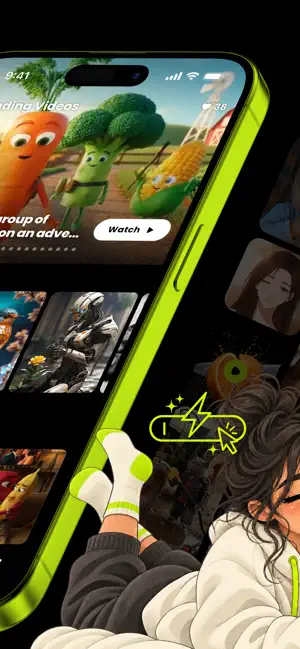
Turn any idea or photo into a video with 360+ AI models in one app. Pick the model that fits the shot, or run one idea on several models side by side and keep the best. You see the credit cost before you create. IMAGE TO VIDEO AND TEXT TO VIDEO • Animate any photo, or describe a scene and watch it become a video. • Guide the shot with start and end frames, camera moves and reference images. • Draw arrows on a photo to show where things should move. • Extend a video, edit it with supported models, and upscale it to 4K. • Not sure which model to pick? Let Auto choose one for your idea and your credits. LIP SYNC, TALKING PHOTOS AND AVATARS • Make a portrait talk with a voice you choose. • Sync the lips in a video to a new voice track. STORYBOARDS AND LONGER STORIES • Turn one idea into a storyboard of up to 8 scenes with a shared look. • Open any scene in a video or image tool when you are ready. • Train a character from your own photos for supported image models. IMAGES, ANIME AND ART • Create art, anime, portraits and illustrations from text. • Edit a photo with words, or draw on it to show what to add or take away. • Retouch an area, expand an image, remove backgrounds and upscale. • Turn a description or a picture into a vector logo, icon or illustration, saved as SVG. • Turn a description or a single picture into a 3D model, then view it in your room. MUSIC, SONGS AND SOUND • Create music and songs from a description or your own lyrics. • Add voiceovers and sound effects, or save your own voice once in My voices and use it for any script. • Describe a scene and get its voices, sounds and music in one track. 200+ VIDEO EFFECTS • One-tap video effects across 12 categories, from dance to cinematic scenes. • Put yourself, a place or a product into a photo effect. VIDEO TOOLS • Add subtitles, or cut a long video into short captioned clips. • Cut out the subject, relight or recolor a shot, and convert it to HDR. • Check whether a clip will hook viewers before you post it. ADS, POSTERS AND MOTION DESIGN • Turn a product photo, a person and a look into a ready-to-post ad or poster. • Paste an App Store link or a product page and get a 15-second promo video. • Pick a finished ad and make it again with your own product. • Design animated titles and text videos layer by layer. COMMUNITY • Share your best work, follow creators and see what is trending. • Earn badges for what you make and pin your favorites to your profile. NO PRICE SURPRISES See the credit cost before every generation. If a generation fails for a technical reason, you get the credits back automatically. Every plan includes the same 360+ models; credit costs depend on the model and settings. In most countries, your first video is on us when you create an account. Choose Basic with 50 credits a month, Pro with 150 or Max with 300. Every paid month adds bonus credits on top. Pay monthly, or pay once a year for less: a yearly plan still adds its credits every month. Need more for one project? Add a one-time credit pack, no subscription needed. Bigger packs include bonus credits. Subscriptions renew automatically at the end of each month or year, and are charged to your Apple Account. To stop the next charge, turn off auto-renew at least 24 hours before the period ends. Manage or cancel any time in your App Store account settings. ON IPHONE, IPAD, MAC AND THE WEB Your library and credit balance follow your King AI account everywhere, and the app speaks 31 languages. Share results without an added King AI watermark, organize them into collections and remix community creations. Support: https://kingaivideo.app/support Terms of Use: https://kingaivideo.app/terms Privacy Policy: https://kingaivideo.app/privacy
Ratings & reviews
4.4
162 ratings
What’s new
Version 10.5.0 · Updated November 5, 2026
MiniMax H3 Max Turbo Reference In Reference to Video, the new MiniMax H3 Max Turbo Reference model turns up to nine pictures and up to three voice clips into a video with sound, at 768p or 1080p. Mureka 9.5 In Text to Music, the new Mureka 9.5 model makes full songs with vocals, about three minutes long, from your own lyrics or from lyrics it writes for you. It can also make instrumental music. Smaller changes: the app now shows how long these two models usually take. This update also includes small fixes.
App privacy
The developer, Zeeshan Ahmed, reported these privacy practices to Apple.
Data Linked to You
The following data, which may be collected and linked to your identity, may be used for the following purposes:
- Purchases: Purchase History
- Location: Coarse Location
- Identifiers: User ID, Device ID
- Usage Data: Product Interaction
- Contact Info: Email Address, Name
- User Content: Photos or Videos, Audio Data, Other User Content
- Diagnostics: Crash Data
Used for: Analytics, App Functionality
Data Not Linked to You
The following data, which may be collected but is not linked to your identity, may be used for the following purposes:
- Diagnostics: Performance Data
Used for: App Functionality
Alternatives to King AI • AI Video Generator
Looking for apps like King AI • AI Video Generator? Here are 6 similar apps on the App Store. The highest rated is SD2 AI Video Generator (4.7/5), and all 6 are free to download.
-
 King AI: AI Video Creator
3.1
-
 AI Video Generator: Vivideo
4.6
-
 SD2 AI Video Generator
4.7
-
 Vero 3 – AI Video Generator
4.1
-
 Flow AI 2.0 - Video Maker
2.7
-
 Hey AI: AI Video Generator
4.3
| App | Rating | Price | Last updated | Compare |
|---|---|---|---|---|
| King AI • AI Video Generator | 4.4 / 5 (162 ratings) | Free | November 5, 2026 | |
| King AI: AI Video Creator | 3.1 / 5 (385) | Free | May 12, 2025 | Compare |
| AI Video Generator: Vivideo | 4.6 / 5 (111) | Free | Oct 13, 2026 | Compare |
| SD2 AI Video Generator | 4.7 / 5 (191) | Free | Oct 22, 2026 | Compare |
| Vero 3 – AI Video Generator | 4.1 / 5 (670) | Free | Aug 9, 2026 | Compare |
| Flow AI 2.0 - Video Maker | 2.7 / 5 (15) | Free | Oct 15, 2026 | Compare |
| Hey AI: AI Video Generator | 4.3 / 5 (366) | Free | Nov 4, 2026 | Compare |