

PDF Converter For Adobe PDF.
Basit Naeem Productivity iPhoneiPadiPod touch
PDF Converter For Adobe PDF. is a free Productivity app for iPhone and iPad by Basit Naeem. Rated 4.4/5 from 5 ratings. Requires iOS 13.0.
- Rating
- 4.4
- 5 ratings
- Price
- Free
- on the App Store
- Size
- 53 MB
- Age 12+
- Updated
- Aug 8
- 2026 · v1.9
Screenshots


About PDF Converter For Adobe PDF.
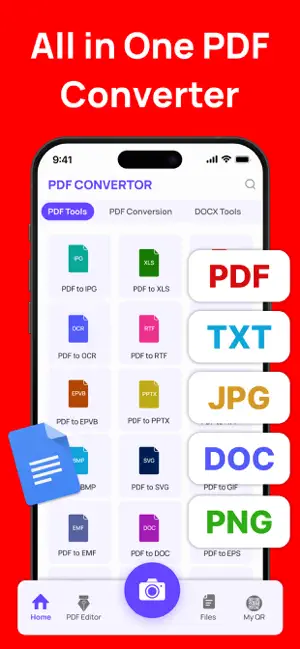
PDF Converter – The Smarter Way to Manage Your Documents Effortlessly convert, edit, and organize your files with PDF Converter, the ultimate all-in-one PDF solution designed to make document management simple, fast, and reliable. Whether you’re a student, professional, or business owner, PDF Converter gives you the power to handle your documents anytime, anywhere with unmatched flexibility and precision. With a clean and intuitive interface, PDF Converter makes it easy to convert Word, Excel, PowerPoint, Images, and more into high-quality PDFs in just seconds. You can also convert PDFs back into editable formats without losing layout, fonts, or formatting accuracy. PDF Converter goes beyond basic conversions — it’s a complete document powerhouse. Merge multiple PDFs into one seamless file, compress large documents without compromising quality, or split PDFs into smaller sections for easier sharing and storage. Built with smart compression and OCR (Optical Character Recognition) technology, PDFFlex ensures your scanned documents remain sharp, searchable, and professional-looking. Your privacy and security come first. PDFFlex uses advanced encryption to protect your data and ensures that your files are automatically deleted from the cloud after processing, giving you full control and peace of mind. Key Features: Convert Instantly: Transform Word, Excel, PowerPoint, images (JPG, PNG), and more into PDFs or back again. Merge & Split: Combine multiple files into one PDF or split large files into smaller parts with ease. Compress PDFs: Reduce file size while maintaining crystal-clear quality. Edit with Ease: Add text, images, annotations, and e-signatures to your PDF documents. OCR Technology: Convert scanned images into editable and searchable PDFs. Cloud Integration: Sync files securely with Drive, Dropbox, or OneDrive. Data Security: All conversions are encrypted and automatically deleted after use. Note: Payment will be charged to your iTunes account at confirmation of purchase. Your subscription will automatically renew unless auto-renew is turned off at least 24-hours before the end of the current subscription period. Your account will be charged for renewal within 24-hours prior to the end of the current subscription period. Automatic renewals will cost the same price you were originally charged for the subscription. You can manage your subscriptions and turn off auto-renewal by going to your Account Settings on the App Store after purchase. Read our terms of service and Privacy Policy for more information. Terms of Service: https://sites.google.com/view/aamirmushtaq/home Privacy Policy: https://sites.google.com/view/privacy-policyaamirmushtaq?usp=sharing
Ratings & reviews
4.4
5 ratings
What’s new
Version 1.9 · Updated August 8, 2026
- Minor fixes and overall enhancements
App privacy
The developer, Basit Naeem, reported these privacy practices to Apple.
Data Not Collected
The developer does not collect any data from this app.
Alternatives to PDF Converter For Adobe PDF.
Looking for apps like PDF Converter For Adobe PDF.? Here are 6 similar apps on the App Store. The highest rated is PDF Converter : PDF To Word • (5.0/5), and all 6 are free to download.
-
 PDF Converter : PDF To Word •
5.0
-
 PDF Editor - Read, Fill & Edit
4.8
-
 FreePDF: PDF Converter & Scan
4.5
-
 PDF Converter : Picture to PDF
5.0
-
 PDF Converter: Maker & Scanner
4.8
-
 PDF Reader: Convert & Edit
4.8
| App | Rating | Price | Last updated | Compare |
|---|---|---|---|---|
| PDF Converter For Adobe PDF. | 4.4 / 5 (5 ratings) | Free | August 8, 2026 | |
| PDF Converter : PDF To Word • | 5.0 / 5 (1) | Free | Sep 14, 2026 | Compare |
| PDF Editor - Read, Fill & Edit | 4.8 / 5 (8) | Free | Aug 10, 2026 | Compare |
| FreePDF: PDF Converter & Scan | 4.5 / 5 (17) | Free | Oct 15, 2026 | Compare |
| PDF Converter : Picture to PDF | 5.0 / 5 (1) | Free | Sep 15, 2026 | Compare |
| PDF Converter: Maker & Scanner | 4.8 / 5 (5) | Free | Sep 28, 2026 | Compare |
| PDF Reader: Convert & Edit | 4.8 / 5 (4) | Free | Jan 5, 2026 | Compare |