

FreePDF: PDF Converter & Scan
Kubilay Oskan Productivity iPhoneiPadiPod touch
FreePDF: PDF Converter & Scan is a free Productivity app for iPhone and iPad by Kubilay Oskan. Rated 4.5/5 from 13 ratings. Requires iOS 15.1.
- Rating
- 4.5
- 13 ratings
- Price
- Free
- on the App Store
- Size
- 79 MB
- Age 4+
- Updated
- Oct 15
- 2026 · v1.0.8
Screenshots

About FreePDF: PDF Converter & Scan
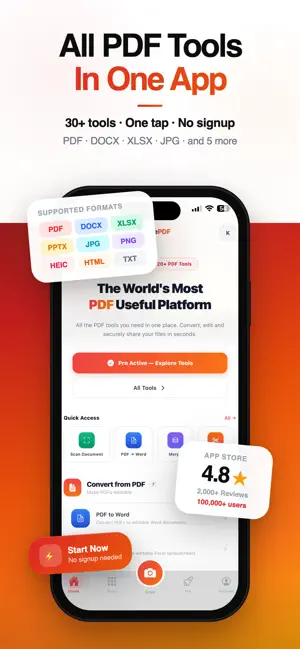
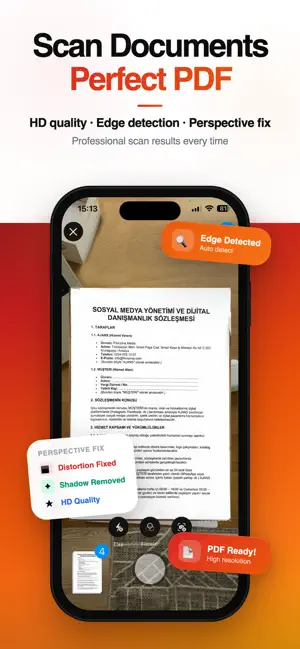
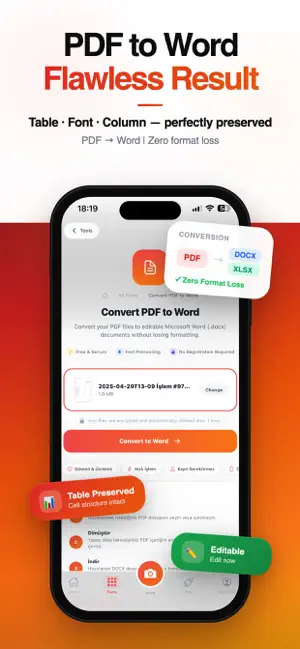
PDF Tools & Scanner gives you 20+ PDF tools and a native iOS document scanner — all in one app. Convert, edit, organize and scan PDF documents right from your iPhone. Convert from PDF • PDF to Word — preserves tables and formatting for instant editing • PDF to Excel — smart column detection exports data accurately • PDF to PowerPoint — convert slides into editable presentations • PDF to JPG or PNG — turn each page into a high-quality image • PDF to Text — extract all readable text as plain .txt • PDF to HTML — convert to web-ready HTML format Convert to PDF • Word, Excel, PowerPoint, Html→ PDF • Photos and images → PDF Edit PDF — • Merge: Combine multiple PDFs into one, drag to reorder • Split: Select specific pages to extract or separate • Rotate: Fix sideways or upside-down pages (90°/180°/270°) • Delete Pages: Visual page grid to remove unwanted pages • Add Page Numbers: Choose position, style and starting number • Watermark: Add text or image watermarks • PDF Info: View page count, file size and metadata Document Scanner Scan paper documents with your iPhone camera. Auto-detects document edges, corrects perspective and saves as PDF. Digitize receipts, contracts, notes, IDs and more. Basic Plan: 10 jobs/day · 100 MB file size · Ads shown Pro Plan: Unlimited jobs · 1 GB file size · PDF to Excel/PPT/HTML · Priority support Terms of Use: https://www.apple.com/legal/internet-services/itunes/dev/stdeula/ Privacy Policy: https://freepdf.co/privacy
Ratings & reviews
4.5
13 ratings
What’s new
Version 1.0.8 · Updated October 15, 2026
Scan documents and convert PDF to Word, Excel, PowerPoint and JPG. Turn photos, Word and Excel files into PDF. Merge, split and compress PDFs, rotate and delete pages, add page numbers, and use OCR to turn scanned text into editable text – all in one app. New in this version: • New show/hide button on password fields • Stability and performance improvements
App privacy
The developer, Kubilay Oskan, reported these privacy practices to Apple.
Data Used to Track You
The following data may be used to track you across apps and websites owned by other companies:
- Location: Coarse Location
- Identifiers: Device ID
- Usage Data: Product Interaction, Advertising Data
Data Linked to You
The following data, which may be collected and linked to your identity, may be used for the following purposes:
- Contact Info: Email Address, Name
- Identifiers: User ID
- Diagnostics: Crash Data
Used for: App Functionality
Data Not Linked to You
The following data, which may be collected but is not linked to your identity, may be used for the following purposes:
- Location: Coarse Location
- Identifiers: Device ID
- Usage Data: Product Interaction, Advertising Data
- Diagnostics: Performance Data
Used for: Third-Party Advertising
Alternatives to FreePDF: PDF Converter & Scan
Looking for apps like FreePDF: PDF Converter & Scan? Here are 6 similar apps on the App Store. The highest rated is PDF Converter : PDF To Word • (5.0/5), and all 6 are free to download.
-
 PDF Converter : PDF To Word •
5.0
PDF Converter : PDF To Word •
5.0
-
 Scanner • PDF Document Scanner
3.7
Scanner • PDF Document Scanner
3.7
-
 DocScanner: PDF Scan
4.7
DocScanner: PDF Scan
4.7
-
 PDF Converter For Adobe PDF.
4.4
PDF Converter For Adobe PDF.
4.4
-
 PDF Editor: Fill & Sign Forms
-
 PDF Reader: Convert & Edit
4.8
PDF Reader: Convert & Edit
4.8
| App | Rating | Price | Last updated | Compare |
|---|---|---|---|---|
| FreePDF: PDF Converter & Scan | 4.5 / 5 (13 ratings) | Free | October 15, 2026 | |
| PDF Converter : PDF To Word • | 5.0 / 5 (1) | Free | Sep 14, 2026 | Compare |
| Scanner • PDF Document Scanner | 3.7 / 5 (3) | Free | Jan 26, 2026 | Compare |
| DocScanner: PDF Scan | 4.7 / 5 (47) | Free | Sep 17, 2026 | Compare |
| PDF Converter For Adobe PDF. | 4.4 / 5 (5) | Free | Aug 8, 2026 | Compare |
| PDF Editor: Fill & Sign Forms | – | Free | Sep 25, 2026 | Compare |
| PDF Reader: Convert & Edit | 4.8 / 5 (4) | Free | Jan 5, 2026 | Compare |