

Vibepad
Saturn Studio Productivity iPhoneiPadiPod touch
Vibepad is a free Productivity app for iPhone and iPad by Saturn Studio. Requires iOS 15.0. Updated October 2, 2026.
- Price
- Free
- on the App Store
- Size
- 34 MB
- Age 4+
- Updated
- Oct 2
- 2026 · v0.7.0
Screenshots


About Vibepad
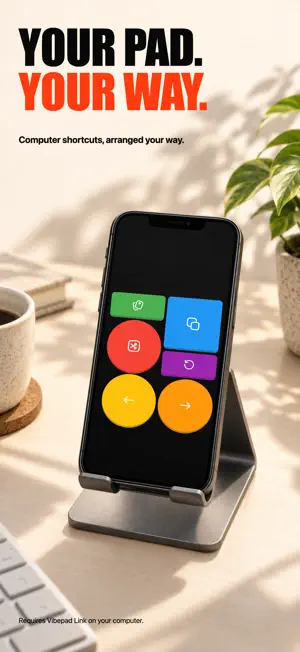
Your phone is already on your desk. Make it the one-tap control deck for the work happening on your computer. Vibepad turns your iPhone into a customizable Bluetooth macro pad for your computer. Build buttons for AI coding-agent workflows, terminal commands, editing shortcuts, reusable text, and everyday desktop controls—without adding another device to your desk. One tap for repetitive workflows Map the same keyboard actions your tools already accept. Create buttons for approval, cancel, navigation, test commands, reusable prompts, and repeatable routines. Vibepad controls the desktop through the shortcuts and text you configure; it does not require a direct integration with any specific app. Customize every control - Keyboard shortcuts and hotkeys - Reusable text snippets - Multi-step sequences combining shortcuts, text, and delays - App-aware layouts that switch with the active desktop app - Drag-and-drop editing with flexible sizes, shapes, colors, and 1,000+ icons - Portrait and landscape configurations Work your way Create multiple layouts for coding, editing, meetings, or everyday shortcuts. Duplicate, import, and export configurations as JSON, or use the web Pad Builder when you want more room to design. Direct Bluetooth, clear setup 1. Install Vibepad on your iPhone. 2. Install the Vibepad Link companion app on your computer. 3. Pair over Bluetooth Low Energy and start controlling your computer. Core controls travel directly over Bluetooth, so they do not need Wi-Fi or a cloud account after setup. The lightweight desktop companion is required and runs in the background. Optional voice input Add a Microphone button to use your phone as a wireless microphone for your computer's dictation app. Audio travels over Bluetooth to the desktop companion, which provides the Vibepad Mic input, and your dictation app turns speech into text. No API key is needed, and Vibepad does not save or upload the audio. Requires Vibepad Link 0.3.0 or later for Mac and the Vibepad Mic driver installed from the helper. Bluetooth microphone is not yet supported on Windows. Tap to start and stop, or hold to talk; optionally trigger your dictation app’s shortcut. Keep Vibepad open while speaking. Your dictation app’s settings determine whether transcription runs locally or in the cloud. Prefer to transcribe on your phone? A Speech-to-Text button turns speech into text and sends it to your computer. It requires your own OpenAI API key and an internet connection. Your key is stored only on your device. Build the controls that fit your workflow, then keep them one tap away on the phone you already own.
What’s new
Version 0.7.0 · Updated October 2, 2026
New Bluetooth microphone for Mac: use your phone with your Mac’s dictation app. Tap to start and stop, or hold to talk. Requires Vibepad Link 0.3.0+ for Mac and Vibepad Mic; Windows microphone is not yet supported. Mac Claude Code and Cursor presets now include a microphone button. API Speech-to-Text buttons keep working as before. Improved Bluetooth pairing and reconnection, plus clearer key names in the editor.
App privacy
The developer, Saturn Studio, reported these privacy practices to Apple.
Data Used to Track You
The following data may be used to track you across apps and websites owned by other companies:
- Identifiers: Device ID
Data Not Linked to You
The following data, which may be collected but is not linked to your identity, may be used for the following purposes:
- Usage Data: Product Interaction
- Diagnostics: Crash Data
Used for: Analytics
Alternatives to Vibepad
Looking for apps like Vibepad? Here are 6 similar apps on the App Store. The highest rated is DUD3P0: Research Draiyod (5.0/5), and 5 of the 6 are free to download.
-
 Overdeck
-
 Unyx
Unyx
-
 Deckboard PRO: Macropad for PC
3.0
Deckboard PRO: Macropad for PC
3.0
-
 MemoAmmo
-
 Gfacility - Kiosk
-
 DUD3P0: Research Draiyod
5.0
DUD3P0: Research Draiyod
5.0
| App | Rating | Price | Last updated | Compare |
|---|---|---|---|---|
| Vibepad | – | Free | October 2, 2026 | |
| Overdeck | – | Free | Sep 4, 2024 | Compare |
| Unyx | – | Free | Sep 19, 2026 | Compare |
| Deckboard PRO: Macropad for PC | 3.0 / 5 (4) | 4.99 USD | Dec 31, 2025 | Compare |
| MemoAmmo | – | Free | Oct 7, 2026 | Compare |
| Gfacility - Kiosk | – | Free | Oct 25, 2026 | Compare |
| DUD3P0: Research Draiyod | 5.0 / 5 (2) | Free | Oct 27, 2026 | Compare |
Compare Vibepad with the top alternatives: ratings, updates, ASO score and keyword gaps →