

Unyx
Divya Prakash Productivity iPhoneiPadiPod touchMac
Unyx is a free Productivity app for iPhone and iPad by Divya Prakash. Requires iOS 17.6. Updated September 19, 2026.
- Price
- Free
- on the App Store
- Size
- 14 MB
- Age 4+
- Updated
- Sep 19
- 2026 · v0.1.8
Screenshots

About Unyx
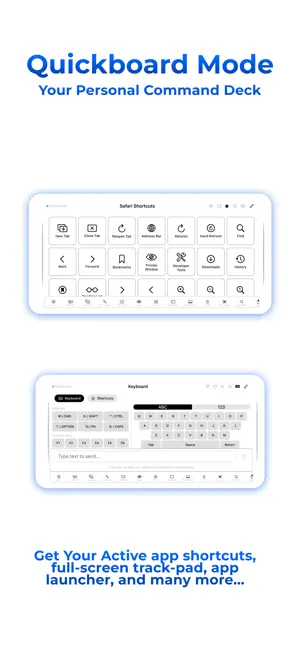
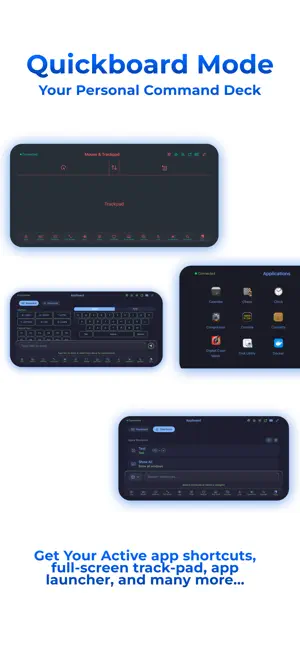
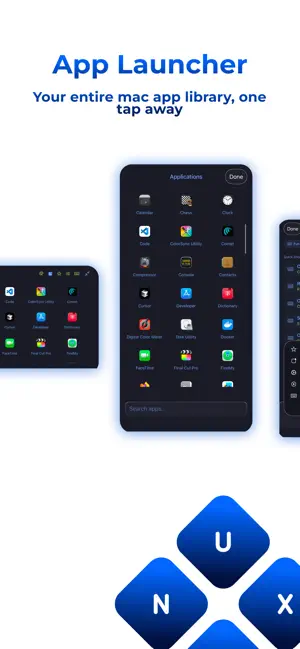
Unyx - The Most Adaptive Productivity Companion for Mac Transform your iPhone into the ultimate Mac remote control. Unyx delivers fastest, seamless, professional-grade control of your Mac from anywhere in your home or office with an intuitive, feature-rich interface. Basic Features:- Free, Forever * Get started with essential Mac control - no subscription required: * Trackpad & Mouse Control - Smooth cursor movement, clicking, and scrolling * Media Controls - Play, pause, adjust volume, and control playback * Basic Text Input - Quick text typing for simple tasks * Spotlight Search - Instant access to Mac's Spotlight * Navigation Controls - Arrow keys for easy navigation * Quickboard Mode:- Landscape mode automatically activates an enhanced control interface optimized for two-handed operation. * Quick Access Bar (Limited) - All your immediate needs, just a tap away. * Localization Support - Now available in multiple regional languages - Advanced Keyboard (Limited Combinations) * Full keyboard with Function keys (F1-F12) * Modifier keys (Command, Control, Option, Shift) * Symbol keyboard with special characters Unyx Pro:- Upgrade to Pro for complete Mac control: - Advanced Keyboard * Full keyboard with Function keys (F1-F12) * Modifier keys (Command, Control, Option, Shift) * Symbol keyboard with special characters * Custom keyboard shortcuts - Smart Shortcuts * App-specific shortcut collections - Pre-configured app shortcuts for professional software for over 50+ apps and 20+ categories, Unable to find shortcuts you were looking for, u can create it * Quick Access Bar (Complete Access) * Create unlimited custom shortcuts - Create unlimited and all kinds of custom shortcuts, the system-level ones or the specific app shortcuts * Auto-detection adapts to your active Mac app * Arrange the shortcuts, wherever you want to place it, so your actions are always where you want * QuickBoard mode - Best possible way to browse and access all your favorite apps and their custom shortcuts - Professional Tools * Application Launcher - Quick access to Mac apps * Screenshot capture * Lock Screen control * Customizable trackpad sensitivity - Personalization * Unlimited custom themes - Create your own custom themes, buttons, colors, exactly the way you love it * Theme library with pre-designed options - Select from 50+ pre-designed themes, all available to customize the way you love it * Customizable QuickBoard - Rearrange the order of your QuickBoard to match your workflow. * Side Tab Scroller for QuickBoard - Fastest possible switching between UIs from any side * Always on Portrait Mode * Advanced quick actions And many more… PRIVACY & SECURITY Your privacy matters. Terms of Use (EULA): https://www.apple.com/legal/internet-services/itunes/dev/stdeula/ Privacy Policy: https://bit.ly/unyx-privacy-policy
What’s new
Version 0.1.8 · Updated September 19, 2026
- New Themes - Custom Device Names - Improved Connectivity - Smart Device Management
App privacy
The developer, Divya Prakash, reported these privacy practices to Apple.
Data Used to Track You
The following data may be used to track you across apps and websites owned by other companies:
- Usage Data: Advertising Data
Data Linked to You
The following data, which may be collected and linked to your identity, may be used for the following purposes:
- Contact Info: Name
Used for: Analytics
Data Not Linked to You
The following data, which may be collected but is not linked to your identity, may be used for the following purposes:
- Usage Data: Product Interaction, Advertising Data, Other Usage Data
Used for: Third-Party Advertising, Analytics
Alternatives to Unyx
Looking for apps like Unyx? Here are 6 similar apps on the App Store. The highest rated is BoltPDF: Fill, Sign & Edit PDF (4.5/5), and all 6 are free to download.
-
 Intervener
-
 ESS Online
-
 BoltPDF: Fill, Sign & Edit PDF
4.5
BoltPDF: Fill, Sign & Edit PDF
4.5
-
 Builder for Google Forms
-
 JustDoneLog
1.0
JustDoneLog
1.0
-
 VMouse - VNC Remote Mouse
4.2
VMouse - VNC Remote Mouse
4.2
| App | Rating | Price | Last updated | Compare |
|---|---|---|---|---|
| Unyx | – | Free | September 19, 2026 | |
| Intervener | – | Free | Jan 11, 2026 | Compare |
| ESS Online | – | Free | Aug 8, 2026 | Compare |
| BoltPDF: Fill, Sign & Edit PDF | 4.5 / 5 (25) | Free | Mar 11, 2026 | Compare |
| Builder for Google Forms | – | Free | Feb 5, 2026 | Compare |
| JustDoneLog | 1.0 / 5 (1) | Free | Jul 12, 2025 | Compare |
| VMouse - VNC Remote Mouse | 4.2 / 5 (39) | Free | Oct 22, 2026 | Compare |
Compare Unyx with the top alternatives: ratings, updates, ASO score and keyword gaps →