

Magic Pen - Draw and Animate
Kareem Dasilva Graphics & Design iPad
Magic Pen - Draw and Animate is a free Graphics & Design app for iPad by Kareem Dasilva. Rated 5.0/5 from 2 ratings. Requires iOS 17.6.
- Rating
- 5.0
- 2 ratings
- Price
- Free
- on the App Store
- Size
- 19 MB
- Age 4+
- Updated
- Oct 7
- 2025 · v1.2
Screenshots
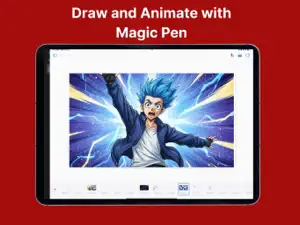
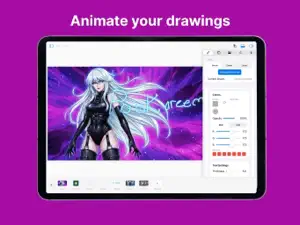


About Magic Pen - Draw and Animate
Welcome to Magic Pen, the place where anyone can make art. You don’t need to be an artist to use it. If you’ve ever looked at a blank page and had no idea where to start, Magic Pen is built for you. It’s the easiest way to turn ideas in your head into drawings, designs, and stories you can actually see. Start with a blank canvas and just draw. Scribble, sketch, paint, or doodle whatever comes to mind. The tools are simple and forgiving, so you don’t need years of experience to make something cool. It feels natural, like sketching in a notebook, but with digital brushes, layers, and colors that make your work look polished. Made a mistake? No problem. Fix it instantly with tools that help you clean up lines, fill in details, or rework parts of your art without starting over. You’ll stay in the flow and keep creating instead of getting frustrated and quitting. Rough doodles become real art here. Even the messiest sketch can turn into a finished piece with a little time and a few tools. Draw something basic and then add more detail step by step until it becomes the picture you imagined. It’s perfect for people who have ideas but aren’t great at drawing yet. Use Magic Pen to plan storyboards or make comic panels. You can lay out scenes, add characters, and build stories visually, even if you’re not confident with your drawing skills. It’s a fun way to bring stories and ideas to life without getting stuck on the details. Edit photos and change backgrounds to match your vision. Add hand drawn touches to pictures, combine real images with sketches, or build unique posts for social media. It’s simple and fun, and you’ll be surprised how creative you can get once you start experimenting. Design characters from scratch without stress. Play with outfits, poses, and expressions until you land on something that feels right. Whether it’s for a story, a comic, a game, or just for fun, Magic Pen gives you the freedom to explore and create without pressure. Magic Pen is made for people who want to make art but think they can’t. It’s for beginners, hobbyists, storytellers, and anyone who wants to express themselves in a creative way. You don’t need training or fancy skills. All you need is curiosity, a bit of imagination, and the willingness to try. Once you start using Magic Pen, you’ll see that making art is less about talent and more about play. You’ll get better without even noticing. You’ll finish drawings you’re proud of. And most importantly, you’ll have fun doing it. Open the app, grab your stylus or just use your finger, and start drawing. Magic Pen will handle the hard parts so you can focus on the fun part: creating something that’s yours.
What’s new
Version 1.2 · Updated October 7, 2025
Added Inpainting
App privacy
The developer, Kareem Dasilva, reported these privacy practices to Apple.
Data Not Linked to You
The following data, which may be collected but is not linked to your identity, may be used for the following purposes:
- Contact Info: Email Address
- Identifiers: User ID
- Usage Data: Product Interaction
- Diagnostics: Crash Data, Performance Data
Used for: App Functionality
Alternatives to Magic Pen - Draw and Animate
Looking for apps like Magic Pen - Draw and Animate? Here are 6 similar apps on the App Store. The highest rated is GlyphSnap: Photo to Font (5.0/5), and all 6 are free to download.
-
 GlyphSnap: Photo to Font
5.0
GlyphSnap: Photo to Font
5.0
-
 FontMaker: Make Your Own Font
5.0
FontMaker: Make Your Own Font
5.0
-
 KaleidoCanvas
-
 KaleidoPen - Spin Symmetry Art
-
 Fontise: Font Maker & Keyboard
5.0
Fontise: Font Maker & Keyboard
5.0
-
 Font Creator Studio
5.0
Font Creator Studio
5.0
| App | Rating | Price | Last updated | Compare |
|---|---|---|---|---|
| Magic Pen - Draw and Animate | 5.0 / 5 (2 ratings) | Free | October 7, 2025 | |
| GlyphSnap: Photo to Font | 5.0 / 5 (2) | Free | Oct 18, 2026 | Compare |
| FontMaker: Make Your Own Font | 5.0 / 5 (1) | Free | Oct 26, 2026 | Compare |
| KaleidoCanvas | – | Free | Aug 30, 2026 | Compare |
| KaleidoPen - Spin Symmetry Art | – | Free | Oct 17, 2026 | Compare |
| Fontise: Font Maker & Keyboard | 5.0 / 5 (1) | Free | Oct 22, 2026 | Compare |
| Font Creator Studio | 5.0 / 5 (2) | Free | Sep 22, 2026 | Compare |