

Photo Pdf Converter – SnapOwl
Alexej Plate Productivity iPhoneiPadiPod touch
Photo Pdf Converter – SnapOwl is a free Productivity app for iPhone and iPad by Alexej Plate. Requires iOS 18.2. Updated August 21, 2025.
- Price
- Free
- on the App Store
- Size
- 4 MB
- Age 4+
- Updated
- Aug 21
- 2025 · v1.0
Screenshots

About Photo Pdf Converter – SnapOwl
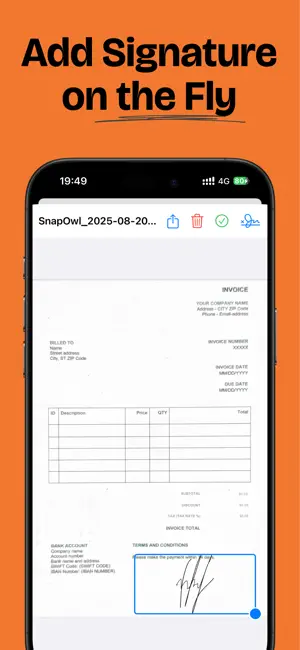
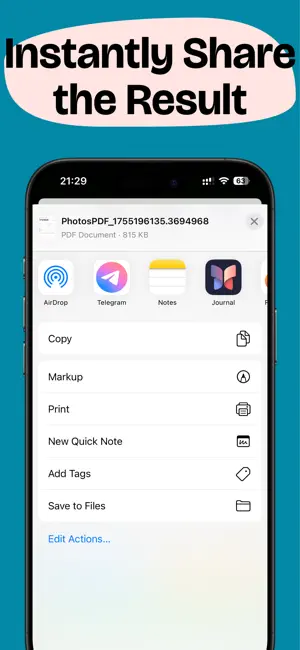
SnapOwl makes it simple to turn your photos and documents into professional PDFs in seconds. Whether you need to scan receipts, save notes, or sign important papers, SnapOwl has you covered. Key Features: • Camera Scanner – Capture documents, receipts, notes, or whiteboards with your camera and instantly convert them into high-quality PDFs. • PDF Converter – Select photos from your gallery and combine them into a single, shareable PDF file. • Add Signatures – Easily sign documents right on your device. No need to print or scan again. • Organize & Share – Keep your files tidy and send them quickly via email, messaging apps, or cloud storage. Why SnapOwl? • Fast and easy to use – convert in just a few taps. • Perfect for students, freelancers, and professionals. • All your documents stored neatly in PDF format. Turn your phone into a pocket PDF studio. With SnapOwl, you can scan, convert, sign, and share anytime, anywhere.
App privacy
The developer, Alexej Plate, reported these privacy practices to Apple.
Data Not Collected
The developer does not collect any data from this app.
Alternatives to Photo Pdf Converter – SnapOwl
Looking for apps like Photo Pdf Converter – SnapOwl? Here are 6 similar apps on the App Store. The highest rated is Calendar Vision (5.0/5), and all 6 are free to download.
-
 Calendar Vision
5.0
-
 Photo PDF Converter App
5.0
-
 AI Podcast Creator PodcastDog
3.1
-
 CloudConvert
4.0
-
 PDF Compress - Reduce PDF Size
3.0
-
 Cover Letter Ai & Resume Maker
5.0
| App | Rating | Price | Last updated | Compare |
|---|---|---|---|---|
| Photo Pdf Converter – SnapOwl | – | Free | August 21, 2025 | |
| Calendar Vision | 5.0 / 5 (3) | Free | Oct 16, 2026 | Compare |
| Photo PDF Converter App | 5.0 / 5 (7) | Free | May 20, 2025 | Compare |
| AI Podcast Creator PodcastDog | 3.1 / 5 (18) | Free | Oct 27, 2024 | Compare |
| CloudConvert | 4.0 / 5 (93) | Free | Sep 21, 2026 | Compare |
| PDF Compress - Reduce PDF Size | 3.0 / 5 (2) | Free | Dec 23, 2024 | Compare |
| Cover Letter Ai & Resume Maker | 5.0 / 5 (9) | Free | Sep 1, 2026 | Compare |