

Calendar Vision
Rowhome Labs LLC Productivity iPhoneiPadiPod touch
Calendar Vision is a free Productivity app for iPhone and iPad by Rowhome Labs LLC. Rated 5.0/5 from 3 ratings. Requires iOS 17.5. Updated October 24, 2026.
- Rating
- 5.0
- 3 ratings
- Price
- Free
- on the App Store
- Size
- 16 MB
- Age 4+
- Updated
- Oct 24
- 2026 · v1.21
Screenshots



About Calendar Vision
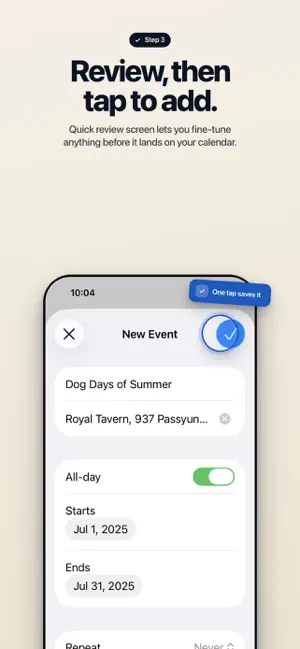
Snap a photo of a flyer. Forward an event email. Paste a link. Calendar Vision uses AI to read the details and create a ready-to-save calendar event — title, time, location, and repeating schedule included. No typing. No editing. Just tap Add. Works on anything with event information: • Photos of flyers, posters, mailers, and printed calendars • Screenshots from Instagram, Facebook, or anywhere else • Forwarded event invitation and newsletter emails • Eventbrite, Meetup, and other web page URLs Smarter than iOS Photos built-in extraction: iOS Photos sees a time on a flyer and creates a blank, unnamed event. Calendar Vision reads the flyer the way you would — it finds the event name, picks up the venue address, and recognizes when something repeats every week. You get a complete event that's ready to save with one tap, not a half-finished draft you still have to fill in yourself. Syncs with every calendar app you already use: Add events directly to Apple Calendar or Google Calendar, or subscribe to your personal Calendar Vision feed from any app that supports iCal — Fantastical, Outlook, Calendars 5, and more. Key features: • AI extracts event name, date, time, location, and description automatically • Detects recurring schedules — weekly, monthly, and more • Forward emails to your personal Calendar Vision address for instant extraction • Paste a web page URL to pull events from Eventbrite, Meetup, and similar sites • iCal feed subscription keeps all your calendars in sync automatically • Works with Apple Calendar, Google Calendar, and any iCal-compatible app • Start free — no account required to try Free plan: 5 free extractions to try every feature. Pro: Unlimited extractions for $3.99/year or a one-time $9.99 lifetime purchase. Download free and turn your first photo into a calendar event in under a minute. Terms of Service: https://calendarvision.app/terms
What’s new
Version 1.21 · Updated October 24, 2026
Updated welcome screen
App privacy
The developer, Rowhome Labs LLC, reported these privacy practices to Apple.
Data Linked to You
The following data, which may be collected and linked to your identity, may be used for the following purposes:
- Usage Data: Product Interaction
- Contact Info: Email Address, Name
- User Content: Emails or Text Messages, Photos or Videos
- Diagnostics: Crash Data, Performance Data, Other Diagnostic Data
Used for: Analytics, App Functionality
Alternatives to Calendar Vision
Looking for apps like Calendar Vision? Here are 6 similar apps on the App Store.


| App | Rating | Price | Last updated | Compare |
|---|---|---|---|---|
| Calendar Vision | 5.0 / 5 (3 ratings) | Free | October 24, 2026 | |
| ClipCal | – | Free | Mar 24, 2026 | Compare |
| Screenshots to Calendar | – | Free | Oct 17, 2026 | Compare |
| MoProblems | – | Free | Jul 6, 2025 | Compare |
| Shared Calendar - Loop | – | Free | Jun 4, 2026 | Compare |
| Lakewood Tower | – | Free | May 13, 2025 | Compare |
| Mimi Calendar | – | Free | May 31, 2026 | Compare |
Compare Calendar Vision with the top alternatives: ratings, updates, ASO score and keyword gaps →