

CloudConvert
Lunaweb GmbH Productivity iPhoneiPadiPod touch
CloudConvert is a free Productivity app for iPhone and iPad by Lunaweb GmbH. Rated 3.9/5 from 82 ratings. Requires iOS 18.0. Updated September 21, 2026.
- Rating
- 3.9
- 82 ratings
- Price
- Free
- on the App Store
- Size
- 20 MB
- Age 4+
- Updated
- Sep 21
- 2026 · v2.0.2
Screenshots

About CloudConvert
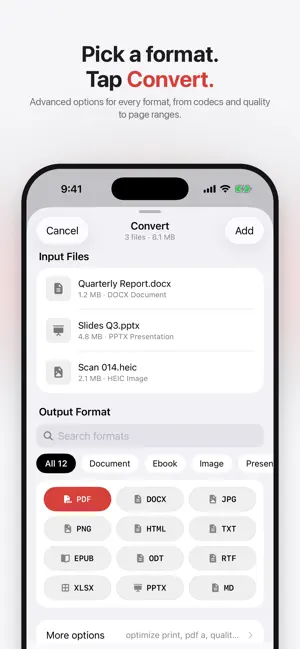
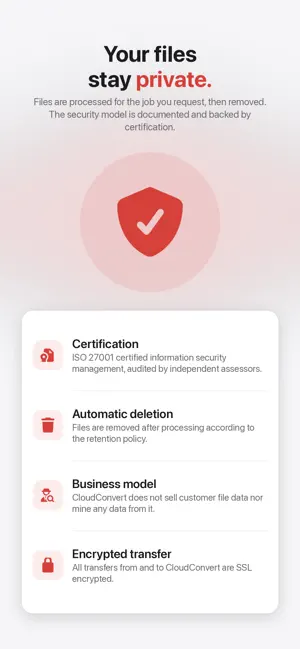
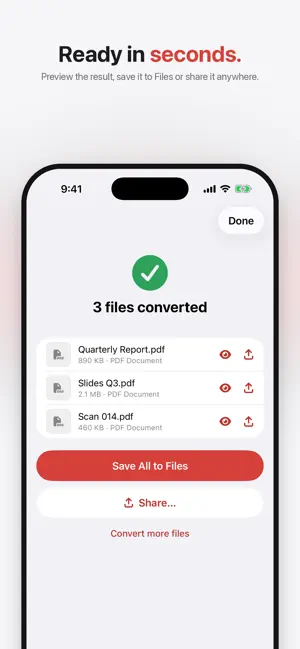
CloudConvert is the file conversion utility for iPhone and iPad. Version 2.0 has been rebuilt from the ground up as a native app and gives you five tools in one place: CONVERT Convert files between more than 200 formats: - documents (PDF, DOC, DOCX, ODT, RTF, TXT, HTML, ...) - images (PNG, JPG, HEIC, SVG, WEBP, TIFF, RAW, ...) - videos (MP4, MOV, MKV, AVI, WEBM, GIF, ...) - audio (MP3, AAC, M4A, FLAC, WAV, OGG, ...) - ebooks (EPUB, MOBI, AZW3, ...) - archives (ZIP, RAR, 7Z, TAR, ...) - spreadsheets (XLS, XLSX, ODS, CSV, ...) - presentations (PPT, PPTX, ODP, ...) CAPTURE WEBSITE Turn any web page into a PDF, PNG or JPG. Share a link from Safari straight into the app. COMPRESS Shrink PDFs, images and videos while keeping them looking good. MERGE TO PDF Combine multiple PDFs, images and documents into a single PDF. PDF/A Convert PDFs into the PDF/A format for long-term archiving. More features: - Advanced options for every format: codecs, quality, resolution, page ranges and much more - Pick files from Files, Photos or any other app via the share sheet - Live progress and a notification when your file is ready - Job history to find and download previous results - Siri and Shortcuts support for all tools, so you can automate your conversions - Designed for iOS 18 with full iPad support FREE TO USE No account is required. You can convert up to 10 files per day for free. CloudConvert customers can sign in with their account to use their existing plan without a daily limit. The conversions are done by the CloudConvert service (https://cloudconvert.com). Your files are transferred securely, processed on our servers and deleted automatically once you have downloaded the result. If you have any issues or feedback, contact us at https://cloudconvert.com/contact. Thank you!
Ratings & reviews
3.9
82 ratings
What’s new
Version 2.0.2 · Updated September 21, 2026
• See thumbnails of your converted files and tap a file to preview it • Simpler conversion options with sliders and presets • New "Contact Support" button in the Account tab • Clearer messages when a free conversion hits a limit • Fixed a crash when deleting several jobs quickly • Other small improvements
App privacy
The developer, Lunaweb GmbH, reported these privacy practices to Apple.
Data Not Collected
The developer does not collect any data from this app.
Alternatives to CloudConvert
Looking for apps like CloudConvert? Here are 6 similar apps on the App Store. The highest rated is Grok Bot (4.9/5), and all 6 are free to download.
-
 Cloud convert ™
1.0
Cloud convert ™
1.0
-
 Audio Converter: MP3, WAV, OGG
4.6
Audio Converter: MP3, WAV, OGG
4.6
-
 MP4 Maker - Convert to MP4
4.6
MP4 Maker - Convert to MP4
4.6
-
 Proton Drive: Cloud Storage
4.1
Proton Drive: Cloud Storage
4.1
-
 Grok Bot
4.9
Grok Bot
4.9
-
 CraftNote: Smart AI Note Taker
4.7
CraftNote: Smart AI Note Taker
4.7
| App | Rating | Price | Last updated | Compare |
|---|---|---|---|---|
| CloudConvert | 3.9 / 5 (82 ratings) | Free | September 21, 2026 | |
| Cloud convert ™ | 1.0 / 5 (2) | Free | Aug 18, 2026 | Compare |
| Audio Converter: MP3, WAV, OGG | 4.6 / 5 (463) | Free | Sep 28, 2026 | Compare |
| MP4 Maker - Convert to MP4 | 4.6 / 5 (2,325) | Free | Sep 28, 2026 | Compare |
| Proton Drive: Cloud Storage | 4.1 / 5 (1,191) | Free | Sep 28, 2026 | Compare |
| Grok Bot | 4.9 / 5 (6,641) | Free | Sep 29, 2026 | Compare |
| CraftNote: Smart AI Note Taker | 4.7 / 5 (4,718) | Free | Sep 26, 2026 | Compare |
Compare CloudConvert with the top alternatives: ratings, updates, ASO score and keyword gaps →