

Video Auto Blur
MITSUKO MARGOT KUBOTA ONO Photo & Video iPhoneiPadiPod touch
Video Auto Blur is a free Photo & Video app for iPhone and iPad by MITSUKO MARGOT KUBOTA ONO. Requires iOS 17.6. Updated September 21, 2026.
- Price
- Free
- on the App Store
- Size
- 9 MB
- Age 4+
- Updated
- Sep 21
- 2026 · v1.3.0
Screenshots


About Video Auto Blur
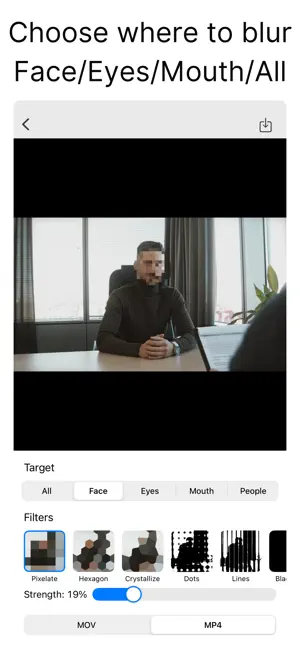
Automatically blur/pixelate people in your videos. Just pick a video—the app detects people and applies blur/pixelation for you. You can target People (full body) or specific parts like Face, Eyes, and Mouth. ●Features 【Simple workflow】 ・Pick a video → choose target & filter → save/share in 3 steps ・Targets: Entire Frame / Face / Eyes / Mouth / People (Full Body) 【Auto detection & tracking】 ・Detects face, eyes, mouth, and full body on each frame ・Stays on the subject even as they move 【Preview & edit】 ・Effects update in real time in the preview ・Adjust effect strength with a slider 【Rich filters】 ・Pixelate / Hexagon / Crystallize ・Dots / Lines / Blackout ・Monochrome / Pointillize / Blur / Zoom Blur ・Motion Blur (H / 45° / V) / Comic / Invert 【High-quality export】 ・Save exactly what you preview as MOV/MP4 ・Share directly to social apps and messages 【No sign-up required】 ・No account needed—use it right after install
What’s new
Version 1.3.0 · Updated September 21, 2026
Added a one-time purchase option to remove ads. You can purchase it or restore your purchase from Settings.
App privacy
The developer, MITSUKO MARGOT KUBOTA ONO, reported these privacy practices to Apple.
Data Used to Track You
The following data may be used to track you across apps and websites owned by other companies:
- Location: Coarse Location
- Identifiers: Device ID
- Usage Data: Product Interaction, Advertising Data
- Diagnostics: Crash Data, Performance Data
Data Not Linked to You
The following data, which may be collected but is not linked to your identity, may be used for the following purposes:
- Location: Coarse Location
- Identifiers: Device ID
- Usage Data: Product Interaction, Advertising Data
- Diagnostics: Crash Data, Performance Data
Used for: Third-Party Advertising
Alternatives to Video Auto Blur
Looking for apps like Video Auto Blur? Here are 6 similar apps on the App Store. The highest rated is Video Blur & Face Censor (5.0/5), and all 6 are free to download.
-
 Video Blur & Face Censor
5.0
Video Blur & Face Censor
5.0
-
 Video Blur Editor - Pixelate
4.2
Video Blur Editor - Pixelate
4.2
-
 blur no.1 - video & photo edit
4.9
blur no.1 - video & photo edit
4.9
-
 Auto Video Blur - Filtering
4.3
Auto Video Blur - Filtering
4.3
-
 MozFace - Face Blur & Mosaic
-
 Bystander Video Blur
| App | Rating | Price | Last updated | Compare |
|---|---|---|---|---|
| Video Auto Blur | – | Free | September 21, 2026 | |
| Video Blur & Face Censor | 5.0 / 5 (1) | Free | Aug 28, 2026 | Compare |
| Video Blur Editor - Pixelate | 4.2 / 5 (10) | Free | Jun 26, 2026 | Compare |
| blur no.1 - video & photo edit | 4.9 / 5 (7) | Free | Aug 13, 2026 | Compare |
| Auto Video Blur - Filtering | 4.3 / 5 (31) | Free | Oct 24, 2026 | Compare |
| MozFace - Face Blur & Mosaic | – | Free | Aug 27, 2026 | Compare |
| Bystander Video Blur | – | Free | Sep 30, 2026 | Compare |
Compare Video Auto Blur with the top alternatives: ratings, updates, ASO score and keyword gaps →