

Video Blur Editor - Pixelate
Yoshinobu Ikeda Photo & Video iPhoneiPadiPod touch
Video Blur Editor - Pixelate is a free Photo & Video app for iPhone and iPad by Yoshinobu Ikeda. Rated 4.2/5 from 10 ratings. Requires iOS 15.0.
- Rating
- 4.2
- 10 ratings
- Price
- Free
- on the App Store
- Size
- 48 MB
- Age 4+
- Updated
- Jun 26
- 2026 · v1.0.14
Screenshots


About Video Blur Editor - Pixelate
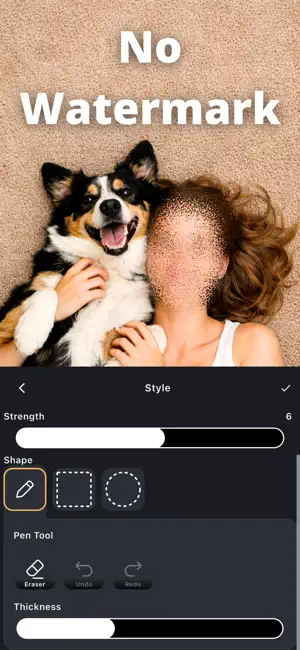
Easy video blur and pixelation—draw to edit with timeline & keyframes. Hide faces, license plates, and other private details naturally, then share with confidence. Edit only what you want Trace with your finger for freehand edits, or select areas using rectangle, circle, and freehand shapes. Quick, intuitive controls let you cover exactly what you need in seconds. Timeline controls for moving subjects Use the timeline to adjust effect timing precisely. With keyframes, fine-tune the position as your subject moves—great for faces and cars. No watermark. Export and share instantly Save videos with no watermark. After exporting, share right away to your favorite apps. You can also save the current frame as an image. Perfect for • Blurring faces before posting to social media • Hiding license plates in dashcam videos • Protecting privacy (kids, bystanders, addresses, personal details) • Fast edits when you still want fine control for moving subjects Key features • Easily blur or pixelate faces, license plates, and privacy-sensitive areas • Finger-draw freehand editing • Rectangle, circle, and freehand area selection • Timeline control to adjust effect duration • Keyframes to fine-tune position with motion • Multiple blur and pixelation effects • No watermark • Undo/redo for quick fixes • Restore your edit session and continue later • Export video and save the current frame as an image • Share immediately after saving
Ratings & reviews
4.2
10 ratings
What’s new
Version 1.0.14 · Updated June 26, 2026
Minor fixes.
App privacy
The developer, Yoshinobu Ikeda, reported these privacy practices to Apple.
Data Used to Track You
The following data may be used to track you across apps and websites owned by other companies:
- Location: Coarse Location
- Identifiers: Device ID
- Usage Data: Product Interaction, Advertising Data, Other Usage Data
- Diagnostics: Crash Data, Performance Data, Other Diagnostic Data
Data Linked to You
The following data, which may be collected and linked to your identity, may be used for the following purposes:
- Location: Coarse Location
- Identifiers: Device ID
- Usage Data: Product Interaction, Advertising Data, Other Usage Data
- Diagnostics: Crash Data, Performance Data, Other Diagnostic Data
Used for: Third-Party Advertising, Analytics, Product Personalization, App Functionality
Alternatives to Video Blur Editor - Pixelate
Looking for apps like Video Blur Editor - Pixelate? Here are 6 similar apps on the App Store. The highest rated is Video Blur & Face Censor (5.0/5), and all 6 are free to download.
-
 AI Photo Restore & Enhance
3.7
-
 Blur Video - Blur Video Editor
4.8
-
 Live Focus
4.0
-
 Video Blur & Face Censor
5.0
-
 Video Auto Blur
-
 IHorizonLock Camera
4.6
| App | Rating | Price | Last updated | Compare |
|---|---|---|---|---|
| Video Blur Editor - Pixelate | 4.2 / 5 (10 ratings) | Free | June 26, 2026 | |
| AI Photo Restore & Enhance | 3.7 / 5 (9) | Free | Oct 22, 2026 | Compare |
| Blur Video - Blur Video Editor | 4.8 / 5 (5) | Free | Sep 25, 2026 | Compare |
| Live Focus | 4.0 / 5 (4) | Free | Mar 22, 2026 | Compare |
| Video Blur & Face Censor | 5.0 / 5 (1) | Free | Aug 28, 2026 | Compare |
| Video Auto Blur | – | Free | Sep 21, 2026 | Compare |
| IHorizonLock Camera | 4.6 / 5 (9) | Free | Oct 20, 2026 | Compare |