

AI Notes: BYOK Transcription
Alpine Cloud Solutions Productivity iPhoneiPadiPod touch
AI Notes: BYOK Transcription is a free Productivity app for iPhone and iPad by Alpine Cloud Solutions. Rated 4.8/5 from 6 ratings. Requires iOS 18.0.
- Rating
- 4.8
- 6 ratings
- Price
- Free
- on the App Store
- Size
- 14 MB
- Age 4+
- Updated
- Oct 10
- 2026 · v2.9
Screenshots
About AI Notes: BYOK Transcription
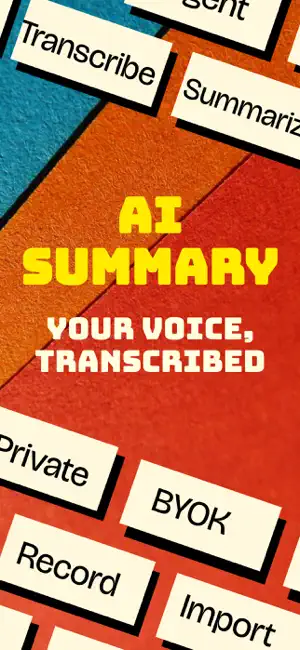
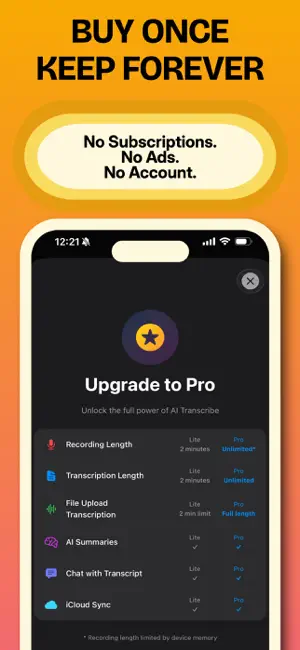
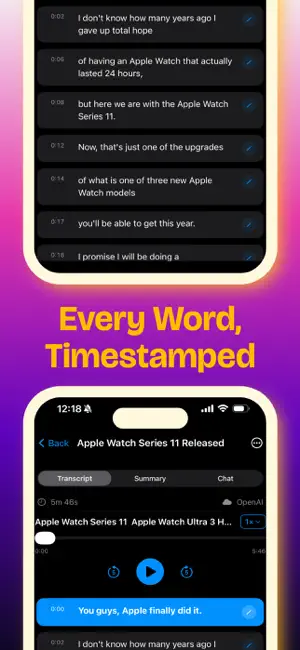
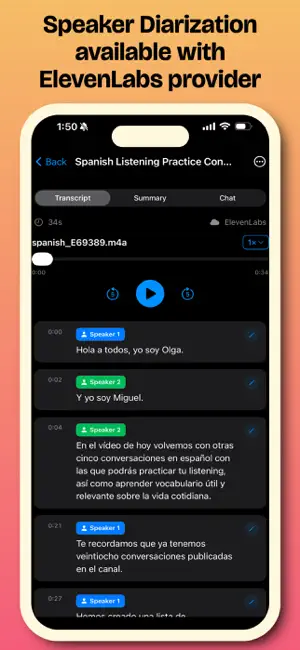
Transcribe and summarize recordings using private on-device AI or your own cloud AI providers with Bring Your Own Key (BYOK). One-time purchase. No subscription. No account required. No ads. Choose between completely offline transcription or your own cloud AI providers — without a middle-man server. **WHY AI NOTES?** ► **Private On-Device Transcription** Transcribe completely offline using Whisper models, including Large V3 Turbo. In local mode, your audio stays on your device. ► **Bring Your Own AI** Connect your own supported AI providers and API keys. Choose the provider and model that works best for your needs, whether you prioritize speed, accuracy, privacy, or cost. ► **Smart AI Summaries & Chat** Turn long recordings into useful summaries, key points, notes, and action items. Choose from multiple summary styles or ask AI questions about your transcript. ► **Live Transcription** See your words appear in real time while recording using on-device transcription or supported cloud providers. Live transcription also includes: • Conversation Copilot — Get contextual AI cues, knowledge lookups, name context, and useful suggestions while you speak. • Live AI Chat — Ask questions about your conversation while you're still recording. • Context & Notes — Add meeting notes, people, and important context before recording. ► **Speaker Identification** Supported providers such as ElevenLabs can identify different speakers, making meetings, conversations, and interviews easier to follow. ► **Audio & Video Import** Import MP3, M4A, WAV, MP4, MOV, AVI, and other supported formats. Import from Voice Memos, Files, Photos, or share audio directly from other apps. ► **99+ Languages** Automatically detect the spoken language or manually select it for improved transcription accuracy. ► **Multiple AI Providers** Use local Whisper models or connect supported cloud providers including OpenAI, Groq, Anthropic, and ElevenLabs. ► **Flexible Model Selection** Choose between different local Whisper models or supported cloud AI models based on the performance, accuracy, and capabilities you need. **PRIVACY FIRST** ► No account required. ► No subscription required. ► No tracking. ► In offline mode, your audio stays on your device. ► In cloud mode, your device communicates directly with the AI provider you choose. AI Notes does not use a middle-man server to process your recordings. **PERFECT FOR** • Professionals — Meeting notes, summaries, and action items • Students — Lecture transcripts and study notes • Journalists — Interviews, recordings, and quotes • Researchers — Transcription, documentation, and analysis • International Teams — Multilingual meetings and conversations • Content Creators — Turn recorded audio and video into reusable text **MORE FEATURES** ► **Searchable History** Search your transcription history to quickly find a quote, conversation, or important detail. ► **Smart Organization** Organize recordings with categories, favorites, and custom folders. ► **iCloud Sync** Keep your recordings, transcripts, summaries, and AI conversations available across your Apple devices. ► **Export & Share** Share transcripts and notes through Messages, Mail, Files, and other apps. AI Notes gives you the flexibility to keep transcription completely private and offline when you want it — or use your own cloud AI provider when you want additional speed and advanced capabilities.
Ratings & reviews
4.8
6 ratings
What’s new
Version 2.9 · Updated October 10, 2026
- Rename speakers (when available). Tap a speaker label in a transcript to give that person a name. Names appear in copied and shared transcripts, and summaries and chat use them to tell who said what. - Trim recordings. Cut the start or end of a recording before transcribing, or trim an existing one from the transcript menu. The original stays available under Restore Original Recording. - Fixed segment edits not being saved after leaving a transcript and duplicate summaries piling up, plus other bug fixes
App privacy
The developer, Alpine Cloud Solutions, reported these privacy practices to Apple.
Data Not Linked to You
The following data, which may be collected but is not linked to your identity, may be used for the following purposes:
- User Content: Audio Data
Used for: Other Purposes
Alternatives to AI Notes: BYOK Transcription
Looking for apps like AI Notes: BYOK Transcription? Here are 6 similar apps on the App Store. The highest rated is SonicScript: Text to Speech (4.8/5), and all 6 are free to download.
-
 Task Batch
3.0
-
 WakeMinder - Popup Reminders
4.5
-
 SonicScript: Text to Speech
4.8
-
 VoiceNoteX: Audio to Notes
-
 Summary AI - QuickSummary
4.4
-
 BoltPDF: Fill, Sign & Edit PDF
4.5
| App | Rating | Price | Last updated | Compare |
|---|---|---|---|---|
| AI Notes: BYOK Transcription | 4.8 / 5 (6 ratings) | Free | October 10, 2026 | |
| Task Batch | 3.0 / 5 (2) | Free | Oct 2, 2025 | Compare |
| WakeMinder - Popup Reminders | 4.5 / 5 (22) | Free | Sep 28, 2026 | Compare |
| SonicScript: Text to Speech | 4.8 / 5 (21) | Free | May 16, 2026 | Compare |
| VoiceNoteX: Audio to Notes | – | Free | Dec 18, 2025 | Compare |
| Summary AI - QuickSummary | 4.4 / 5 (16) | Free | Sep 25, 2025 | Compare |
| BoltPDF: Fill, Sign & Edit PDF | 4.5 / 5 (25) | Free | Mar 11, 2026 | Compare |