

CozyTime: Lock Screen Clocks
Rekishi, LLC Utilities iPhoneiPadiPod touch
CozyTime: Lock Screen Clocks is a free Utilities app for iPhone and iPad by Rekishi, LLC. Rated 5.0/5 from 1 ratings. Requires iOS 17.0.
- Rating
- 5.0
- 1 ratings
- Price
- Free
- on the App Store
- Size
- 39 MB
- Age 4+
- Updated
- May 26
- 2026 · v0.1.10
Screenshots



About CozyTime: Lock Screen Clocks
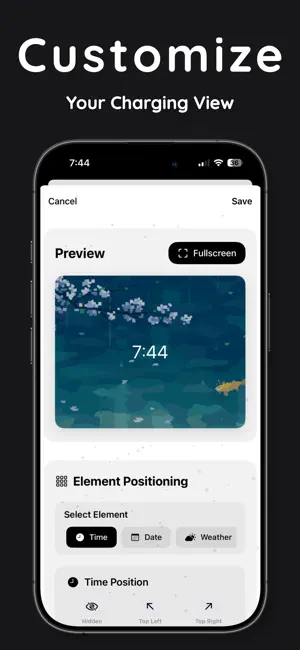
Transform your iPhone into a beautiful animated display CozyTime turns your iPhone into a gorgeous animated clock while charging, featuring 15 unique clock styles with stunning GIF backgrounds and live weather updates. STANDBY MODE PERFECTION Automatically activates when your iPhone is charging Works seamlessly with iOS 17+ StandBy mode Optimized for both portrait and landscape orientations One-tap setup - just select your favorite clock style 15 BEAUTIFUL CLOCK STYLES Center: Clean, minimalist time display Corner: Elegant corner positioning Weather Focus: Real-time weather integration Analog: Classic analog clock faces Digital: Modern digital displays Neon Glow: Striking neon-lit effects Glass Morphism: Translucent modern styling Flip Clock: Retro flip-style numbers And 14 more unique styles... 15 STUNNING ANIMATED BACKGROUNDS Each clock style features carefully matched animated GIF backgrounds: Cozy rainy windows Cyberpunk cityscapes Peaceful nature scenes Pixel art animations Abstract flowing patterns And many more aesthetic loops LIVE WEATHER INTEGRATION Real-time weather data powered by Apple Weather Current temperature and conditions Location-based updates Toggle weather display on/off COMPREHENSIVE CUSTOMIZATION 4 font families (System, Rounded, Monospaced, Serif) 8 font weights (Ultra Light to Black) 12 color options for all text elements Flexible positioning (center, corners, custom) Individual element styling options PREMIUM FEATURES ($2.99/month) Individual element colors (separate colors for time, date, weather, location) Individual element fonts (mix and match different fonts) Advanced styling options Future premium features included SMART FEATURES Intelligent GIF preloading for smooth performance Automatic charging detection Siri Shortcuts integration ("Hey Siri, open CozyTime") Custom screensaver timing (5min to 1 hour) Location services for accurate weather Persistent configuration across app launches TECHNICAL EXCELLENCE Optimized for iOS 17+ and iPhone Seamless StandBy mode integration Battery-efficient design Smooth 60fps GIF animations MVVM architecture for reliability PERFECT FOR: Bedside charging displays Desk clock replacement Aesthetic room decoration Lofi music sessions Cozy work environments CozyTime makes your charging time beautiful. Simply select your favorite clock style, customize it to your taste, and enjoy a stunning animated display every time you charge your iPhone. Weather data provided by Apple Weather. Requires iOS 17+ and iPhone for StandBy mode functionality. Privacy Policy: https://www.rekishi.io/privacy-policy Terms of Use: https://www.rekishi.io/terms-and-conditions
What’s new
Version 0.1.10 · Updated May 26, 2026
Fixes: - Settings scrolling.
App privacy
The developer, Rekishi, LLC, reported these privacy practices to Apple.
Data Not Collected
The developer does not collect any data from this app.
Alternatives to CozyTime: Lock Screen Clocks
Looking for apps like CozyTime: Lock Screen Clocks? Here are 6 similar apps on the App Store. The highest rated is Dock: StandBy Clock & Planets (5.0/5), and all 6 are free to download.
-
 CozyTime-Enjoy life
-
 Dock: StandBy Clock & Planets
5.0
-
 StandBy Hub: Nightstand & Home
5.0
-
 Clock Stand: Desk Clock
-
 Moment Bloom
-
 LaserScope
| App | Rating | Price | Last updated | Compare |
|---|---|---|---|---|
| CozyTime: Lock Screen Clocks | 5.0 / 5 (1 rating) | Free | May 26, 2026 | |
| CozyTime-Enjoy life | – | Free | Apr 19, 2025 | Compare |
| Dock: StandBy Clock & Planets | 5.0 / 5 (1) | Free | Oct 18, 2026 | Compare |
| StandBy Hub: Nightstand & Home | 5.0 / 5 (1) | Free | Oct 23, 2026 | Compare |
| Clock Stand: Desk Clock | – | Free | Jul 12, 2026 | Compare |
| Moment Bloom | – | Free | Oct 29, 2026 | Compare |
| LaserScope | – | Free | Oct 7, 2026 | Compare |