

PDF Editor & Converter - PDNob
Tenorshare(Hongkong)Limited Productivity iPhoneiPadiPod touch
PDF Editor & Converter - PDNob is a free Productivity app for iPhone and iPad by Tenorshare(Hongkong)Limited. Rated 4.7/5 from 3 ratings. Requires iOS 15.0.
- Rating
- 4.7
- 3 ratings
- Price
- Free
- on the App Store
- Size
- 83 MB
- Age 4+
- Updated
- Aug 20
- 2026 · v1.4.1
Screenshots


About PDF Editor & Converter - PDNob
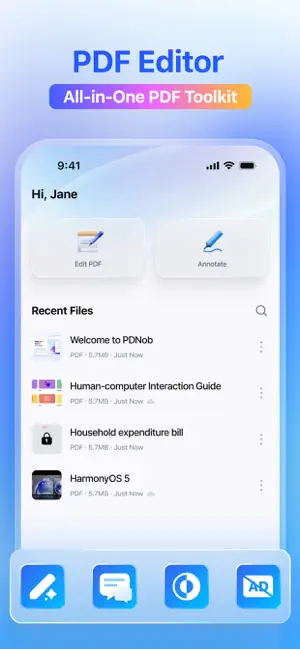
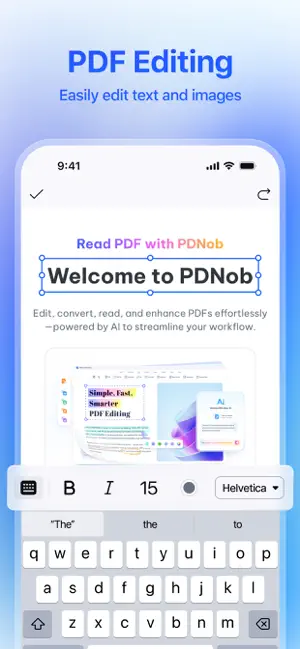
PDNob – The powerful iPhone PDF Editor App! Meet PDNob, a new & feature-rich app that helps you manage PDFs fast, developed by the creators of the world-famous Professional tool brand, Tenorshare. Why Choose PDNob? * No Feature Compromises: PDNob empowers you with all major tools to simplify editing, scaning, converting, managing, sharing, and saving your PDFs — quickly and effortlessly. * No Ads: Enjoy an uninterrupted editing experience with no pop-ups or distractions. KEY FEATURES PDF EDITOR • Edit and correct any typos directly on PDFs • Delete and add text • Change PDF background color • Add & remove PDF watermarks OCR & PDF CONVERTER • OCR scanned images & PDFs into editable text in 14 languages • Convert PDFs to Word, Excel, PPT, JPG, PNG, BMP, TIFF, and more • Save as TXT, RTF, EPUB, or PDF/A for versatile use • Preserve fonts, layouts, and formatting during every conversion VIEW FILES • Supports all mainstream file formats • Dark mode supported (only for iOS 15 and later) ANNOTATE & REVIEW PDF • Annotate PDFs with Highlights, Pencils, Markers, Underlines, Strikethroughs and Stickers • Add handwritten notes to PDFs CLOUD BACKUP • Free up your phone's local capacity conveniently with ample cloud storage COMPRESS & OPTIMIZE • Compress PDF file size while keeping clear quality • Reduce PDF size for faster sharing and easier saving Powerful & Simple Features to Edit & Read PDF! Terms and Conditions:https://www.tenorshare.com/pdnob-app-terms-of-service.html Privacy Policy:https://www.tenorshare.com/pdnob-app-privacy-policy.html Automatic Renewal Service Agreement: https://www.tenorshare.com/pdnob-app-automatic-renewal-service-agreement.html
What’s new
Version 1.4.1 · Updated August 20, 2026
1. Shape Annotations: Added shape annotation features to make your document markup more intuitive. 2. Watermark Editing: You can now easily add, modify, and delete document watermarks. 3. Multi-Language Support: The UI is now fully localized into 15 languages, including English, German, French, Japanese, Italian, Spanish, Portuguese, Russian, Dutch, Korean, Traditional Chinese, Simplified Chinese, Arabic, Thai, and Turkish.
App privacy
The developer, Tenorshare(Hongkong)Limited, reported these privacy practices to Apple.
Data Not Linked to You
The following data, which may be collected but is not linked to your identity, may be used for the following purposes:
- Identifiers: User ID, Device ID
- Usage Data: Product Interaction
- Diagnostics: Crash Data, Performance Data
- Contact Info: Email Address
- User Content: Photos or Videos, Other User Content
Used for: Analytics, App Functionality
Alternatives to PDF Editor & Converter - PDNob
Looking for apps like PDF Editor & Converter - PDNob? Here are 6 similar apps on the App Store. The highest rated is SparkPDF: Scan, Sign & Fill (5.0/5), and all 6 are free to download.
-
 PDF Text Editor ‑ Edit PDF
4.3
PDF Text Editor ‑ Edit PDF
4.3
-
 SparkPDF: Scan, Sign & Fill
5.0
SparkPDF: Scan, Sign & Fill
5.0
-
 Afirstsoft PDF:AI Chat PDFs
5.0
Afirstsoft PDF:AI Chat PDFs
5.0
-
 RevPDF: PDF Editor & Reader
4.7
RevPDF: PDF Editor & Reader
4.7
-
 Notelane - Markdown Editor
5.0
Notelane - Markdown Editor
5.0
-
 Markflow — Markdown Reader
5.0
Markflow — Markdown Reader
5.0
| App | Rating | Price | Last updated | Compare |
|---|---|---|---|---|
| PDF Editor & Converter - PDNob | 4.7 / 5 (3 ratings) | Free | August 20, 2026 | |
| PDF Text Editor ‑ Edit PDF | 4.3 / 5 (7) | Free | Aug 13, 2026 | Compare |
| SparkPDF: Scan, Sign & Fill | 5.0 / 5 (2) | Free | Sep 27, 2026 | Compare |
| Afirstsoft PDF:AI Chat PDFs | 5.0 / 5 (3) | Free | Jun 3, 2025 | Compare |
| RevPDF: PDF Editor & Reader | 4.7 / 5 (20) | Free | Aug 19, 2026 | Compare |
| Notelane - Markdown Editor | 5.0 / 5 (5) | Free | Jul 1, 2026 | Compare |
| Markflow — Markdown Reader | 5.0 / 5 (2) | Free | May 12, 2026 | Compare |