

Audyify: Record & Transcribe
Pardeep Kumar Productivity iPhoneiPadiPod touch
Audyify: Record & Transcribe is a free Productivity app for iPhone and iPad by Pardeep Kumar. Requires iOS 16.6. Updated November 2, 2026.
- Price
- Free
- on the App Store
- Size
- 34 MB
- Age 4+
- Updated
- Nov 2
- 2026 · v1.0.7
Screenshots



About Audyify: Record & Transcribe
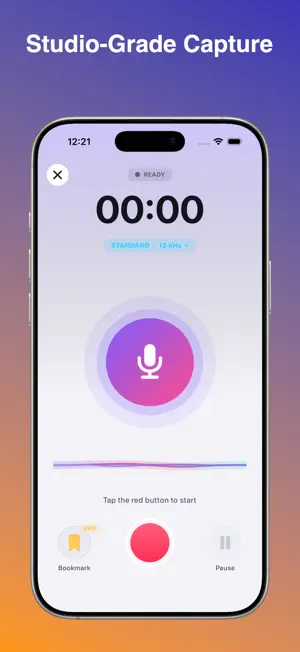
Record, edit and share audio like a pro. Audyify is a fast, beautiful voice recorder with a built-in audio studio. Capture meetings, lectures, interviews and ideas in crisp quality, polish them with studio effects, turn them into text, and even build full podcast episodes, all on your iPhone. RECORD ANYTHING • One-tap recording with a live waveform • Keeps recording when you switch apps or lock your phone • Pause and resume, with automatic pause during phone calls • Optional 3 or 5 second countdown • Organize with categories: Meeting, Lecture, Interview, Idea, Notes, Podcast and more • Standard quality for small files, HD (44.1 kHz) and Studio (48 kHz) with Pro A LIBRARY THAT KEEPS UP • Search, filter by category, favorite and sort your recordings • Swipe or long-press for quick actions: rename, share, change category, delete • Import audio from the Files app • All your recordings stay on your device A PLAYER BUILT FOR LISTENING • Tap the waveform to jump anywhere • Speed from 0.5x to 2x, loop, skip 10/15/30 seconds and a sleep timer • Remembers where you stopped • Export a copy as M4A or lossless WAV VOICE EFFECTS STUDIO • One-tap presets: Voice Boost, Podcast, Studio, Radio, Telephone, Cathedral, Stadium, Deep Voice and more • Fine-tune pitch, speed, bass, clarity, treble, reverb, echo and fades • Remove rumble, boost volume and save as a new file. Your original is never changed. TRIM, CUT AND CLEAN UP • Drag handles on the waveform to keep or cut out a section • Remove long silences automatically (Pro) • Convert between M4A and WAV PODCAST STUDIO • Build an episode with an intro, segments and outro • Drag to reorder, preview every clip • Smooth pauses or crossfades between clips • Add a background music bed that dips under your voice (Pro) • Fade in and out, then export straight to your library CONNECT TO YOUR PC • Open a private web page from any computer on your Wi-Fi • Play, download, upload, rename, favorite and delete your recordings from your browser • Protected by a PIN. Free: 10 minutes a day. Pro: unlimited AUDIO TO TEXT (PRO) • Private transcripts created on your device when your language supports it • 12 languages, edit, copy and share as text MAKE IT YOURS • Dark, Light, System and AMOLED themes • Accent colors, haptics, default category, default speed and more AUDYIFY PRO Unlock HD and Studio recording, all voice effects, Podcast Studio Pro, transcripts, bookmarks, premium themes, unlimited PC Connect and an ad-free experience with a single one-time purchase. No subscription. Questions or ideas? We'd love to hear from you. Rate Audyify in the App Store if you enjoy it!
What’s new
Version 1.0.7 · Updated November 2, 2026
Audyify has been completely redesigned for recording and managing audio. NEW • Brand-new look with Dark, Light, System and AMOLED themes and 8 accent colors • Voice Effects Studio with one-tap presets, pitch, reverb, echo, EQ and fades • Podcast Studio: intro, segments, outro, crossfades and a background music bed • Connect to PC: manage your recordings from any browser on your Wi-Fi • Trim & Cut with a visual waveform, plus automatic silence removal (Pro) • Smarter player with speed control, loop, sleep timer and bookmarks • Library search, filters, favorites and sorting • Recording now continues in the background, and pauses automatically during calls • Settings for quality, countdown, default category and more IMPROVED • Faster, cleaner recorder with a live waveform • All your existing recordings are kept and appear in the new Library
App privacy
The developer, Pardeep Kumar, reported these privacy practices to Apple.
Data Used to Track You
The following data may be used to track you across apps and websites owned by other companies:
- Usage Data: Advertising Data
Data Not Linked to You
The following data, which may be collected but is not linked to your identity, may be used for the following purposes:
- Usage Data: Advertising Data
- Contact Info: Email Address, Name
- Identifiers: Device ID
Used for: Third-Party Advertising, App Functionality
Alternatives to Audyify: Record & Transcribe
Looking for apps like Audyify: Record & Transcribe? Here are 6 similar apps on the App Store. The highest rated is LoudScript: Text to Speech (5.0/5), and all 6 are free to download.
-
 LoudScript: Text to Speech
5.0
-
 Meeting Recorder Transcriber
3.1
-
 Audio to Text Transcription
-
 Yaps: AI Voice Typing Keyboard
4.0
-
 AI Meeting Notes & Recorder
5.0
-
 Countdown Timer Nano (Legacy)
4.3
| App | Rating | Price | Last updated | Compare |
|---|---|---|---|---|
| Audyify: Record & Transcribe | – | Free | November 2, 2026 | |
| LoudScript: Text to Speech | 5.0 / 5 (2) | Free | Oct 29, 2026 | Compare |
| Meeting Recorder Transcriber | 3.1 / 5 (8) | Free | May 21, 2026 | Compare |
| Audio to Text Transcription | – | Free | Aug 9, 2026 | Compare |
| Yaps: AI Voice Typing Keyboard | 4.0 / 5 (1) | Free | Oct 30, 2026 | Compare |
| AI Meeting Notes & Recorder | 5.0 / 5 (4) | Free | Oct 24, 2026 | Compare |
| Countdown Timer Nano (Legacy) | 4.3 / 5 (25) | Free | Oct 21, 2026 | Compare |