

Yaps: AI Voice Typing Keyboard
Yaps AI Ltd Productivity iPhoneiPadiPod touch
Yaps: AI Voice Typing Keyboard is a free Productivity app for iPhone and iPad by Yaps AI Ltd. Rated 4.0/5 from 1 ratings. Requires iOS 17.0.
- Rating
- 4.0
- 1 ratings
- Price
- Free
- on the App Store
- Size
- 183 MB
- Age 4+
- Updated
- Oct 20
- 2026 · v1.7
Screenshots



About Yaps: AI Voice Typing Keyboard
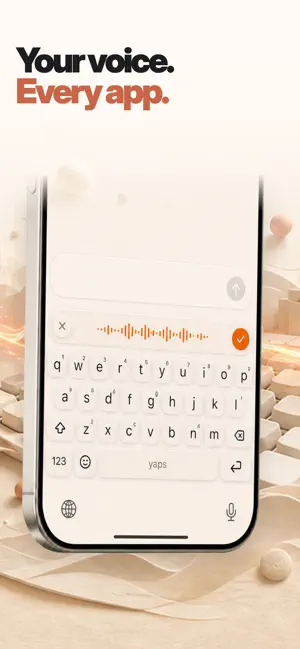
Talk naturally. Send clearly. Yaps is an AI voice typing keyboard, speech-to-text transcriber, and read-aloud companion for iPhone and iPad. Speak the way you think—pauses, restarts and all—and Yaps turns it into clean, ready-to-send text wherever you type. VOICE TYPE ANYWHERE Use Yaps in Messages, Mail, WhatsApp, Slack, Notes, Safari and any app with a text field. Type, swipe, dictate, move the cursor, search emoji, and tune the keyboard layout, height, fonts, sounds and themes. SPEECH TO TEXT THAT WRITES WHAT YOU MEANT • Removes filler words and repeated phrases • Adds punctuation, capitalization and paragraphs • Understands corrections and changes of mind • Formats messages, emails, lists and notes • Learns names, acronyms and specialist vocabulary TRANSCRIBE AUDIO AND VIDEO Import a recording and turn it into a clean transcript with the same on-device speech-to-text tools. Copy it, share it, or save it with your notes. TEXT TO SPEECH AND READ ALOUD Turn notes and saved text into natural audio. Choose a voice, adjust the playback speed, and listen when reading is not convenient. YOUR NOTES, IN SYNC Capture ideas on iPhone or iPad, keep a searchable dictation history, and sync notes with Yaps on desktop so your words move with you. LOCAL AI, PRIVATE BY DESIGN Download Yaps' offline voice model for local dictation. Core speech and cleanup can run on your device when supported. Optional online features use encrypted connections. Yaps does not sell your data or log your keystrokes. GET STARTED 1. Open Yaps and follow the guided setup. 2. Add Yaps in Settings > General > Keyboard > Keyboards. 3. Turn on Full Access so the keyboard can use dictation and shared Yaps features. 4. Switch keyboards, tap the audio wave and speak. A free allowance is included. Upgrade in the app for higher limits and additional access. Subscriptions renew automatically unless cancelled in App Store settings. Support: https://www.yaps.ai/support Privacy: https://www.yaps.ai/privacy Terms: https://www.yaps.ai/terms
What’s new
Version 1.7 · Updated October 20, 2026
Yaps 1.7 improves keyboard spacing, double-space punctuation and learned-word management. Review or remove learned typing words with more reliable resets. Dictation better preserves spoken punctuation, lists and numbers across languages, and notes editing is smoother.
App privacy
The developer, Yaps AI Ltd, reported these privacy practices to Apple.
Data Linked to You
The following data, which may be collected and linked to your identity, may be used for the following purposes:
- Purchases: Purchase History
- Contact Info: Email Address
- Identifiers: User ID
- Usage Data: Product Interaction
Used for: App Functionality
Data Not Linked to You
The following data, which may be collected but is not linked to your identity, may be used for the following purposes:
- Search History: Search History
- Diagnostics: Crash Data, Performance Data, Other Diagnostic Data
Used for: App Functionality
Alternatives to Yaps: AI Voice Typing Keyboard
Looking for apps like Yaps: AI Voice Typing Keyboard? Here are 6 similar apps on the App Store. The highest rated is Willow Dictation & AI Keyboard (4.6/5), and all 6 are free to download.
-
 Spokenly: Audio to Text AI app
4.4
-
 Hello Haven
4.3
-
 Superwhisper - AI Dictation
4.4
-
 Willow Dictation & AI Keyboard
4.6
-
 Google AI Edge Eloquent
4.0
-
 Typeless: AI Voice Keyboard
4.5
| App | Rating | Price | Last updated | Compare |
|---|---|---|---|---|
| Yaps: AI Voice Typing Keyboard | 4.0 / 5 (1 rating) | Free | October 20, 2026 | |
| Spokenly: Audio to Text AI app | 4.4 / 5 (66) | Free | Oct 23, 2026 | Compare |
| Hello Haven | 4.3 / 5 (29) | Free | Oct 15, 2026 | Compare |
| Superwhisper - AI Dictation | 4.4 / 5 (846) | Free | Oct 23, 2026 | Compare |
| Willow Dictation & AI Keyboard | 4.6 / 5 (1,073) | Free | Oct 15, 2026 | Compare |
| Google AI Edge Eloquent | 4.0 / 5 (26) | Free | Aug 21, 2026 | Compare |
| Typeless: AI Voice Keyboard | 4.5 / 5 (782) | Free | Oct 22, 2026 | Compare |