

FIMIT: LiDAR Room Scanner
SEYED SALAR KIABI Business iPhoneiPadiPod touch
FIMIT: LiDAR Room Scanner is a free Business app for iPhone and iPad by SEYED SALAR KIABI. Requires iOS 18.0. Updated October 30, 2026.
- Price
- Free
- on the App Store
- Size
- 6 MB
- Age 4+
- Updated
- Oct 30
- 2026 · v2.0.6
Screenshots



About FIMIT: LiDAR Room Scanner
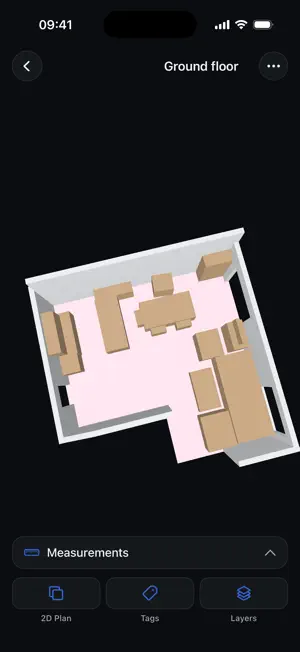
Scan a room with your iPhone Pro or iPad Pro and get an accurate 3D model and 2D floor plan in minutes. No tape measure, no drafting, no waiting for a drawing service. START FREE Create an account in the app and you are on the Free plan right away: 1 project, 3 scans, and a web dashboard where you can view every scan in 3D and 2D, measure it, and share it with a public link. No credit card required. WHAT YOU CAN DO • Capture walls, doors, windows and openings automatically with LiDAR • Get a clean 2D floor plan of every scan, with room types recognised as you scan • Name each room on site while you scan, and see every room's floor area from the floor plan • Organise scans into projects with building and room categories • Share a scan as a link, view-only or with downloads, and export the 3D model as USDZ • Save the 2D floor plan as a PDF, with or without furniture, doors and windows ON THE WEB Open any scan in your web dashboard to view it in 3D, edit walls, rooms and calibration, export to CSV, JSON, GeoJSON or DXF, and share it with clients or colleagues through a link. BUILT FOR TEAMS FIMIT is made for facility management, real-estate and property teams. Invite colleagues to your organisation and everyone scans into the same projects. REQUIREMENTS Scanning uses the LiDAR sensor, available on iPhone 12 Pro and later Pro models and on iPad Pro. On other devices you can still sign in, open your scans and share them.
What’s new
Version 2.0.6 · Updated October 30, 2026
• Name rooms while you scan: stand in a room, tap "Name this room" and pick or type its name. It appears on your floor plan. • See and rename every room of a saved scan from the new Rooms list. • Room areas now come from your floor plan, so the app and the web show the same numbers. • Share a link to a scan: view the 3D model and 2D plan in any browser, with optional downloads. • Choose what the 2D PDF shows: furniture, doors and windows. • Editing walls, rooms and calibration has moved to the web app, where it is easier on a bigger screen.
App privacy
The developer, SEYED SALAR KIABI, reported these privacy practices to Apple.
Data Linked to You
The following data, which may be collected and linked to your identity, may be used for the following purposes:
- Usage Data: Product Interaction
- Diagnostics: Other Diagnostic Data
- Contact Info: Email Address, Name, Phone Number
- Surroundings: Environment Scanning
Used for: Analytics, App Functionality
Alternatives to FIMIT: LiDAR Room Scanner
Looking for apps like FIMIT: LiDAR Room Scanner? Here are 6 similar apps on the App Store. The highest rated is Surely – Smarter Decisions (5.0/5), and all 6 are free to download.
-
 Planmark Room Scanner
1.0
Planmark Room Scanner
1.0
-
 BlueSphere
-
 ROAR Advocates
-
 Change Order Pro Contractor
-
 Surely – Smarter Decisions
5.0
Surely – Smarter Decisions
5.0
-
 BeaverPlot: Floor Plan Scanner
| App | Rating | Price | Last updated | Compare |
|---|---|---|---|---|
| FIMIT: LiDAR Room Scanner | – | Free | October 30, 2026 | |
| Planmark Room Scanner | 1.0 / 5 (1) | Free | Oct 30, 2026 | Compare |
| BlueSphere | – | Free | Jun 15, 2026 | Compare |
| ROAR Advocates | – | Free | Jul 25, 2025 | Compare |
| Change Order Pro Contractor | – | Free | Oct 9, 2026 | Compare |
| Surely – Smarter Decisions | 5.0 / 5 (1) | Free | Feb 5, 2025 | Compare |
| BeaverPlot: Floor Plan Scanner | – | Free | Oct 23, 2026 | Compare |