

AmberDraw: Animated Drawing
Mykyta Gaidukov Graphics & Design iPhoneiPadiPod touch
AmberDraw: Animated Drawing is a free Graphics & Design app for iPhone and iPad by Mykyta Gaidukov. Rated 4.3/5 from 324 ratings. Requires iOS 17.0.
- Rating
- 4.3
- 324 ratings
- Price
- Free
- on the App Store
- Size
- 40 MB
- Age 4+
- Updated
- Oct 22
- 2026 · v3.9.0
Screenshots


About AmberDraw: Animated Drawing
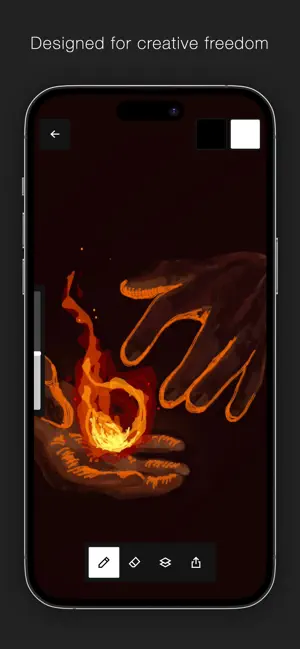
AmberDraw is a drawing app where the brushes themselves animate. Not filters. Not effects added afterwards. The motion is built into every single stroke. Pick up your Apple Pencil, draw a line, and watch it wiggle, scatter, flow, or pulse — live, as you draw. There are no keyframes. No timelines. No exporting to After Effects just to make something move. You draw, and it's already animated. The wiggle line aesthetic, finally in an app If you've ever loved the hand-drawn, jittery motion style — in title sequences, illustrated reels, motion posters — AmberDraw is how you make that. Each brush has its own character: Scribble shakes with nervous energy, Gradient flows like liquid, Particle explodes outward, Charcoal drifts like smoke. You're not choosing a tool, you're choosing a feeling. What's inside • Animated brushes, each with unique bespoke motion • Full brush customisation — speed, density, size, behaviour • Layers for organisation and creative control • Custom canvas dimensions • Apple Pencil support • Import images directly onto your canvas • Transform tool for repositioning and scaling • Export your finished piece as video — ready to post Who it's for Artists who composite across apps. Illustrators who want their work to breathe. Designers making content for social. Anyone who's opened Procreate and thought — what if this moved? Export your animations as video and bring them straight into After Effects, CapCut, or anywhere else you work. AmberDraw fits into your workflow, not the other way around. Free to download. Unlock the full brush library with Pro. Terms of use: https://www.apple.com/legal/internet-services/itunes/dev/stdeula/ Privacy policy: https://sites.google.com/view/amberdraw-privacypolicy/home
Ratings & reviews
4.3
324 ratings
What’s new
Version 3.9.0 · Updated October 22, 2026
- Complete rework of the eraser tool - Pause animated brushes and keep drawing on a still frame
App privacy
The developer, Mykyta Gaidukov, reported these privacy practices to Apple.
Data Not Linked to You
The following data, which may be collected but is not linked to your identity, may be used for the following purposes:
- Identifiers: Device ID
- Usage Data: Product Interaction, Advertising Data, Other Usage Data
- Diagnostics: Crash Data, Performance Data, Other Diagnostic Data
Used for: Analytics
Alternatives to AmberDraw: Animated Drawing
Looking for apps like AmberDraw: Animated Drawing? Here are 6 similar apps on the App Store. The highest rated is Pixquare - Pixel Art Studio (4.8/5), and 5 of the 6 are free to download.
-
 Pixquare - Pixel Art Studio
4.8
-
 ZBrush - 3D Model Maker
4.1
-
 MediBang Paint – Drawing & Art
4.6
-
 MediBang Paletta:Drawing App
4.5
-
 Brushes for Procreate
4.7
-
 Feather: Draw in 3D
4.1
| App | Rating | Price | Last updated | Compare |
|---|---|---|---|---|
| AmberDraw: Animated Drawing | 4.3 / 5 (324 ratings) | Free | October 22, 2026 | |
| Pixquare - Pixel Art Studio | 4.8 / 5 (3,282) | Free | Oct 26, 2026 | Compare |
| ZBrush - 3D Model Maker | 4.1 / 5 (260) | Free | Oct 14, 2026 | Compare |
| MediBang Paint – Drawing & Art | 4.6 / 5 (32,727) | Free | Oct 13, 2026 | Compare |
| MediBang Paletta:Drawing App | 4.5 / 5 (1,081) | Free | Oct 13, 2026 | Compare |
| Brushes for Procreate | 4.7 / 5 (19,638) | Free | Feb 17, 2026 | Compare |
| Feather: Draw in 3D | 4.1 / 5 (115) | 14.99 USD | Feb 3, 2026 | Compare |