

Feather: Draw in 3D
Sketchsoft Inc. Graphics & Design iPad
Feather: Draw in 3D is a paid Graphics & Design app for iPad by Sketchsoft Inc. Rated 4.1/5 from 115 ratings. Requires iOS 16.0. Updated February 3, 2026.
- Rating
- 4.1
- 115 ratings
- Price
- 14.99 USD
- on the App Store
- Size
- 49 MB
- Age 4+
- Updated
- Feb 3
- 2026 · v1.3.4
Screenshots

About Feather: Draw in 3D
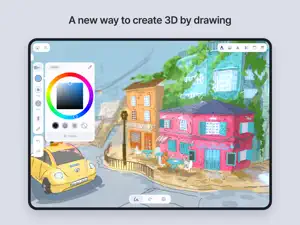
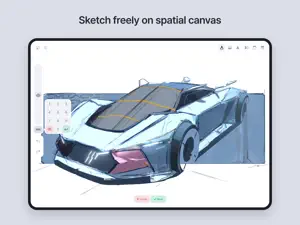
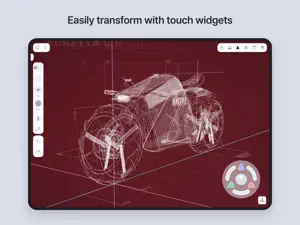
Feather is a next-generation 3D drawing application built for professional designers, visionary artists, and you. Bring your imagination to life with versatile 3D brushes redesigned for space, seamless and intuitive navigation, and a delicate interplay of light and shadow powered by the Airbreath rendering engine. Feather is the ultimate creative space to unleash your ideas without limits. Draw. Rotate. Create. • All you need is a pen and touch. Freely navigate 3D space, draw from any perspective, and turn your ideas into reality. Editing feels like gaming. • Move, rotate, and scale using the joystick. Tedious 3D editing has never been easier. Liquify the space. • Masterpieces arise from many trials. Use "3D Liquify" to push and pull every detail, letting your imagination roam free. Brushes reimagined in 3D. • Enjoy the classic feel of drawing with pressure-sensitive 3D brushes, featuring styles and patterns for enhanced expression. Every angle tells a story. • 3D artworks are meant to be viewed from various angles. Capture and sequence shots to weave your own story. A creative toolkit for artists, designers, architects, and everyone. • Tools unleash your boundless imagination. Feather is for creators who embrace diverse themes, styles, techniques, and dimensions. Polish it up. • Make your creations vibrant with shading and special effects. • Lighting: Illuminate and cast shadows with a single tap. • Post-processing: Add a finishing touch with grain, depth of field, glow, pixelation, or toon shading. Export to 3D formats. • Your 3D creations have no limits. Export your work from Feather, use it in other tools, and explore new workflows. Features you need. Indeed. • Fully Offline: Use anywhere without an internet connection. • Shapes: Draw straight lines, circles, ellipses, and smooth curves. • Eraser: Works just as you expect. • Live Mirror: Draw symmetrical lines with a virtual mirror. • Import Reference: Insert images or 3D models into your workspace. • Clipboard: Display reference images in a separate window. • Background Image: Add colors or images behind your 3D artwork. • AR View: View 3D creations in real-world settings. • Share: Generate a 3D viewer link to share your artwork. • Folders: Organize drawings into folders for easy access. • Geometric Primitives: Draw on spheres, cylinders, cones, or rings. • Data Backup: Back up your files and keep them secure. ... what if you don’t have a pen? • Turn on "Finger-pen" mode to sketch, paint, and edit using just your fingers. Showcase your work. • Feather Gallery is the best place to view and share 3D artworks. Discover what’s possible and find inspiration. Your journey starts here. • From detailed guides to hands-on tutorials, everything you need is at your fingertips. • Documentation: Learn all of Feather's interfaces, gestures, and features. • Basic tutorial: Follow our videos to draw and learn how to use Feather. • Community: Join Feather users from around the world on Discord.
Ratings & reviews
4.1
115 ratings
What’s new
Version 1.3.4 · Updated February 3, 2026
We fixed several bugs that affected app stability and usability. - Fixed an issue where pen pressure was not applied after using the Liquify tool. - Resolved an issue where some fonts were not displayed correctly. - Addressed an issue where the color panel did not work properly when using the clipboard. - Updated the layout of some interface elements. - Fixed an issue where straight lines were not drawn correctly near the edges of the 3D guide. The Restore Previous Data service, available since November 2024, will be discontinued. This service was provided for users of the discontinued Feather web version to transfer their data. If you would like to download data created in Feather before November 2024, please contact [email protected].
App privacy
The developer, Sketchsoft Inc., reported these privacy practices to Apple.
Data Not Linked to You
The following data, which may be collected but is not linked to your identity, may be used for the following purposes:
- Location: Coarse Location
- Contact Info: Email Address, Name, Other User Contact Info
- Usage Data: Product Interaction, Other Usage Data
- Search History: Search History
- Diagnostics: Performance Data, Crash Data
- User Content: Photos or Videos, Customer Support, Other User Content
- Identifiers: User ID, Device ID
Used for: Developer’s Advertising or Marketing, Analytics, App Functionality
Alternatives to Feather: Draw in 3D
Looking for apps like Feather: Draw in 3D? Here are 6 similar apps on the App Store. The highest rated is Nomad Sculpt (4.8/5), and 4 of the 6 are free to download.
-
 ZBrush - 3D Model Maker
4.1
ZBrush - 3D Model Maker
4.1
-
 Nomad Sculpt
4.8
Nomad Sculpt
4.8
-
 Metaspace - 3D Sketchbook
3.5
Metaspace - 3D Sketchbook
3.5
-
 HEAVYPAINT
4.0
HEAVYPAINT
4.0
-
 ToonSquid
4.6
ToonSquid
4.6
-
 AmberDraw: Animated Drawing
4.3
AmberDraw: Animated Drawing
4.3
| App | Rating | Price | Last updated | Compare |
|---|---|---|---|---|
| Feather: Draw in 3D | 4.1 / 5 (115 ratings) | 14.99 USD | February 3, 2026 | |
| ZBrush - 3D Model Maker | 4.1 / 5 (260) | Free | Oct 14, 2026 | Compare |
| Nomad Sculpt | 4.8 / 5 (14,517) | 19.99 USD | Oct 23, 2026 | Compare |
| Metaspace - 3D Sketchbook | 3.5 / 5 (88) | Free | Oct 26, 2026 | Compare |
| HEAVYPAINT | 4.0 / 5 (66) | Free | Oct 26, 2026 | Compare |
| ToonSquid | 4.6 / 5 (1,335) | 9.99 USD | Sep 2, 2026 | Compare |
| AmberDraw: Animated Drawing | 4.3 / 5 (324) | Free | Oct 22, 2026 | Compare |