

MediBang Paletta:Drawing App
MediBang inc. Graphics & Design iPhoneiPadiPod touch
MediBang Paletta:Drawing App is a free Graphics & Design app for iPhone and iPad by MediBang inc. Rated 4.5/5 from 1,081 ratings. Requires iOS 16.0.
- Rating
- 4.5
- 1K ratings
- Price
- Free
- on the App Store
- Size
- 143 MB
- Age 4+
- Updated
- Oct 13
- 2026 · v4.19
Screenshots


About MediBang Paletta:Drawing App
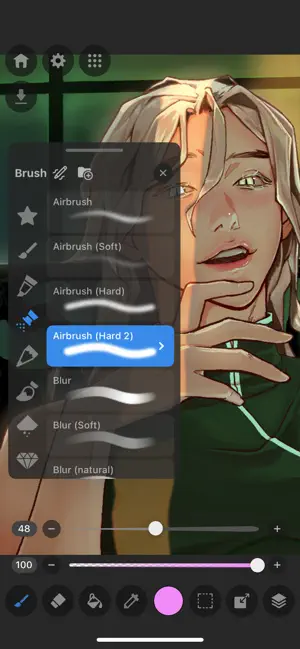
No intrusive ads to interrupt your flow. Free for 2 hours every day. You can extend your usage time after 2 hours by watching ads. Draw for yourself, in your time, by you like. MediBang Paletta is the painting app for you. We made this for you. The latest work in the MediBang Paint series, which boasts 100 million downloads. This is a new proposal from MediBang. The app's beautiful canvas is waiting for you to create art. Today, try MediBang Paletta and watch your improvement skyrocket! Crafted by the minds behind MediBang Paint, MediBang Paletta gives you a perfectly designed experience to reach creative heights never thought possible, no subscription required. Key Highlights: ・User-Friendly Interface: Work effortlessly with an intuitive interface. ・World-Class Brushes: Enjoy meticulously crafted brushes for the iPad experience. ・Auto-Save: Never worry about losing a sketch again. ・Nuanced Layering: Exercise precise control over your art. Your Perfect Brushes ・Customizable Default Brushes: Tailor any default brushes to match your style. ・Stabilization Tool: Create your smoothest lines ever. ・Creative Effects: Add intricate details with cool effect and stamp brushes. ・Pen Pressure Settings: Responsive and adjustable settings to suit you. ・Unique Brushes: Explore dozens of brushes designed exclusively for MediBang Paletta's brush engine. Effortless Layers and Colors ・Clipping Masks: Edit without compromising your initial art. ・Layer Groups: Keep your work neat and tidy. ・Blending Modes: Nearly 20 blending modes to adjust your art as you desire. Professional Finishing Touches ・Artistic Filters: Add captivating effects to give your work a professional look. ・Blur Tool: Achieve softness, movement, and depth. ・Easy Edits: Refine your work's proportions using the Transformation Tool. Intuitive and Lightweight ・Artist-First Design: Enjoy an app designed with giving you the best artistic experience in mind. ・Simplicity is Key: Focus on your creativity with a simple, lightweight interface that transforms your screen into a studio. ・Efficient Storage: Save your work in MediBang Paletta export it to the Files app. ・No Lag: Bid farewell to brush lag and slow loading times forever. Share Your Masterpieces ・Pro Export: Import or export your art in various formats, including Adobe® Photoshop® PSD files. ・Seamless Saving and Backups: Save your art locally in MediBang Paletta and find your files backed up to the app itself in the event of a crash. Operating Environment ・OS: iOS 18 or later ・Recommended Devices: iPhone13 or later / iPad 9th generation or later / iPad Air 5th generation or later / iPad mini 6th generation or later / iPad Pro 5th generation or later *App performance may vary depending on the device condition Crafted by visionaries and tailored for artists, MediBang Paletta is here to provide the ultimate digital art experience. With a canvas and tools that are convenient yet unobtrusive, this app transforms your iPad screen into an inviting workspace, allowing your creativity to flow freely. Every element is meticulously decided by MediBang Paletta's designers to ensure the most immersive and intuitive experience that maximizes all the best parts of working on the iPad for the individual creator experience. MediBang Paletta is more than just an app, it's a creator-centric space that gives you what you need to translate vision into reality. No compromises or limitations—just pure creative freedom. Bid farewell to confusing design, and software bloat. Say hello to MediBang Paletta.
Ratings & reviews
4.5
1K ratings
What’s new
Version 4.19 · Updated October 13, 2026
[New Features] - Added color set sharing function - Added function to create materials - Added parallel translation and numerical display to the move tool - Added layer type and color badge display to the layer list [Improvements] - Improved the ability to immediately input text when creating new text - Improved the ability to set styles with the text tool even when no text is selected - Improved the guidance display when using old fonts - Improved the ease of resizing floating layers [Bug Fixes] - Fixed a bug where the drawing settings tab state of the shape tool was not maintained when the screen was rotated - Fixed a bug where the same image could not be imported consecutively - Fixed an issue where the ruler was sometimes not displayed - Fixed a bug where the division number slider and numerical value did not return when mesh deformation was reset - Fixed a bug where the stopwatch and timer display was not hidden when the setting to hide the UI during drawing was ON - Fixed a bug where the app would crash when the camera was launched in an environment where the camera was not available - Fixed an issue where tapping text while using the hand tool would not launch the text tool - [iPad] Fixed a bug where the position of the keyboard in the text editing window would shift after closing it - Fixed an issue where tapping anywhere other than the slider handle would move the handle to that position. - Fixed a bug in Custom Noise (Type 2) where the slider and numerical display/movement were out of sync. - Fixed a bug in Custom Noise (Type 2) where the numerical value was abbreviated as "-...0" when the offset was -200 or less.
App privacy
The developer, MediBang inc., reported these privacy practices to Apple.
Data Used to Track You
The following data may be used to track you across apps and websites owned by other companies:
- Usage Data: Product Interaction
Data Not Linked to You
The following data, which may be collected but is not linked to your identity, may be used for the following purposes:
- Usage Data: Product Interaction
- Diagnostics: Crash Data, Performance Data, Other Diagnostic Data
Used for: Third-Party Advertising, Analytics, App Functionality
Alternatives to MediBang Paletta:Drawing App
Looking for apps like MediBang Paletta:Drawing App? Here are 6 similar apps on the App Store. The highest rated is Clip Studio Paint (4.7/5), and all 6 are free to download.
-
 Artstudio Pro: Draw, Paint
4.6
Artstudio Pro: Draw, Paint
4.6
-
 HiPaint- Sketch & Paint
4.6
HiPaint- Sketch & Paint
4.6
-
 Pastela
4.6
Pastela
4.6
-
 Infinite Painter
4.1
Infinite Painter
4.1
-
 VRoid Studio
3.5
VRoid Studio
3.5
-
 Clip Studio Paint
4.7
Clip Studio Paint
4.7
| App | Rating | Price | Last updated | Compare |
|---|---|---|---|---|
| MediBang Paletta:Drawing App | 4.5 / 5 (1,081 ratings) | Free | October 13, 2026 | |
| Artstudio Pro: Draw, Paint | 4.6 / 5 (4,083) | Free | Oct 10, 2025 | Compare |
| HiPaint- Sketch & Paint | 4.6 / 5 (3,075) | Free | Sep 15, 2026 | Compare |
| Pastela | 4.6 / 5 (98) | Free | Oct 22, 2026 | Compare |
| Infinite Painter | 4.1 / 5 (10,194) | Free | Oct 22, 2026 | Compare |
| VRoid Studio | 3.5 / 5 (232) | Free | Oct 29, 2026 | Compare |
| Clip Studio Paint | 4.7 / 5 (14,455) | Free | Sep 8, 2026 | Compare |