

Pixaboost
Faruk Hayrullah Karasın Photo & Video iPhoneiPadiPod touch
Pixaboost is a free Photo & Video app for iPhone and iPad by Faruk Hayrullah Karasın. Requires iOS 13.4. Updated February 9, 2025.
- Price
- Free
- on the App Store
- Size
- 50 MB
- Age 17+
- Updated
- Feb 9
- 2025 · v1.0.0
Screenshots


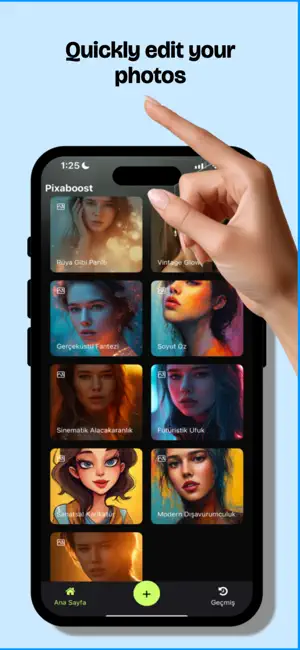

About Pixaboost
Transform your photos effortlessly with Pixaboost, the AI-powered photo editing app designed to meet all your creative needs. Whether you're a professional designer, a social media enthusiast, or someone looking to enhance personal memories, Pixaboost has got you covered with its innovative features and user-friendly interface. Key Features: Background Removal Remove unwanted backgrounds from your photos with just one tap. Perfect for creating professional-looking product images or isolating subjects for creative designs. Old Photo Restoration Revive faded and damaged photographs with advanced restoration tools. Bring back the colors, clarity, and vibrancy of your most treasured memories. Image Upscaler Enhance the quality and resolution of your photos up to 4x. Say goodbye to pixelation and enjoy high-definition images perfect for printing and sharing. Artistic Transformations Unleash your creativity with artistic tools like: Dreamlike Gleam: Add glowing, magical hues to your portraits. Vintage Glow: Infuse your photos with timeless, sepia-toned elegance. Surreal Fantasy: Dive into imaginative worlds with surreal elements and vibrant colors. AI-Powered Enhancements From reducing noise to deblurring and dehazing, Pixaboost’s AI tools help you refine your images for crisp and clear results, no matter the condition of the original photo. Personalized Portraits Create stunning, custom portraits with features like: HairSalon: Experiment with new hairstyles and colors. Santa on Reindeer: Add festive touches to your portraits for the holiday season. Abstract Essence: Turn your portraits into bold, artistic expressions. Text and Effects Add captivating text behind images or expand your photo's borders with the innovative outpainting feature. Why Choose Pixaboost? Ease of Use: Designed for all skill levels, Pixaboost makes professional editing accessible to everyone. AI Precision: Harness the power of advanced AI to achieve perfect results every time. Diverse Tools: From simple touch-ups to complex artistic transformations, Pixaboost is your all-in-one solution. Fast and Secure: Process your photos quickly without compromising on quality. All your data remains secure and private. How It Works: Choose a Feature: Select from a wide array of tools and enhancements. Upload Your Photo: Upload images from your device in seconds. Customize Parameters: Use intuitive sliders, dropdowns, and other controls to fine-tune your edits. Get Results Instantly: View high-quality results in real-time and save them to your gallery. Who Is Pixaboost For? Social Media Creators: Make your posts stand out with vibrant edits and unique artistic effects. Photographers: Perfect your shots with advanced tools like image enhancement and deblurring. E-Commerce Sellers: Showcase your products with clean, professional images. Families and Individuals: Restore and preserve your cherished memories with ease. What Sets Us Apart? Pixaboost isn’t just a photo editor; it’s your creative companion. With its state-of-the-art AI capabilities, Pixaboost turns ordinary photos into extraordinary masterpieces. Unlike other apps, we focus on delivering high-quality, personalized results that reflect your vision. Discover the power of Pixaboost’s seasonal features, including festive transformations like "Santa on Reindeer" and "Winter Wonderland." Keep your images fresh with regular updates and exclusive holiday themes. With Pixaboost, you don’t just edit photos; you create lasting memories and artistic masterpieces. Perfect for professionals, creatives, and anyone who loves capturing life’s best moments. Your imagination is the limit with Pixaboost! Terms Of Use - EULA: https://www.apple.com/legal/internet-services/itunes/dev/stdeula/ Privacy Policy: https://pixaboost.app/home/privacy-policy
App privacy
The developer, Faruk Hayrullah Karasın, reported these privacy practices to Apple.
Data Used to Track You
The following data may be used to track you across apps and websites owned by other companies:
- Usage Data: Product Interaction, Other Usage Data
Data Not Linked to You
The following data, which may be collected but is not linked to your identity, may be used for the following purposes:
- Identifiers: Device ID
- Usage Data: Product Interaction, Other Usage Data
Used for: Analytics
Alternatives to Pixaboost
Looking for apps like Pixaboost? Here are 6 similar apps on the App Store. The highest rated is Lumi Revive Restore old photos (5.0/5), and all 6 are free to download.
-
 Memorlo - Old Photo Restorer
-
 7 Wonder Ai Art Generator
-
 Clarity AI: Photo Enhancer
-
 Chroma - AI Photo Colorizer
-
 Lumi Revive Restore old photos
5.0
Lumi Revive Restore old photos
5.0
-
 Restora — Old Photo Restore
3.0
Restora — Old Photo Restore
3.0
| App | Rating | Price | Last updated | Compare |
|---|---|---|---|---|
| Pixaboost | – | Free | February 9, 2025 | |
| Memorlo - Old Photo Restorer | – | Free | Oct 19, 2026 | Compare |
| 7 Wonder Ai Art Generator | – | Free | Jul 23, 2026 | Compare |
| Clarity AI: Photo Enhancer | – | Free | Jul 10, 2026 | Compare |
| Chroma - AI Photo Colorizer | – | Free | Apr 10, 2026 | Compare |
| Lumi Revive Restore old photos | 5.0 / 5 (1) | Free | Sep 3, 2026 | Compare |
| Restora — Old Photo Restore | 3.0 / 5 (2) | Free | Apr 12, 2026 | Compare |
Compare Pixaboost with the top alternatives: ratings, updates, ASO score and keyword gaps →