

Restora — Old Photo Restore
MOKKA STUDIOS SRL Photo & Video iPhoneiPadiPod touch
Restora — Old Photo Restore is a free Photo & Video app for iPhone and iPad by MOKKA STUDIOS SRL. Rated 3.0/5 from 2 ratings. Requires iOS 15.1.
- Rating
- 3.0
- 2 ratings
- Price
- Free
- on the App Store
- Size
- 56 MB
- Age 4+
- Updated
- Apr 12
- 2026 · v1.3.1
Screenshots


About Restora — Old Photo Restore
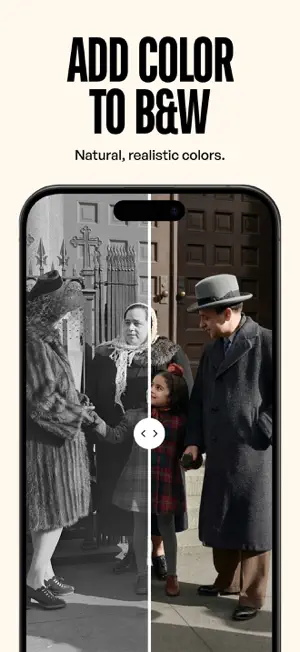
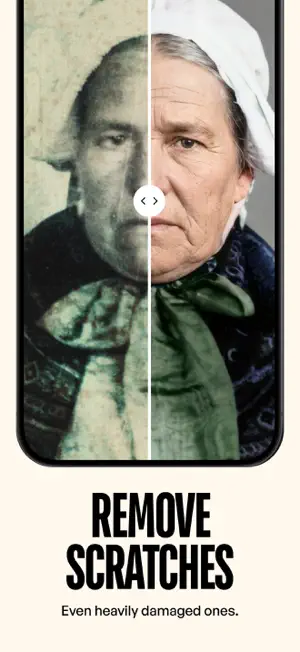
Your grandmother's wedding photo. Your parents as children. That faded print from the '70s — they all deserve to be seen the way they were meant to be. Restora is your AI photo restorer, here to breathe new life into old, damaged, or faded photographs. Pick a photo, tap once, and see it restored in seconds. • Colorize: Turn black-and-white and sepia photos into vivid, natural color. • Repair: Fix scratches, tears, creases, water damage, and stains. • Restore: Bring back contrast, brightness, and detail lost to time. • Sharpen: Improve clarity on blurry faces and fine details. • Preserve Faces: Every face stays recognizable and authentic. Always. How it works: 1. Pick an old photo from your camera roll — or take a picture of a physical print. 2. Tap once. Restora restores it in seconds. 3. Compare before and after with the interactive slider. 4. Save to your camera roll or share directly with family. Built for families. Large buttons, clear text, and a simple flow that anyone can use. No tutorials. No learning curve. Your first restoration is completely free. After that, $1.99 per photo or $29.99/year for unlimited restorations. No tricks. No hidden fees. Cancel anytime. No account required. No data collection. Your photos are processed securely and never stored on our servers. Terms of Use: https://restora.one/terms Privacy Policy: https://restora.one/privacy
What’s new
Version 1.3.1 · Updated April 12, 2026
What's New - The app is now fully available in English, Italian, Spanish, French, and German. Choose your language anytime in Settings. - While a photo is restoring, you’ll see clearer progress and a steadier before-and-after preview. - We refined the tab bar, the empty gallery, and the result screen so the app feels calmer and easier to use. - Subscription prices show in your local currency, with clearer plan choices. - We also fixed reliability issues and polished small details across the app. Every old photo deserves a second chance.
App privacy
The developer, MOKKA STUDIOS SRL, reported these privacy practices to Apple.
Data Used to Track You
The following data may be used to track you across apps and websites owned by other companies:
- Identifiers: Device ID
Data Not Linked to You
The following data, which may be collected but is not linked to your identity, may be used for the following purposes:
- Identifiers: Device ID, User ID
- Usage Data: Advertising Data, Product Interaction
- Purchases: Purchase History
- Diagnostics: Crash Data
- User Content: Photos or Videos
Used for: Developer’s Advertising or Marketing, Analytics, App Functionality
Alternatives to Restora — Old Photo Restore
Looking for apps like Restora — Old Photo Restore? Here are 6 similar apps on the App Store. The highest rated is PicRevive - Photo Restoration (5.0/5), and all 6 are free to download.
-
 Restore Old Photos: Fix Photo
-
 PicRevive - Photo Restoration
5.0
PicRevive - Photo Restoration
5.0
-
 Restore Old Photos - LumiFix
4.4
Restore Old Photos - LumiFix
4.4
-
 Photo Restoration Resizer Pfix
4.7
Photo Restoration Resizer Pfix
4.7
-
 Restore & Colorize Old Photos
-
 Old photo restore repair :
4.7
Old photo restore repair :
4.7
| App | Rating | Price | Last updated | Compare |
|---|---|---|---|---|
| Restora — Old Photo Restore | 3.0 / 5 (2 ratings) | Free | April 12, 2026 | |
| Restore Old Photos: Fix Photo | – | Free | Oct 5, 2025 | Compare |
| PicRevive - Photo Restoration | 5.0 / 5 (1) | Free | Sep 16, 2026 | Compare |
| Restore Old Photos - LumiFix | 4.4 / 5 (8) | Free | May 11, 2026 | Compare |
| Photo Restoration Resizer Pfix | 4.7 / 5 (3) | Free | Apr 14, 2026 | Compare |
| Restore & Colorize Old Photos | – | Free | Apr 4, 2026 | Compare |
| Old photo restore repair : | 4.7 / 5 (23) | Free | Jul 9, 2026 | Compare |