

Video Silence Remover: Jumpcut
Mila Araz Photo & Video iPhoneiPadiPod touch
Video Silence Remover: Jumpcut is a free Photo & Video app for iPhone and iPad by Mila Araz. Rated 4.3/5 from 27 ratings. Requires iOS 17.0.
- Rating
- 4.3
- 27 ratings
- Price
- Free
- on the App Store
- Size
- 37 MB
- Age 4+
- Updated
- Oct 22
- 2026 · v1.7.0
Screenshots



About Video Silence Remover: Jumpcut
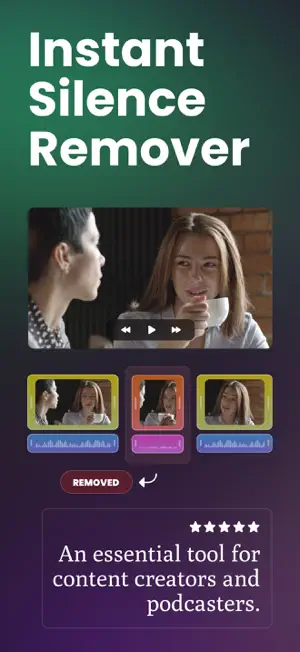
Introducing Jumpcut - smart audio cutter, audio cropper, video silence remover, and automatic caption generator for content creators. With our cutting-edge on-device machine learning model, you can easily import your video and let Jumpcut automatically detect and remove silent moments, saving you valuable editing time. Now with automatic on-device captions, you can generate subtitles for your videos instantly and customize their appearance to match your style. • Automatically remove silent parts from your audio and video • Generate captions automatically using on-device AI • Customize subtitle style (font, size, color, position, and background) • Save your editing settings as presets and reuse them anytime • Adjust the silence threshold to your preference • Eliminate unwanted audio blips and glitches • Preview your video before finalizing the cuts • Review each cut on the timeline and adjust it by hand if needed • Export your optimized video for your favorite social networks (Instagram, TikTok, Facebook, and more) • Boost video audio volume up to 300% for crystal-clear sound Key Features: • Instant Silence Remover: Swiftly eliminate silent sections with just one click. • Automatic Caption Generator: Create subtitles automatically with our powerful on-device AI. • Subtitle Style Customization: Personalize the look of your captions with flexible design controls. • Preset System: Save your favorite editing configurations and apply them instantly to future videos. • Audio Volume Booster: Amplify your video’s audio up to 300% while maintaining quality. • Advanced Audio Cutter & Cropper: Precisely trim and crop your audio tracks effortlessly. • Powerful On-Device Machine Learning: Our sophisticated ML model processes videos directly on your device. • Privacy First: All processing is done on-device, ensuring your content remains secure and private. • Offline Working: No internet connection needed, so you can edit your videos anywhere, anytime. • Seamless Integration: Effortlessly import your videos and let Jumpcut handle the rest. • Multi-File Processing: Remove silence from several videos or audio tracks simultaneously. • Background Processing: Continue using the app or your device while Jumpcut works silently in the background. Jumpcut is a must-have app for YouTubers, vloggers, and content creators who want to streamline their editing process and keep their audience engaged. With automatic silence removal, caption generation, subtitle customization, and reusable presets, you can produce polished videos faster than ever. Our state-of-the-art on-device machine learning technology ensures accurate silence detection, subtitle generation, and precise audio cutting and cropping, delivering professional-quality results. Say goodbye to tedious manual editing and hello to faster, smarter video creation. Download Jumpcut now and experience the power of instant silence removal, automatic captions, and powerful editing tools — all powered by advanced on-device machine learning. Let’s cut your editing time, so you can focus on creating amazing content! Terms & Conditions: https://milaapps.com/jumpcut/terms.html Privacy Policy: https://milaapps.com/jumpcut/privacy.html
Ratings & reviews
4.3
27 ratings
What’s new
Version 1.7.0 · Updated October 22, 2026
Jumpcut is now ready for iPhone Duo! Enjoy full big-screen support. • Layout optimized for the larger display • Bug fixes and performance improvements
App privacy
The developer, Mila Araz, reported these privacy practices to Apple.
Data Used to Track You
The following data may be used to track you across apps and websites owned by other companies:
- Identifiers: Device ID
Data Not Linked to You
The following data, which may be collected but is not linked to your identity, may be used for the following purposes:
- Identifiers: Device ID
- Usage Data: Other Usage Data
- Diagnostics: Crash Data, Performance Data
Used for: Analytics, Other Purposes
Alternatives to Video Silence Remover: Jumpcut
Looking for apps like Video Silence Remover: Jumpcut? Here are 6 similar apps on the App Store. The highest rated is Silence Remover (5.0/5), and all 6 are free to download.
-
 Remove Silence: Jump Cut Video
4.0
-
 JumpCut Teleprompter for Video
4.5
-
 Silence Remover - Auto Cut
-
 Video Splitter - BlitzCut AI
4.4
-
 Silence Remover
5.0
-
 Video Silence Remover
| App | Rating | Price | Last updated | Compare |
|---|---|---|---|---|
| Video Silence Remover: Jumpcut | 4.3 / 5 (27 ratings) | Free | October 22, 2026 | |
| Remove Silence: Jump Cut Video | 4.0 / 5 (7) | Free | Oct 2, 2026 | Compare |
| JumpCut Teleprompter for Video | 4.5 / 5 (2) | Free | Oct 14, 2026 | Compare |
| Silence Remover - Auto Cut | – | Free | Oct 22, 2026 | Compare |
| Video Splitter - BlitzCut AI | 4.4 / 5 (20) | Free | Oct 6, 2026 | Compare |
| Silence Remover | 5.0 / 5 (3) | Free | Sep 28, 2026 | Compare |
| Video Silence Remover | – | Free | Oct 15, 2026 | Compare |