

ImageFit: Photo Compressor
慧鑫 贾 Photo & Video iPhoneiPadiPod touch
ImageFit: Photo Compressor is a free Photo & Video app for iPhone and iPad by 慧鑫 贾. Rated 4.2/5 from 9 ratings. Requires iOS 17.0. Updated October 2, 2026.
- Rating
- 4.2
- 9 ratings
- Price
- Free
- on the App Store
- Size
- 22 MB
- Age 4+
- Updated
- Oct 2
- 2026 · v4.7.1
Screenshots

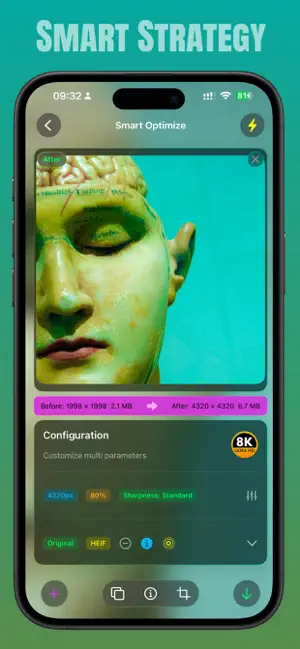
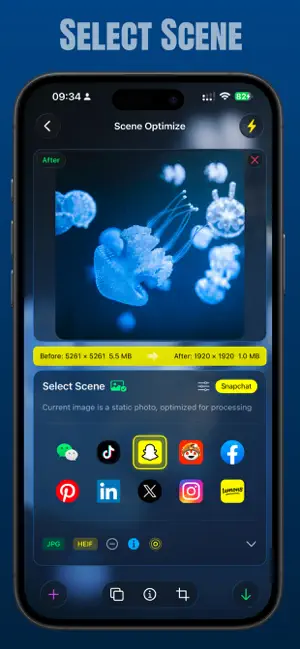
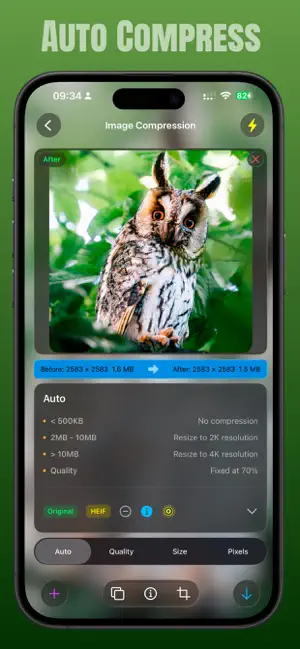
About ImageFit: Photo Compressor
Compress, resize, and convert photos without uploading them. ImageFit processes every image on your device, giving you practical control over file size, dimensions, quality, and format. MAKE PHOTOS FIT THE TASK Need a smaller email attachment, a specific pixel size, or a lighter image for sharing? Choose a target and export without working through complicated editing tools. CORE FEATURES • Photo compression — reduce file size while keeping the visual quality you need. • Image resizing — set custom width and height for exact pixel dimensions. • Target file size — choose an output-size goal and let ImageFit adjust quality and resolution for each photo. Actual results can vary with image content and format. • Quality control — tune output quality without changing dimensions. • Batch processing — prepare multiple photos in one workflow. • Social presets — quickly size images for common sharing situations. • Format conversion — export HEIC, JPEG, PNG, or WebP. • Optional watermarks — add your own mark when needed. PRIVATE BY DESIGN Your photos stay on your device during processing. No image upload is required. SIMPLE, PRECISE CONTROLS ImageFit keeps the essential tools easy to find. Select photos, choose compression, dimensions, quality, or format, then export the results. It is built for everyday limits without the clutter of a full photo editor. Use ImageFit to save storage, meet upload requirements, prepare attachments, and create consistently sized images for sharing. Questions or feedback: [email protected] Terms of Use: https://www.apple.com/legal/internet-services/itunes/dev/stdeula/
Ratings & reviews
4.2
9 ratings
What’s new
Version 4.7.1 · Updated October 2, 2026
Bug fixes and stability improvements. • Fixed a crash that could occur when displaying shutter speed in photo metadata • The photo picker now keeps its position and selection when you switch between editing modes • You can re-import photos right after clearing the editor • Original photos are now deleted as soon as the compressed copy is saved successfully Thank you for using ImageFit! If you have a moment, a rating on the App Store helps us a lot.
App privacy
The developer, 慧鑫 贾, reported these privacy practices to Apple.
Data Not Collected
The developer does not collect any data from this app.
Alternatives to ImageFit: Photo Compressor
Looking for apps like ImageFit: Photo Compressor? Here are 6 similar apps on the App Store. The highest rated is MarkMe. (5.0/5), and all 6 are free to download.
-
 PicTune - Music Live Photo
2.8
PicTune - Music Live Photo
2.8
-
 MarkMe.
5.0
MarkMe.
5.0
-
 Litti - HDR Reversal film
5.0
Litti - HDR Reversal film
5.0
-
 BiLens: Front & Back Camera
5.0
BiLens: Front & Back Camera
5.0
-
 Retouchr-AI Photo Editor & Cam
4.2
Retouchr-AI Photo Editor & Cam
4.2
-
 inPhotos Album
4.6
inPhotos Album
4.6
| App | Rating | Price | Last updated | Compare |
|---|---|---|---|---|
| ImageFit: Photo Compressor | 4.2 / 5 (9 ratings) | Free | October 2, 2026 | |
| PicTune - Music Live Photo | 2.8 / 5 (4) | Free | Sep 12, 2025 | Compare |
| MarkMe. | 5.0 / 5 (1) | Free | Sep 20, 2026 | Compare |
| Litti - HDR Reversal film | 5.0 / 5 (1) | Free | Oct 10, 2026 | Compare |
| BiLens: Front & Back Camera | 5.0 / 5 (6) | Free | Sep 15, 2026 | Compare |
| Retouchr-AI Photo Editor & Cam | 4.2 / 5 (5) | Free | Oct 31, 2026 | Compare |
| inPhotos Album | 4.6 / 5 (11) | Free | Sep 22, 2026 | Compare |