

BiLens: Front & Back Camera
ChaoYuan Zheng Photo & Video iPhoneiPadiPod touch
BiLens: Front & Back Camera is a free Photo & Video app for iPhone and iPad by ChaoYuan Zheng. Rated 5.0/5 from 6 ratings. Requires iOS 14.0.
- Rating
- 5.0
- 6 ratings
- Price
- Free
- on the App Store
- Size
- 8 MB
- Age 4+
- Updated
- Sep 15
- 2026 · v1.2.9
Screenshots


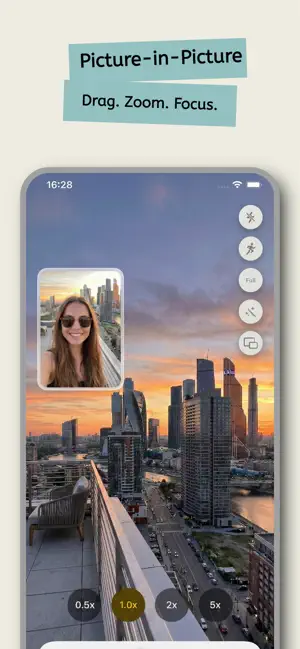
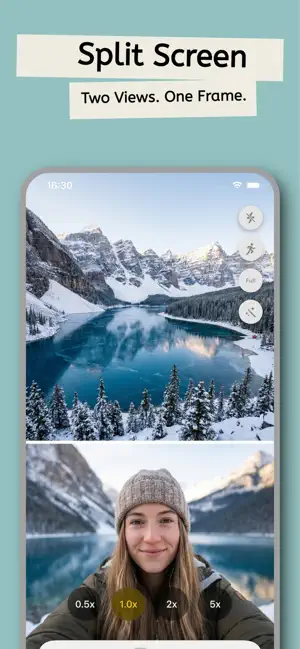
About BiLens: Front & Back Camera
BiLens — Two Cameras, One Perfect Shot You don't need the latest iPhone to shoot with both cameras at once. BiLens uses your front and rear cameras simultaneously, capturing two perspectives in a single shot to make your photos and videos more lively and fun. Travel vlogs, parent-and-child moments, food and street exploring, everyday memories — capture it all in one shot. 【Dual Cameras, Shot Together】 Turn on the front and rear cameras at the same time and capture both views with one tap. The front camera records your reaction while the rear captures the scene in front of you — truly "what you see is what you shoot." 【Live Photos】 Your dual-camera shots can be Live Photos too. Just touch and hold to replay the motion and sound of the moment, with support for 48MP high-resolution Live Photos. 【Flexible Layouts】 - Picture-in-Picture: a rectangular or circular window you can freely drag and resize; two-finger tap to switch shapes instantly - Top/Bottom or Left/Right split screen: both views shown equally - Diagonal split: left- or right-leaning creative framing for a distinctive look - Swap the main and secondary cameras with one tap for full control over your angles 【Pro-Level Capture】 - Up to 48MP high-resolution photos and 1080p / 4K ultra-clear video - Selectable 24/30/60fps frame rates with video stabilization - Zoom from 0.5x ultra-wide to 5x telephoto - Multiple ratios: Full, 16:9, 4:3, 5:4, 1:1, 9:16 - Portrait-and-landscape cinematic mode with 4:3 recording 【Beauty & Color】 - Skin smoothing and brightening beauty effects, rendered in real time with high-performance Metal — for both photos and video - Fine-tune with the color panel: brightness, contrast, saturation, grain, coarse grain and more - A range of filters and film-grain textures to give your shots more character 【Photo Editor】 Fine-tune every shot right after you capture it: - Text tool: horizontal or vertical layouts, multiple fonts, one-tap outlines and background colors - Smart eyedropper: pick any color straight from your photo for perfectly matched styling (Live Photos too) - Aspect-ratio fill: switch ratios and your image fills the crop frame automatically - Export in original quality, with date and location preserved 【Teleprompter】 No script memorizing for vlogs or pieces to camera: on-screen floating prompts with adjustable speed and font size let you speak smoothly right into the lens. 【Tap to Focus & Exposure Control】 Tap anywhere on screen for precise focus, swipe up or down to adjust exposure, and press and hold to lock focus and exposure (AE/AF Lock). 【Date & Location Watermark】 - Multiple time formats: 24-hour, 12-hour, US/Europe/Asia styles, ISO 8601 and more - Multiple location formats: city name, GPS coordinates, full address, altitude and more - Pin the watermark to any corner or drag it freely; adjustable opacity, lockable to prevent accidental moves, with custom text support 【Shooting Countdown】 3-, 5-, or 10-second timer, perfect for selfies and group photos. 【Audio Settings】 Choose mono or stereo, with AAC or Apple Lossless audio quality. 【Flexible Photo Saving】 - Merged: a single photo containing both camera views - Separate: the merged photo plus the original front and rear shots — 3 photos in total - Orientation and metadata handled just like the native camera 【More Details】 - Grid lines to help you compose, with customizable PiP border color and thickness - An easy onboarding guide, a clean and elegant interface, and smooth performance Have suggestions or feedback? Reach us anytime through the in-app "Feedback & Suggestions" feature.
Ratings & reviews
5.0
6 ratings
What’s new
Version 1.2.9 · Updated September 15, 2026
New Features • Pause and resume video recording, and take photos while recording. • New full-screen teleprompter with double-tap switching between floating and full-screen modes, plus a first-use guide. • Save merged, front-camera, and rear-camera videos together in dual-camera mode. • Tap the watermark to cycle through location display formats. Improvements • Improved preview stability during recording, photo capture, and camera switching. • Optimized speech-following highlights, editing, and layout for long teleprompter scripts. • Optimized video and Live Photo processing to reduce redundant rendering and resource use. • Improved long watermark text layout and Live Photo divider opacity consistency. • Refined recording control animations and expanded swipe areas for filters and color adjustments. • Simplified capture save options and added retry support when video saving fails.
App privacy
The developer, ChaoYuan Zheng, reported these privacy practices to Apple.
Data Not Collected
The developer does not collect any data from this app.
Alternatives to BiLens: Front & Back Camera
Looking for apps like BiLens: Front & Back Camera? Here are 6 similar apps on the App Store. The highest rated is BiCamera: Dual Camera & Video (5.0/5), and all 6 are free to download.
-
 BiCamera: Dual Camera & Video
5.0
BiCamera: Dual Camera & Video
5.0
-
 CPCam
5.0
CPCam
5.0
-
 Filmix Camera
5.0
Filmix Camera
5.0
-
 TutuType - Text on Path
4.9
TutuType - Text on Path
4.9
-
 PaPop
3.0
PaPop
3.0
-
 Tinge - Color Palette
5.0
Tinge - Color Palette
5.0
| App | Rating | Price | Last updated | Compare |
|---|---|---|---|---|
| BiLens: Front & Back Camera | 5.0 / 5 (6 ratings) | Free | September 15, 2026 | |
| BiCamera: Dual Camera & Video | 5.0 / 5 (7) | Free | Oct 12, 2026 | Compare |
| CPCam | 5.0 / 5 (1) | Free | Aug 30, 2026 | Compare |
| Filmix Camera | 5.0 / 5 (2) | Free | Oct 17, 2026 | Compare |
| TutuType - Text on Path | 4.9 / 5 (16) | Free | Aug 26, 2026 | Compare |
| PaPop | 3.0 / 5 (2) | Free | Sep 27, 2026 | Compare |
| Tinge - Color Palette | 5.0 / 5 (2) | Free | May 10, 2026 | Compare |