

CPCam
永强 彭 Photo & Video iPhoneiPadiPod touchApple Watch
CPCam is a free Photo & Video app for iPhone and iPad by 永强 彭. Rated 5.0/5 from 1 ratings. Requires iOS 15.0. Updated August 30, 2026.
- Rating
- 5.0
- 1 ratings
- Price
- Free
- on the App Store
- Size
- 62 MB
- Age 4+
- Updated
- Aug 30
- 2026 · v2.6
Screenshots


About CPCam
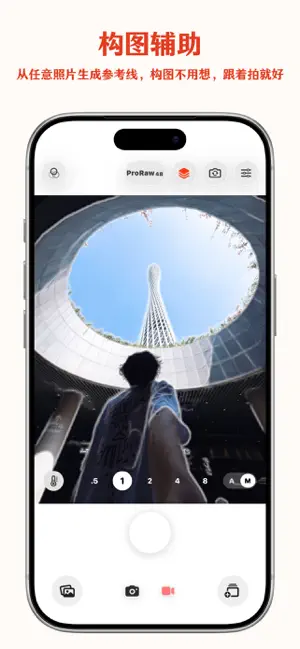
CPCam is a composition-assistant and film-style camera app. You can import any reference photo or use built-in templates, and combine them with AI composition assistance (configure an API key to receive framing suggestions). The app generates contour guides on device and overlays them in the live viewfinder, helping you quickly align poses, framing, camera position, and aspect ratios. Great for: - Recreating reference compositions while traveling - Aligning poses for selfies, group photos, outfits, and café or store shots - Creating covers for Xiaohongshu, Instagram, and short-form videos - Getting film-style photos in one tap while retaining manual control - Shooting high-quality photos, unsharpened ProRAW images, or video Key features: - Reference contour overlay: convert reference photos into clean outlines and overlay them on the viewfinder for composition guidance - AI composition assistant: analyzes the current view, suggests framing, and automatically applies optimal focal length, white balance, exposure, and other camera settings - Multiple contour modes: full image, subject only, subject with internal structure, or original-image overlay - Curated templates: use built-in shooting templates or import and reuse your own reference images - Auto capture: automatically trigger the shutter when the subject and composition are steadily aligned - Film filters: preview and render a wide range of film-inspired looks in real time - Film bracketing: create multiple film-style versions with one press of the shutter for quick comparison - ProRAW capture: shoot unsharpened ProRAW photos for greater editing flexibility - Film editing: apply film-inspired edits to photos and continue your creative workflow - Video recording: record high-quality video at up to 4K or 240 fps - 48MP photography: capture high-resolution photos at up to 48 megapixels - Auto/Manual modes: switch between automatic and manual controls for a flexible shooting experience - Grain effects: add adjustable film grain for an authentic analog texture - Beauty and fill light: adjust beauty effects, front fill light, and multiple light colors - Half-frame color card: apply and adjust a half-frame color-card effect during import - Date watermark: customize timestamp style, position, alignment, and size - Post-import editing: adjust filters, beauty, grain, and half-frame effects for imported photos On-device processing and privacy: Reference imports, contour extraction, filter rendering, automatic matching, and photo saving are processed on device. When you use AI Composition Assist, the current camera frame is sent to the selected AI service to generate composition suggestions. The app requests camera, photo library read/write, and optional location permissions only when needed. Privacy Policy: https://storm-salamander-137.notion.site/Privacy-Policy-2ef934e1a39b80bd8f19feb07917351b/ Terms of Use (EULA): https://www.apple.com/legal/internet-services/itunes/dev/stdeula/
What’s new
Version 2.6 · Updated August 30, 2026
• Added four film filters: C200, RCP400, Vivid, and Hasselblad Blue, with refreshed filter icons. • Improved AI Composition Assist tracking by combining visual and motion data for steadier alignment and more forgiving center matching. • Fixed AI Composition Assist failures with Kimi models. • Automatically returns to 1x after completing an AI Composition Assist capture.
App privacy
The developer, 永强 彭, reported these privacy practices to Apple.
Data Not Collected
The developer does not collect any data from this app.
Alternatives to CPCam
Looking for apps like CPCam? Here are 6 similar apps on the App Store. The highest rated is v.a.c.s. (5.0/5), and all 6 are free to download.
-
 LensMentor
4.5
LensMentor
4.5
-
 Sfuma: AI Cam &Photo Coach
-
 Nex Fotos - Pro Camera
3.0
Nex Fotos - Pro Camera
3.0
-
 v.a.c.s.
5.0
v.a.c.s.
5.0
-
 Cammo: Film Camera & Darkroom
5.0
Cammo: Film Camera & Darkroom
5.0
-
 MarkMe.
5.0
MarkMe.
5.0
| App | Rating | Price | Last updated | Compare |
|---|---|---|---|---|
| CPCam | 5.0 / 5 (1 rating) | Free | August 30, 2026 | |
| LensMentor | 4.5 / 5 (2) | Free | Oct 5, 2026 | Compare |
| Sfuma: AI Cam &Photo Coach | – | Free | Oct 1, 2026 | Compare |
| Nex Fotos - Pro Camera | 3.0 / 5 (4) | Free | Sep 28, 2026 | Compare |
| v.a.c.s. | 5.0 / 5 (3) | Free | Mar 28, 2026 | Compare |
| Cammo: Film Camera & Darkroom | 5.0 / 5 (1) | Free | Sep 24, 2026 | Compare |
| MarkMe. | 5.0 / 5 (1) | Free | Sep 20, 2026 | Compare |
Compare CPCam with the top alternatives: ratings, updates, ASO score and keyword gaps →