

inPhotos Album
志雄 孙 Photo & Video iPhoneiPadiPod touch
inPhotos Album is a free Photo & Video app for iPhone and iPad by 志雄 孙. Rated 4.6/5 from 11 ratings. Requires iOS 15.0. Updated September 22, 2026.
- Rating
- 4.6
- 11 ratings
- Price
- Free
- on the App Store
- Size
- 225 MB
- Age 17+
- Updated
- Sep 22
- 2026 · v2.50.0
Screenshots



About inPhotos Album
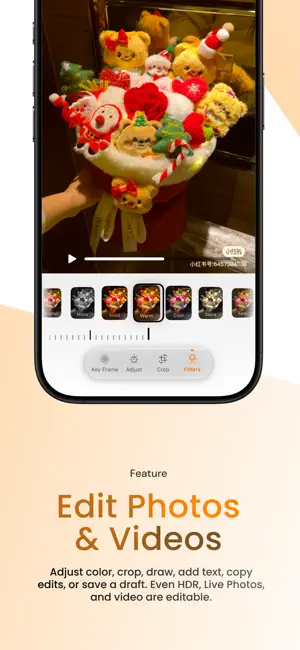
How many photos in your library have you only seen once? A photo can hold a trip, a dinner, or an ordinary afternoon you'll never have again. inPhotos helps you rediscover it in a crowded library, really see it, and make something of it. FIND YOUR WAY BACK Move between grid, waterfall, calendar, and year views. Filter, sort, and jump through the timeline to the day you want. Rounded cards, soft gradient blur, and large album headers let your library feel like yours. SEE THE WHOLE PICTURE Enjoy HDR, Live Photos, videos, GIFs, and RAW files. Color insights, histograms, and customizable info cards reveal more about each image. Loop a Live Photo, play it back and forth, or turn it into a long exposure. On supported devices, try the 3D photo effect. MAKE THE MOMENT YOURS Edit photos, Live Photos, and videos with color tools, filters, crop and perspective controls, drawing, and text. Save an unfinished idea as a draft, then pick up where you left off. Copy edits to carry a favorite look across photos. Export a frame from a video or turn a Live Photo into a video. GIVE MEMORIES A PLACE Organize with albums and folders; revisit recent imports by date. Choose photos, add music, and let a slideshow tell their story again. iCloud can sync your app settings and preferences, not your photos. Open inPhotos and take another look at the life you captured.
Ratings & reviews
4.6
11 ratings
What’s new
Version 2.50.0 · Updated September 22, 2026
inPhotos 2.50: Rediscover your photos. We've reworked the things we do most often in a photo library: returning to a day, lingering over an image, saving a frame from a video, editing, and reliving it all. Here is what you can try in this release: 1 | FIND YOUR WAY BACK TO THAT DAY New calendar and year views make it easier to browse by time, with a layout toolbar for quick switching. Choose rounded cards, gradient blur, or a large album header. You can even adjust the position and size of dates in the calendar. The timeline sidebar reveals more precise time information as you slow down or stop scrolling. Focus playback now includes HDR and 3D photos. We also refined pinch-to-zoom, layout, and scrolling, and fixed incorrect ordering with some sort options. 2 | A VIEWER WORTH LINGERING IN The redesigned viewer brings HDR, RAW, GIFs, video, and Live Photos together. New color insights and a histogram help you read the image; corner actions, info cards, the filmstrip, and playback controls can be arranged to suit you. Loop a Live Photo, play it back and forth, make a long exposure, or scrub to the exact moment you want. You can also export its video quickly. The classic filmstrip has been refined for browsing and dragging. 3 | KEEP THE FRAME YOU ALMOST MISSED Super Capture can mark and export multiple high-resolution video frames at once. When a video is paused, save the current frame directly—no repeated screenshots and cropping just to keep a moment. 4 | EDIT MORE THAN STILL PHOTOS Trim a Live Photo or choose a new key photo; trim video and adjust its speed. Color controls, filters, drawing, text, and more complete crop, rotation, perspective, and aspect-ratio tools are now part of the editor. Save work as a draft, copy edits to other photos, or undo and revert a change. Export HDR photos, HDR Live Photos, and HDR video, with a custom filename when saving or sharing. 5 | ALBUMS THAT ARE EASIER TO EXPLORE Swipe between categories on the new album home. Recent Activity groups imports by date. Organize uncategorized albums, customize categories, and keep your last sort and filter choices. 6 | PUT YOUR MEMORIES IN MOTION Pick photos and start a slideshow with four transitions, looping playback, and music from your library or an imported audio file. 7 | ADD A LITTLE DEPTH Try the 3D photo effect on devices that meet the system requirements, and fine-tune its settings. 8 | THE FINISHING TOUCHES App settings and preferences can now sync through iCloud (photos are not included). Copy a short link to a photo or album and open it again on the same device; cross-device links aren't supported yet. We've also adapted the app to the iOS 27 appearance and fixed issues around deleting and updating photos. If you discover a detail you love, please tell us. We'll keep refining it.
App privacy
The developer, 志雄 孙, reported these privacy practices to Apple.
Data Not Linked to You
The following data, which may be collected but is not linked to your identity, may be used for the following purposes:
- Usage Data: Product Interaction, Advertising Data, Other Usage Data
- Diagnostics: Crash Data, Performance Data, Other Diagnostic Data
Used for: Analytics
Alternatives to inPhotos Album
Looking for apps like inPhotos Album? Here are 6 similar apps on the App Store. The highest rated is SnapX Pro: Save Your Moments (5.0/5), and 5 of the 6 are free to download.
-
 微商截图神器-聊天长截图、微商文案、批量视频转实况
3.1
微商截图神器-聊天长截图、微商文案、批量视频转实况
3.1
-
 PickBox - Photo Cleaner App
4.9
PickBox - Photo Cleaner App
4.9
-
 AirCull: Photo Cleaner
4.6
AirCull: Photo Cleaner
4.6
-
 Photo Booth – Vintage camera
-
 AI Image Generator: PicEdit.ai
-
 SnapX Pro: Save Your Moments
5.0
SnapX Pro: Save Your Moments
5.0
| App | Rating | Price | Last updated | Compare |
|---|---|---|---|---|
| inPhotos Album | 4.6 / 5 (11 ratings) | Free | September 22, 2026 | |
| 微商截图神器-聊天长截图、微商文案、批量视频转实况 | 3.1 / 5 (23) | Free | Jul 17, 2026 | Compare |
| PickBox - Photo Cleaner App | 4.9 / 5 (31) | Free | Oct 16, 2026 | Compare |
| AirCull: Photo Cleaner | 4.6 / 5 (10) | Free | Oct 7, 2026 | Compare |
| Photo Booth – Vintage camera | – | Free | Sep 23, 2026 | Compare |
| AI Image Generator: PicEdit.ai | – | Free | Jun 4, 2025 | Compare |
| SnapX Pro: Save Your Moments | 5.0 / 5 (1) | 1.99 USD | Jul 29, 2025 | Compare |
Compare inPhotos Album with the top alternatives: ratings, updates, ASO score and keyword gaps →