

TrimCut - Video Editor
CLIPCUT TECHNOLOGY LIMITED Photo & Video iPhoneiPadiPod touch
TrimCut - Video Editor is a free Photo & Video app for iPhone and iPad by CLIPCUT TECHNOLOGY LIMITED. Rated 4.3/5 from 78 ratings. Requires iOS 15.0.
- Rating
- 4.3
- 78 ratings
- Price
- Free
- on the App Store
- Size
- 197 MB
- Age 17+
- Updated
- Oct 26
- 2026 · v3.2.26
Screenshots

About TrimCut - Video Editor
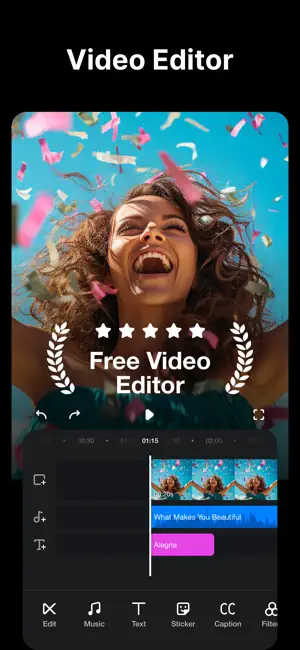
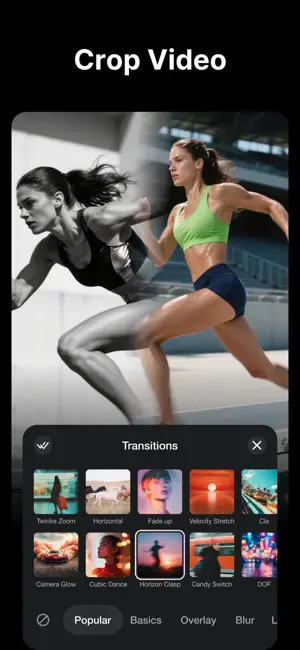
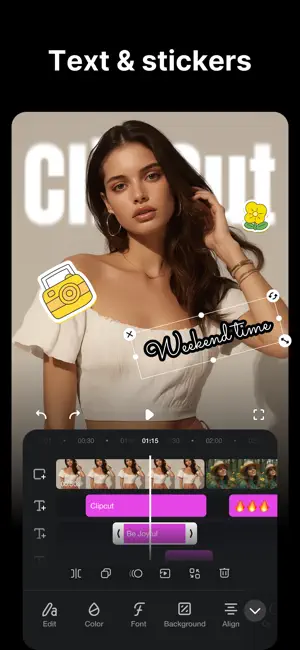
Unleash your creativity with TrimCut: your all-in-one video editing studio and pro retouching app. Use our powerful AI tools, slow-motion effects, auto captions and background removal to transform your ideas into captivating stories for Reels, YouTube and FaceBook! Powerful AI Tools • AI Retouch: Smooth skin, eliminate blemishes and wrinkles, whiten teeth, you can easily create flawless videos for social media. • Auto Captions: Generate accurate subtitles or lyrics with a single tap. Perfect for making your YouTube stories or Instagram Reels accessible and engaging. • AI Remove Background: Instantly remove your video's background with one tap. • Slow-motion effects: Transform your moment into smooth and cinematic sequences that heighten the drama and emotion. • Auto Adjust: Automatically balances colors and lighting to make your videos or vlogs look their best. Basic Video Editing • Trim & Merge: Seamlessly stitch multiple clips together. • Speed Adjustment: Precisely control the pace of your video with customizable speed curves. • Easy Reordering & Deletion: Manage your clips intuitively with drag-and-drop. • Draft Saving: Save your projects anytime and undo/redo with confidence. Advanced Video Editing • Picture-in-Picture (PIP): Layer multiple video clips to create dynamic content. • Multi-Track Timeline: Easily overlay videos, photos, stickers, and text on a user-friendly timeline. • Blur Video: Artfully blur the background to make yourself stand out, or add a dreamy haze to a memory, turning ordinary clips into professional-looking scenes. Text & Brush Tools • Use playful texts and draw directly on your video to highlight a moment, wish someone a happy birthday, or create a unique viral clip. Trending Filters & Effects • Professional Effects: Access a rich library of glitch, transition, VHS, and FX effects. • Cinematic Filters: Apply movie-style filters to your videos to set the perfect mood. Photo to Video Templates • Turn your favorite photos into stunning videos in seconds. • Choose from trending templates with cinematic transitions, stylish effects, and perfectly synced music. • Simply select your photos and let TrimCut automatically create eye-catching slideshows, travel stories, birthday videos, memories, and social media clips. • Customize text, filters, music, and timing to make every video uniquely yours. • Perfect for Reels, TikTok, Shorts, YouTube, and Instagram. Music & Sound • Explore a vast library of music to find the perfect audio match for your video • Music Beat Detection: Automatically add markers to sync your edits with the music's rhythm, taking your videos to the next level. • Adjust sound: Easily make your voice clear over the music, or emphasize a key moment with a sound effect boost. Easy to Share • 4K HD & GIF Export: Save and share your creations in stunning 4K quality or as fun GIFs. • One-Tap Sharing: Directly share your masterpieces to your favorite social platforms. TrimCut Pro Unlimited Subscription - Subscription type: Weekly, Monthly, Yearly. - Subscription automatically renews unless auto-renew is turned off at least 24-hours before the end of the current period. - Subscriptions may be managed by the user and auto-renewal may be turned off by going to the user's Account Settings after purchase. - Any unused portion of a free trial period will be forfeited when the user purchases a subscription. - Payment will be charged to iTunes Account at confirmation of purchase. - An account will be charged for renewal within 24 hours prior to the end of the current period. The cost depends on the selected plan. Privacy Policy: https://pzmobile.com/app/en/policy Terms of Use: https://pzmobile.com/app/en/terms
Ratings & reviews
4.3
78 ratings
What’s new
Version 3.2.26 · Updated October 26, 2026
Bug fixes and performance improvements
App privacy
The developer, CLIPCUT TECHNOLOGY LIMITED, reported these privacy practices to Apple.
Data Used to Track You
The following data may be used to track you across apps and websites owned by other companies:
- Diagnostics: Crash Data
Data Not Linked to You
The following data, which may be collected but is not linked to your identity, may be used for the following purposes:
- Usage Data: Advertising Data
- Diagnostics: Crash Data
Used for: Analytics, App Functionality
Alternatives to TrimCut - Video Editor
Looking for apps like TrimCut - Video Editor? Here are 6 similar apps on the App Store. The highest rated is YouCut - AI Video Editor (4.8/5), and all 6 are free to download.
-
 YouCut - AI Video Editor
4.8
YouCut - AI Video Editor
4.8
-
 Adobe Premiere AI Video Editor
4.8
Adobe Premiere AI Video Editor
4.8
-
 Background Eraser - Remove BG*
4.8
Background Eraser - Remove BG*
4.8
-
 VITA - Video Editor & Maker
4.8
VITA - Video Editor & Maker
4.8
-
 Remove Objects: AI Retouch
4.8
Remove Objects: AI Retouch
4.8
-
 Cymera・Photo Cam Beauty Editor
4.7
Cymera・Photo Cam Beauty Editor
4.7
| App | Rating | Price | Last updated | Compare |
|---|---|---|---|---|
| TrimCut - Video Editor | 4.3 / 5 (78 ratings) | Free | October 26, 2026 | |
| YouCut - AI Video Editor | 4.8 / 5 (23,518) | Free | Aug 19, 2026 | Compare |
| Adobe Premiere AI Video Editor | 4.8 / 5 (27,095) | Free | Oct 27, 2026 | Compare |
| Background Eraser - Remove BG* | 4.8 / 5 (4,743) | Free | Jul 23, 2026 | Compare |
| VITA - Video Editor & Maker | 4.8 / 5 (78,129) | Free | Aug 13, 2026 | Compare |
| Remove Objects: AI Retouch | 4.8 / 5 (1,078) | Free | Oct 28, 2026 | Compare |
| Cymera・Photo Cam Beauty Editor | 4.7 / 5 (4,325) | Free | Sep 16, 2026 | Compare |