

Splitink: Split Bills & Budget
IGLU s.r.l.s. Finance iPhoneiPadiPod touch
Splitink: Split Bills & Budget is a free Finance app for iPhone and iPad by IGLU s.r.l.s. Requires iOS 15.6. Updated September 21, 2026.
- Price
- Free
- on the App Store
- Size
- 161 MB
- Age 4+
- Updated
- Sep 21
- 2026 · v1.3.0
Screenshots

About Splitink: Split Bills & Budget
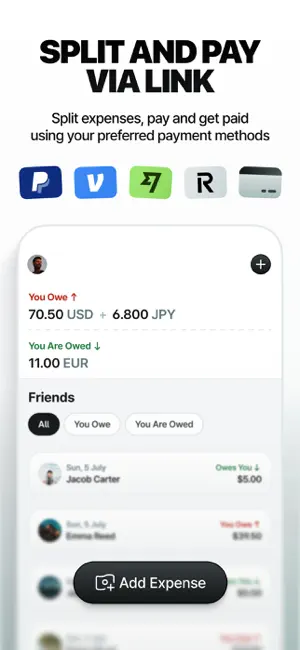
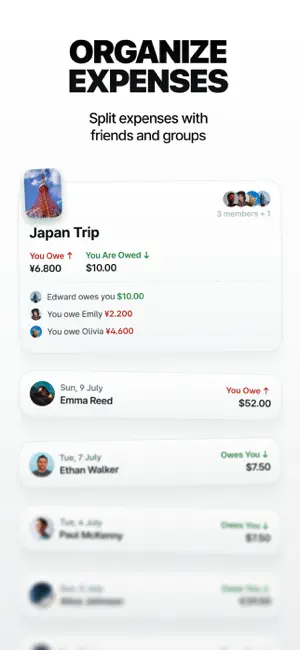
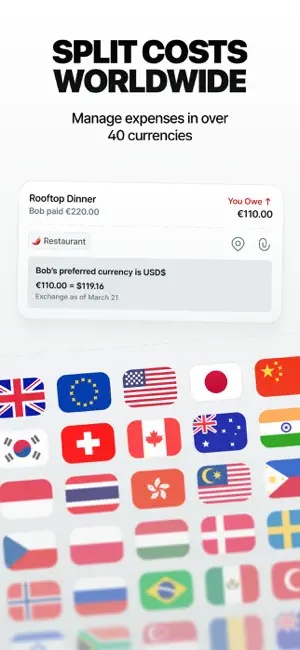
Managing money with others or on your own shouldn’t be complicated. With Splitink, you can split bills, track shared expenses, manage your personal spending, and settle up in seconds. Use it with a group, with one friend, or just for yourself. Perfect for trips, roommates, couples, everyday shared costs, and personal budgeting. WHY PEOPLE CHOOSE SPLITINK • Track personal and shared expenses in one place • Split bills easily in groups or one to one • Always know who paid and who owes what • Set a monthly budget and keep track of your spending • Use multiple currencies with automatic conversion • Settle up through PayPal, Wise, Revolut, or bank transfer • Explore detailed insights for your personal spending, friends, and groups You enjoy what matters. Splitink handles the math. PERSONAL BUDGETING Keep track of your everyday spending directly in Splitink. Set a monthly budget, add personal expenses, and understand where your money goes with detailed insights and category breakdowns. Customize your dashboard with the charts and insights you care about, and compare your spending over time. If you spend in different currencies, Splitink automatically converts every expense into your preferred currency, so your budget and insights always stay consistent. SPLIT EXPENSES YOUR WAY Whether you’re sharing rent with a roommate, planning a trip with friends, splitting dinner with your partner, or managing everyday costs, Splitink adapts to every situation. Choose how to split each expense: • Equally • By exact amount • By percentage • By shares • With custom adjustments Add notes, categories, dates, locations, and more to keep every expense organized. UNDERSTAND HOW YOU SPEND TOGETHER Get a clearer view of your spending with one friend or across an entire group. See: • Total and average spending • Who paid more • Category breakdowns • Spending trends over time • Insights for individual friends and groups Everything stays clear, whether you’re traveling together or managing everyday expenses at home. PAY THE WAY YOU PREFER Choose how you want to receive money with PayPal, Wise, Revolut, or your bank details. When it’s time to settle up, everyone knows exactly how much they owe and how to pay. FULL CONTROL, FULL PRIVACY Splitink never asks for your payment service login credentials. Payments are completed directly through the service you choose. FEATURES • Personal expense tracking • Monthly personal budget • Customizable personal dashboard • Personal spending insights • Split expenses equally, by amount, percentage, or shares • Groups and one to one expenses • Notes, categories, dates, and locations • Multi currency conversion • Recurring expenses • Smart reminders • Advanced filters • Custom categories • Insights for groups and individual friends • PayPal, Wise, Revolut, and bank transfer support • Group Pass, which lets one Plus member unlock Plus features for the entire group SPLITINK PLUS Upgrade to Splitink Plus for unlimited expenses, advanced tools, deeper insights, and the ability to enable Group Pass for your groups. Available as a monthly, yearly, or one time purchase, with Purchasing Power Parity supported. Track your spending. Split smarter. Terms of use: https://www.apple.com/legal/internet-services/itunes/dev/stdeula
What’s new
Version 1.3.0 · Updated September 21, 2026
Splitink 1.3 is here! With this update we’re introducing Personal Budgeting, giving you a new way to track and manage your everyday spending alongside shared expenses. Set a monthly budget, explore detailed insights and category breakdowns, customize your dashboard, and keep everything consistent with automatic currency conversion.
App privacy
The developer, IGLU s.r.l.s., reported these privacy practices to Apple.
Data Used to Track You
The following data may be used to track you across apps and websites owned by other companies:
- Usage Data: Advertising Data
Data Linked to You
The following data, which may be collected and linked to your identity, may be used for the following purposes:
- Contact Info: Email Address, Name
- Identifiers: User ID, Device ID
Used for: App Functionality
Data Not Linked to You
The following data, which may be collected but is not linked to your identity, may be used for the following purposes:
- Usage Data: Advertising Data, Product Interaction
- Diagnostics: Crash Data, Performance Data, Other Diagnostic Data
- Location: Coarse Location
Used for: Third-Party Advertising, Analytics, App Functionality
Alternatives to Splitink: Split Bills & Budget
Looking for apps like Splitink: Split Bills & Budget? Here are 6 similar apps on the App Store. The highest rated is WhoPays AI: Group expenses (5.0/5), and all 6 are free to download.
-
 Splitie – Split & Settle Bills
-
 JeySplit - Split Expenses
-
 Splittalo: Split Bills & Tips
-
 WhoPays AI: Group expenses
5.0
WhoPays AI: Group expenses
5.0
-
 Divvy Bills: Split Expenses
1.0
Divvy Bills: Split Expenses
1.0
-
 Expenses Split
4.2
Expenses Split
4.2
| App | Rating | Price | Last updated | Compare |
|---|---|---|---|---|
| Splitink: Split Bills & Budget | – | Free | September 21, 2026 | |
| Splitie – Split & Settle Bills | – | Free | Oct 7, 2026 | Compare |
| JeySplit - Split Expenses | – | Free | Jul 29, 2026 | Compare |
| Splittalo: Split Bills & Tips | – | Free | Apr 8, 2026 | Compare |
| WhoPays AI: Group expenses | 5.0 / 5 (1) | Free | Apr 18, 2026 | Compare |
| Divvy Bills: Split Expenses | 1.0 / 5 (1) | Free | Oct 1, 2026 | Compare |
| Expenses Split | 4.2 / 5 (5) | Free | Jul 7, 2026 | Compare |