

WhoPays AI: Group expenses
Volodymyr Bilous Finance iPhoneiPadiPod touch
WhoPays AI: Group expenses is a free Finance app for iPhone and iPad by Volodymyr Bilous. Rated 5.0/5 from 1 ratings. Requires iOS 14.0.
- Rating
- 5.0
- 1 ratings
- Price
- Free
- on the App Store
- Size
- 35 MB
- Age 4+
- Updated
- Apr 18
- 2026 · v1.18
Screenshots

About WhoPays AI: Group expenses
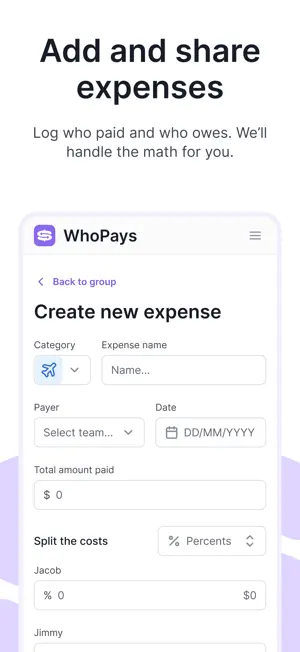
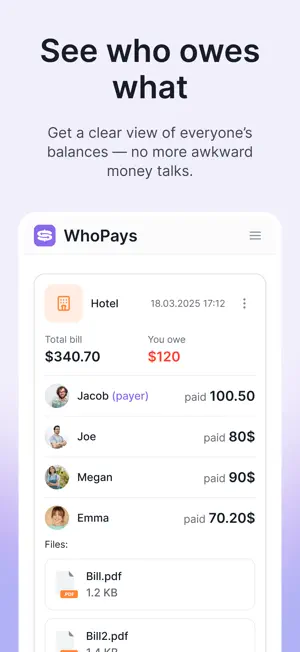
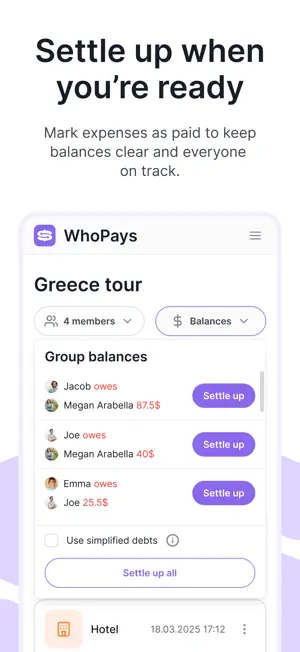
WhoPays makes sharing money with friends, roommates, couples, or travel groups effortless and fair. Whether it’s a weekend trip, household costs, dinner, or any shared expense—stop doing mental math and let WhoPays handle the rest. Key Features: - Group & Participant Management: Create groups for trips, apartments, events, or couples. Invite others via link or email and manage members easily. - Flexible Expense Tracking: Add, edit, and delete expenses with descriptions, receipts/photos, and notes. Split equally, by share, percentage, or custom amounts. - Currencies Support: Use 150+ currencies. Set a group currency and create expenses, view balances, and settle up in any currency. - AI Receipt Scanner: Snap a photo of a receipt and automatically capture line items and currency. - AI Assistant: Record a voice message and let WhoPays recognize the category, name, date, currency, payer, and each participant’s amounts. - Real-Time Balances: See who owes whom instantly; balances update across devices so everyone stays in sync. - Settle Up Smoothly: Mark payments, settle debts, and close out balances with clarity—no more awkward IOUs. - Detailed Summary & Reports: Categorize expenses, view totals per person or category, and get clear breakdowns so you know where the money went. - Detailed History: View a clear history of all expenses, edits, and settlements for each group so you always know who added what and when. - Invite & Share: Share the group with friends via a link; join with minimal friction. - Cross-Platform Sync: Use WhoPays on iOS and web - everything stays consistent whether you’re on your phone or desktop. - Notifications: Remind group members about unsettled balances or new expenses. - Attachments: Attach photos or files to expenses (e.g., receipts) for transparency. Why WhoPays? No more guessing, awkward paybacks, or lost receipts. WhoPays is built for real people sharing real costs — simple, transparent, and fair. Use Cases: - Split trip costs among travelers - Share rent and utilities with roommates - Track a couple or family expenses - Settle group dinners, gifts, events - Manage shared project or hobby spending Use AI-powered receipt scanning and voice input to speed up all of these scenarios, so your group can focus on the fun — not the math. Getting Started: - Create a group. - Invite members. - Log expenses. - See balances and settle up. Download WhoPays and take the stress out of shared money. Terms of Use: https://who-pays.com/terms
What’s new
Version 1.18 · Updated April 18, 2026
Improving the app’s logic and UI
App privacy
The developer, Volodymyr Bilous, reported these privacy practices to Apple.
Data Linked to You
The following data, which may be collected and linked to your identity, may be used for the following purposes:
- Contact Info: Email Address, Name
- User Content: Photos or Videos
- Identifiers: User ID
- Diagnostics: Crash Data
Used for: App Functionality
Alternatives to WhoPays AI: Group expenses
Looking for apps like WhoPays AI: Group expenses? Here are 6 similar apps on the App Store. The highest rated is Subscription Day. Calendar (4.8/5), and all 6 are free to download.
-
 Subscription Day. Calendar
4.8
-
 GreenBooks: Money Manager
4.7
-
 Split Bills - Easy Split Check
-
 MidFirst Bank Business Mobile
1.5
-
 Splital - Bill Splitter
4.5
-
 MoneyWiz 2026 Personal Finance
4.6
| App | Rating | Price | Last updated | Compare |
|---|---|---|---|---|
| WhoPays AI: Group expenses | 5.0 / 5 (1 rating) | Free | April 18, 2026 | |
| Subscription Day. Calendar | 4.8 / 5 (19) | Free | Aug 17, 2026 | Compare |
| GreenBooks: Money Manager | 4.7 / 5 (237) | Free | Aug 6, 2026 | Compare |
| Split Bills - Easy Split Check | – | Free | Dec 10, 2025 | Compare |
| MidFirst Bank Business Mobile | 1.5 / 5 (51) | Free | Sep 21, 2026 | Compare |
| Splital - Bill Splitter | 4.5 / 5 (21) | Free | Oct 23, 2026 | Compare |
| MoneyWiz 2026 Personal Finance | 4.6 / 5 (2,173) | Free | Oct 19, 2026 | Compare |