

Subscription Day. Calendar
Chuta Dmytro Finance iPhoneiPadiPod touchMac
Subscription Day. Calendar is a free Finance app for iPhone and iPad by Chuta Dmytro. Rated 4.8/5 from 19 ratings. Requires iOS 17.0.
- Rating
- 4.8
- 19 ratings
- Price
- Free
- on the App Store
- Size
- 21 MB
- Age 4+
- Updated
- Aug 17
- 2026 · v1.1.4
Screenshots

About Subscription Day. Calendar
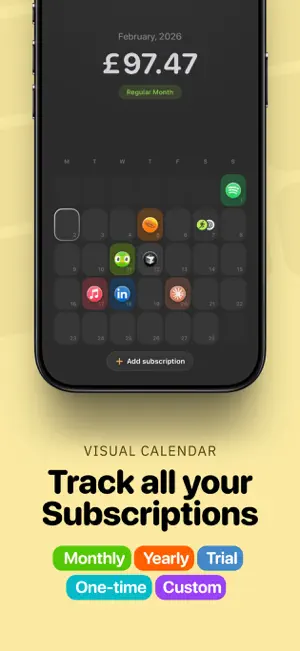
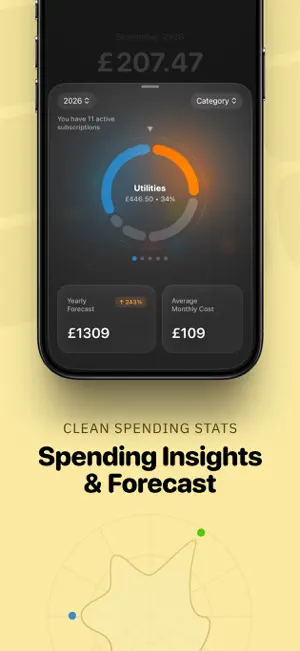
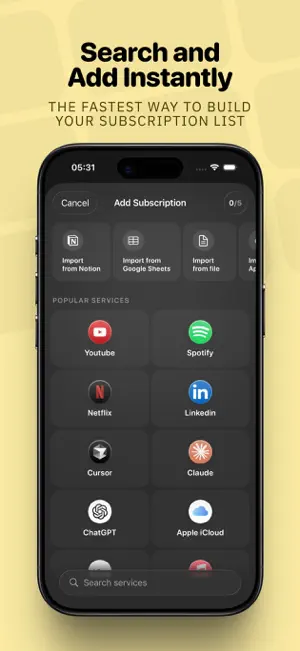
If you have so many subscriptions that you’ve lost track of them and hate unexpected charges, Subscription Day is built exactly for this. Subscription Day is a simple and powerful subscription calendar for iOS & Mac. No clutter. Only what really matters. • Visual Calendar: See the current month and all upcoming payments at a glance. • Widgets. Quickly check your most important subscription information right from your Home Screen. • Subscription Types: Supports monthly subscriptions, yearly plans, trial versions, one time purchases, and fully custom billing periods. • Smart Notifications: Set reminders so you never miss a charge or forget to cancel a trial. • Highlights: Easily flag important items like annual, trial, or one‑time payments. • Statistics and Insights: Get a clear overview of your projected yearly budget, average monthly costs, and peak spending months with a clean radial chart. • Personal/Work/Custom Lists: Separate subscriptions into Personal and Work lists and track budgets and statistics independently. • Custom own categories: Organize subscriptions using your own categories exactly the way you prefer. • Multi-Currency Support: Supports 150+ currencies with automatic conversion so everything is shown in your selected currency. • Status Management: Mark subscriptions as active or canceled and keep your statistics always accurate. • Quick Addition: Start typing a service name and get automatic suggestions including logo, category, and color. You can also choose emojis or symbols for custom avatars. • Smart Import Manager: Import subscriptions in one click from Notion, Google Sheets, or from any text file in any structure. You can also import directly from the App Store by recognizing subscriptions from screenshots. • Generate period based PDF reports for accountants and employers & export your data • iCloud Sync: Your subscriptions stay in sync across all your devices. • iPad Support. Important note: Subscription Day does not automatically detect or fetch your subscriptions. You add them manually or use the smart import manager to bring in existing subscription lists from your documents and tools. Subscription Day is constantly evolving. We actively listen to user feedback and would love to hear your ideas via email. Have a great day.
Ratings & reviews
4.8
19 ratings
What’s new
Version 1.1.4 · Updated August 17, 2026
• Fixed number formatting for amounts. It now follows the system settings • Added the new currency symbol for Saudi Arabia • Fixed the display of large numbers in statistics. • Fixed visual issues on iOS 18 and earlier.
App privacy
The developer, Chuta Dmytro, reported these privacy practices to Apple.
Data Not Collected
The developer does not collect any data from this app.
Alternatives to Subscription Day. Calendar
Looking for apps like Subscription Day. Calendar? Here are 6 similar apps on the App Store. The highest rated is Subo - Subscription Manager (4.8/5), and all 6 are free to download.
-
 Control: Budget Tracker
4.3
Control: Budget Tracker
4.3
-
 Budget Tracker - Brim
3.4
Budget Tracker - Brim
3.4
-
 Subo - Subscription Manager
4.8
Subo - Subscription Manager
4.8
-
 Subbie - Money Calendar
4.8
Subbie - Money Calendar
4.8
-
 Finny: AI Money Manager
4.4
Finny: AI Money Manager
4.4
-
 Expensa: Expense Tracker
3.9
Expensa: Expense Tracker
3.9
| App | Rating | Price | Last updated | Compare |
|---|---|---|---|---|
| Subscription Day. Calendar | 4.8 / 5 (19 ratings) | Free | August 17, 2026 | |
| Control: Budget Tracker | 4.3 / 5 (11) | Free | Oct 27, 2026 | Compare |
| Budget Tracker - Brim | 3.4 / 5 (5) | Free | Oct 21, 2026 | Compare |
| Subo - Subscription Manager | 4.8 / 5 (81) | Free | Oct 26, 2026 | Compare |
| Subbie - Money Calendar | 4.8 / 5 (13) | Free | Apr 20, 2026 | Compare |
| Finny: AI Money Manager | 4.4 / 5 (34) | Free | Oct 10, 2026 | Compare |
| Expensa: Expense Tracker | 3.9 / 5 (10) | Free | Oct 17, 2026 | Compare |