

Expenses Split
katuri dinesh Finance iPhoneiPadiPod touch
Expenses Split is a free Finance app for iPhone and iPad by katuri dinesh. Rated 4.2/5 from 5 ratings. Requires iOS 26.0. Updated July 7, 2026.
- Rating
- 4.2
- 5 ratings
- Price
- Free
- on the App Store
- Size
- 10 MB
- Age 4+
- Updated
- Jul 7
- 2026 · v5.1
Screenshots

About Expenses Split
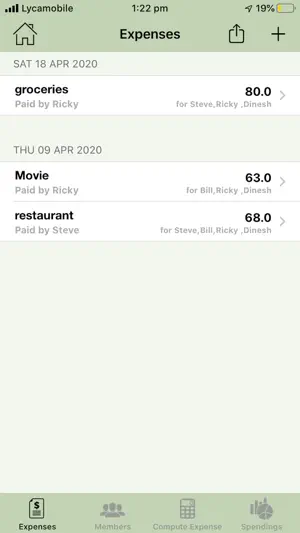
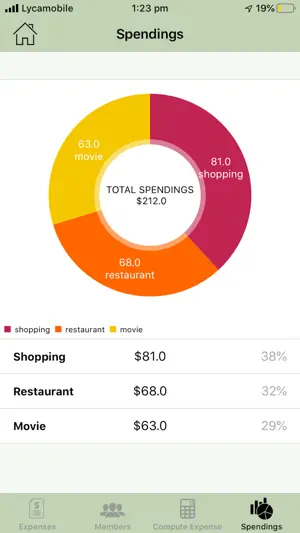
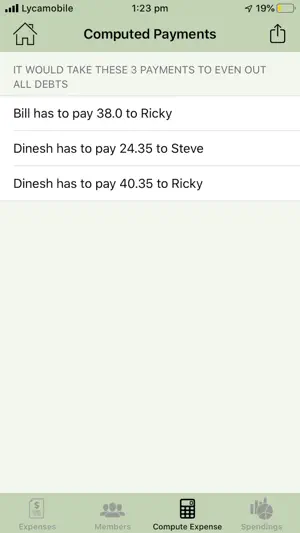
Split Expenses is the best multi-user online app you can use for tracking, splitting, syncing, sharing and automating your team/room expense. Based on expense entered, app calculates and suggests debts of each person and who has to receive money. Split Expenses app supports push notifications for notifying any changes in a team’s expenses. Whenever user enters an expense into a team, a notification is sent to all members in the team and on clicking on the notification expense is auto synced to other members in the team. Split Expenses support offline mode, if you don’t have Internet while you are adding expense, it will be synced next time you connect to Internet. Auto sync of latest team details happens on every launch and manual sync on click of sync button in teams screen. You can share team details across other Split Expenses users who are willing to join your team by just clicking share button in expenses screen. You can also share final computed debts list to any other interested parties through all popular sharing media. Summarizing what you can do with split expense app: - 1) Create new team/page, where you can add involved members/ roommates. 2) Create a new expense, edit expense and delete expense when settled, automatically notifies other members in 3) Share team details with other teammates online by clicking share in Expenses screen of a Team. 4) Edit members and add new members, so that if new member joined a team, it’s useful 5) Automate the final expense and debt calculation 6) Share the final expense debts with the team members/others. Difference when compared to Split Expense Lite: - a. Multi user app b. Can add expense, team, members online and offline and can sync data entered offline to online on launch or on click of sync button in Team screen c. Share Team details using share button present in Expenses screen d. Notifications will be broadcasted to all members with in a team whenever a new expense is added Lots coming in future releases as well. Future releases: - Introducing graphs/charts, which tells user where he/she is spending more.
Ratings & reviews
4.2
5 ratings
What’s new
Version 5.1 · Updated July 7, 2026
UI uplift and bug fixes
App privacy
The developer, katuri dinesh, reported these privacy practices to Apple.
Data Not Linked to You
The following data, which may be collected but is not linked to your identity, may be used for the following purposes:
- Usage Data: Advertising Data, Other Usage Data
- Diagnostics: Crash Data
Used for: Third-Party Advertising, Developer’s Advertising or Marketing, Analytics, App Functionality, Other Purposes
Alternatives to Expenses Split
Looking for apps like Expenses Split? Here are 6 similar apps on the App Store.
-
 SplitX - Manage Group Expenses
-
 Splitink: Split Bills & Budget
-
 Expenso - Split Expense Easily
-
 Splitler: AI Expense Manager
-
 EvenlySplit: Expense & Khata
-
 Split Mate – Expense Manager
| App | Rating | Price | Last updated | Compare |
|---|---|---|---|---|
| Expenses Split | 4.2 / 5 (5 ratings) | Free | July 7, 2026 | |
| SplitX - Manage Group Expenses | – | Free | Sep 7, 2025 | Compare |
| Splitink: Split Bills & Budget | – | Free | Sep 21, 2026 | Compare |
| Expenso - Split Expense Easily | – | Free | Jun 10, 2025 | Compare |
| Splitler: AI Expense Manager | – | Free | Jan 2, 2025 | Compare |
| EvenlySplit: Expense & Khata | – | Free | Jun 17, 2026 | Compare |
| Split Mate – Expense Manager | – | Free | Mar 27, 2026 | Compare |
Compare Expenses Split with the top alternatives: ratings, updates, ASO score and keyword gaps →