

QuickPlanX: Project Gantt Plan
皓 李 Business iPhoneiPadiPod touchMac
QuickPlanX: Project Gantt Plan is a free Business app for iPhone and iPad by 皓 李. Rated 5.0/5 from 8 ratings. Requires iOS 18.2. Updated October 15, 2026.
- Rating
- 5.0
- 8 ratings
- Price
- Free
- on the App Store
- Size
- 57 MB
- Age 4+
- Updated
- Oct 15
- 2026 · v6.0
Screenshots



About QuickPlanX: Project Gantt Plan
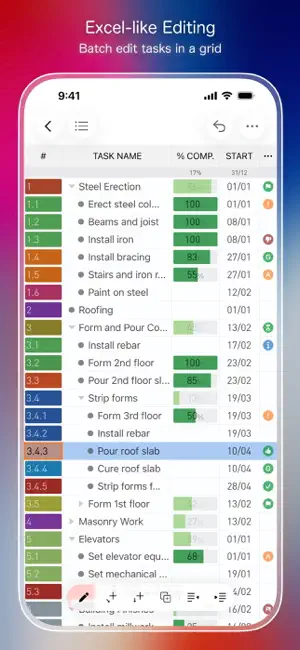
QuickPlanX brings professional scheduling to a fast, clear workflow — without the overhead or steep learning curve. Plan in a modern, distraction-free workspace. Use Gantt, Table, Tree, and Column views plus a centralized Inspector for quick edits and consistency. One app for iPhone, iPad, and Mac. Professional scheduling tools in an intuitive, discoverable workflow — without the complexity. - Draft structure instantly with indented text paste. - Keep schedules accurate with visual links and batch edits. - Share progress with clear exports and reports. ## Privacy You Can Trust Your projects are stored on your device and in your private iCloud (CloudKit). ## Work Faster, Stay Current Projects change. QuickPlanX keeps your plan accurate as work moves. - Paste indented text to draft your WBS (notes, minutes, AI outlines). - Paste from spreadsheets, then batch edit in Table View like a grid. - Duplicate tasks/branches, then drag to reorganize. - Switch views for structure, schedule, and data edits. - Link tasks on the Gantt chart (Link Maintenance + gestures + shortcuts). - Use shortcuts, Action Bar, and context menus. - On Mac, use multiple windows. - Widgets keep active tasks in sight. ## Multiple Views, One Plan Switch views to see every angle without losing context, so you can plan, edit, and review faster. - Gantt Chart: Schedule, links, baselines, Critical Path. - Table View: Spreadsheet-style batch editing. - Tree View: Build and reorganize your WBS. - Column View: Finder-style navigation for deep plans. - Inspector: Edit task properties. ## Customize Your Workflow Every project is unique. Track what matters. Beyond core fields, add what you need—especially for cost and metadata. Add extra cost (including Budget and Cost Variance), text, toggle, URL, picker, and rich fields (Photo, Icon, Contact, Color). - Choose fields per project; show/hide in Table View and Inspector. - Rename and reorder fields to match your terminology. - Cost control: track Resource Cost; compare budget vs. actual. - Choose what appears on Gantt bars and Tree/Column views. ## Professional Scheduling, Made Practical Don’t trade power for simplicity. Get the scheduling capabilities professionals need. - Deep Hierarchy: Task groups and nested subprojects. - Real-World Logic: Finish-to-Start and Linked Lists. - Critical Path: See what drives the finish date. - Baselines: Compare planned vs. current schedule, work, and costs. - Flexible Calendars: Working days, holidays, and hours. - Resources & Rates: Plan workload; track costs. - Progress Tracking: % Complete and Physical % Complete. ## Share Clear Reports Share and discuss your plan with stakeholders, clients, or your team. - Export to PDF, image, or CSV. - Export task data to text via templates (emails, reports, docs) for clean status updates. - Export the whole plan or a branch. - Resource Report: workload and costs by Day/Week/Month/Year. - Milestones Report: key dates, with baseline comparison. - S-Curve and Bar charts for work/cost trends (with baselines). ## Sync and Backup You Can Trust QuickPlanX uses CloudKit to sync projects across devices on the same Apple ID. - Automatic sync across iPhone, iPad, and Mac. - Offline capable: work anywhere; sync when you reconnect. - Conflict handling protects your edits. - Built-in safety tools: - Trash (restore or delete) - Auto Backup to `.quickplanx` - Export/Import `.quickplanx` via AirDrop, email, or cloud ## Import and Export with Your Tools Fits into your existing ecosystem. - Microsoft Project (XML): import and export for collaboration. - Spreadsheets: column mapping + copy/paste workflows. - Mind maps (OPML): import/export. - iCalendar (ICS): export timelines. - CostX import for estimate-driven planning. - Import legacy QuickPlan `.qpp` files. QuickPlanX helps you stay focused on the project, not the tool. --- Terms of Use: https://www.apple.com/legal/internet-services/itunes/dev/stdeula/
Ratings & reviews
5.0
8 ratings
What’s new
Version 6.0 · Updated October 15, 2026
What’s New: * Added compatibility with iPhone Duo. * Enhanced the Inspector for a better user experience.
App privacy
The developer, 皓 李, reported these privacy practices to Apple.
Data Not Collected
The developer does not collect any data from this app.
Alternatives to QuickPlanX: Project Gantt Plan
Looking for apps like QuickPlanX: Project Gantt Plan? Here are 6 similar apps on the App Store. The highest rated is Ganttly: Project Planner (5.0/5), and all 6 are free to download.
-
 Ganttly: Project Planner
5.0
Ganttly: Project Planner
5.0
-
 GanttchartAI: GanttChart by AI
5.0
GanttchartAI: GanttChart by AI
5.0
-
 PlanXT- Scheduling,Gantt Chart
5.0
PlanXT- Scheduling,Gantt Chart
5.0
-
 Projectholic: Project Planner
4.9
Projectholic: Project Planner
4.9
-
 Project Office X: Gantt chart
1.0
Project Office X: Gantt chart
1.0
-
 Deadliner – Time Management
3.0
Deadliner – Time Management
3.0
| App | Rating | Price | Last updated | Compare |
|---|---|---|---|---|
| QuickPlanX: Project Gantt Plan | 5.0 / 5 (8 ratings) | Free | October 15, 2026 | |
| Ganttly: Project Planner | 5.0 / 5 (5) | Free | Oct 27, 2026 | Compare |
| GanttchartAI: GanttChart by AI | 5.0 / 5 (1) | Free | Oct 12, 2026 | Compare |
| PlanXT- Scheduling,Gantt Chart | 5.0 / 5 (6) | Free | Jun 30, 2026 | Compare |
| Projectholic: Project Planner | 4.9 / 5 (22) | Free | Oct 15, 2026 | Compare |
| Project Office X: Gantt chart | 1.0 / 5 (2) | Free | Oct 9, 2026 | Compare |
| Deadliner – Time Management | 3.0 / 5 (2) | Free | Jun 26, 2026 | Compare |