

Verba: AI Captions Reels Maker
Verba Creative Inc. Photo & Video iPhoneiPadiPod touch
Verba: AI Captions Reels Maker is a free Photo & Video app for iPhone and iPad by Verba Creative Inc. Rated 4.9/5 from 535 ratings. Requires iOS 16.1.
- Rating
- 4.9
- 535 ratings
- Price
- Free
- on the App Store
- Size
- 521 MB
- Age 12+
- Updated
- Oct 5
- 2026 · v3.68.0
Screenshots


About Verba: AI Captions Reels Maker
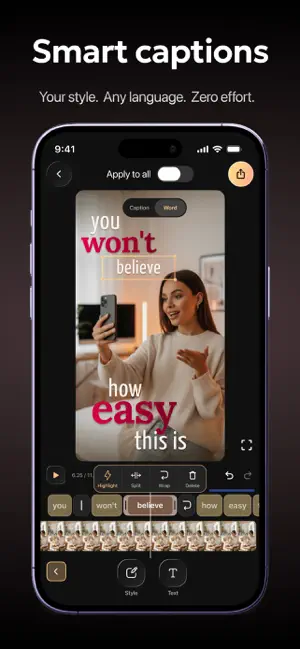
Verba is an AI-powered video editor and caption generator for short-form video creators who want to record, edit, and publish polished videos faster. Whether you're adding dynamic AI captions, cleaning up background noise, or styling subtitles to match your brand - Verba handles it all in one place. Rated 4.9 by creators who say Verba captures audio accurately even in noisy environments, where other apps fall short. • Dynamic AI captions - AI auto-generates, positions, and styles subtitles to match your video. 50+ presets, unlimited custom styles. • Publish in 1080p or 4K - your content looks sharp on any platform and any screen. • Make subtitles yours - 50+ caption presets, custom fonts, colors, animations, and gradient styles to match your brand. • Studio-quality audio - Audio Enhancement removes background noise so your voice sounds clear and professional. • Reach a global audience - translate your subtitles into 25+ languages with a single tap. KEY FEATURES Smart Captions Verba's AI analyzes every frame of your video and automatically positions, sizes, and styles your subtitles to match the visual context - or take full control with 50+ ready-made presets, custom fonts, colors, animations, gradient text, and background options so subtitles feel like part of your brand. Now with trending presets, a liquid glass effect, and more languages. High Resolution Export Export every video at 1080p or 4K so your content looks sharp on any platform and any screen. Teleprompter Record while reading your script on screen. Scrolls at your pace, available in portrait and landscape mode. Plus dual-camera, Bluetooth remote, exposure, and white balance - shoot like a pro. Audio Enhancement One tap removes background noise and brings your voice to studio-quality clarity - no external mic needed. AI Translation Translate your subtitles into 25+ languages in one tap and reach audiences worldwide - without re-recording a single word. AI Voiceover Add a voice to your video without recording. Choose language, style, and pacing - Verba generates the audio and syncs it automatically. Beat-Sync Edit AI analyzes your audio track and cuts your footage to the beat automatically - perfect for vlog-format content without manual timeline work. Clean Speech Removes pauses, filler words, and dead air from your talking videos automatically - so every sentence lands clean. AI B-Roll Never shoot B-roll again - AI generates matching photorealistic footage the moment you say it. Regenerate any shot to get exactly what you imagined. Pro Editor Tools Pro-level control - masks, blurs, transparency, keyframes, animations, freeze-frame, and cinematic zoom (0.5x-10x, custom curve). Download Verba and publish your next video today. Q: Can Verba add captions to my video automatically? A: Yes - drop in your video and AI generates accurate subtitles in seconds. Works reliably even with background noise or multiple speakers. Q: Is Verba built for short-form video? A: Yes - Verba is designed for short-form content. It handles AI captions, teleprompter, beat-sync editing, voiceover, and 4K export in one place, optimized for vertical formats. Q: Can Verba translate my video captions into other languages? A: Yes - AI Translation converts your subtitles into 25+ languages in one tap, so you can reach a global audience without re-recording anything. SUBSCRIPTION Unlock the full Verba experience - more AI tools, higher export quality, and everything you need to create faster. Start free - no commitment needed. Subscriptions auto-renew unless cancelled at least 24 hours before the end of the current period. Privacy Policy: https://static.verba.digital/verba-privacy-policy.pdf Terms of Use: https://static.verba.digital/verba-terms-and-conditions.pdf Support: [email protected]
Ratings & reviews
4.9
535 ratings
What’s new
Version 3.68.0 · Updated October 5, 2026
This update brings more creative freedom to your edits, with powerful animation tools and an easier way to capture cinematic footage. LAYER VIDEOS WITH OVERLAYS Add a second video on top of your main clip and edit it independently. It is perfect for reactions, tutorials, picture-in-picture effects, and more. MORE POWERFUL KEYFRAME ANIMATIONS Bring more of your edit to life with keyframes. You can now animate Blur, Volume, Filters, Gradients, Masks, and Color Correction for smoother, more expressive results. ONE-TAP GRAPHICS ANIMATIONS Make graphics move without setting up keyframes by hand. Choose from ready-made animation presets and add polished motion to your edit in a single tap. CINEMATIC TELEPROMPTER RECORDING Cinematic mode is now available on the teleprompter recording screen, helping you create beautifully focused videos while staying confidently on script. We hope these new tools make your next video even more fun to create!
App privacy
The developer, Verba Creative Inc., reported these privacy practices to Apple.
Data Used to Track You
The following data may be used to track you across apps and websites owned by other companies:
- Identifiers: User ID, Device ID
Data Linked to You
The following data, which may be collected and linked to your identity, may be used for the following purposes:
- Identifiers: User ID
- User Content: Audio Data, Customer Support
Used for: Analytics, Product Personalization, App Functionality, Other Purposes
Data Not Linked to You
The following data, which may be collected but is not linked to your identity, may be used for the following purposes:
- Identifiers: Device ID
- Usage Data: Advertising Data, Product Interaction
- Purchases: Purchase History
- Diagnostics: Crash Data, Performance Data, Other Diagnostic Data
Used for: Third-Party Advertising, Developer’s Advertising or Marketing, Analytics, Product Personalization, App Functionality, Other Purposes
Alternatives to Verba: AI Captions Reels Maker
Looking for apps like Verba: AI Captions Reels Maker? Here are 6 similar apps on the App Store. The highest rated is Vozo AI Video Translator & Dub (4.8/5), and all 6 are free to download.
-
 Auto Captions: Video Subtitles
4.6
-
 Liro: AI Video Caption Editor
4.5
-
 Captions for Videos - SubMe AI
4.6
-
 Captions AI for Videos - Dubs
4.4
-
 Captions AI: Video Subtitles
4.4
-
 Vozo AI Video Translator & Dub
4.8
| App | Rating | Price | Last updated | Compare |
|---|---|---|---|---|
| Verba: AI Captions Reels Maker | 4.9 / 5 (535 ratings) | Free | October 5, 2026 | |
| Auto Captions: Video Subtitles | 4.6 / 5 (1,472) | Free | Dec 23, 2025 | Compare |
| Liro: AI Video Caption Editor | 4.5 / 5 (274) | Free | Mar 25, 2026 | Compare |
| Captions for Videos - SubMe AI | 4.6 / 5 (1,182) | Free | Sep 22, 2026 | Compare |
| Captions AI for Videos - Dubs | 4.4 / 5 (869) | Free | Sep 2, 2026 | Compare |
| Captions AI: Video Subtitles | 4.4 / 5 (238) | Free | Mar 31, 2025 | Compare |
| Vozo AI Video Translator & Dub | 4.8 / 5 (2,126) | Free | Jun 10, 2026 | Compare |